EasyManua.ls Logo

Health O Meter 599KL - User Manual

Health O Meter 599KL
60 pages
Print Icon
To Next Page IconTo Next Page
Loading...
P/N UM597KL_KG 599KL_KG 752KL_KG REV20181212_Web
1
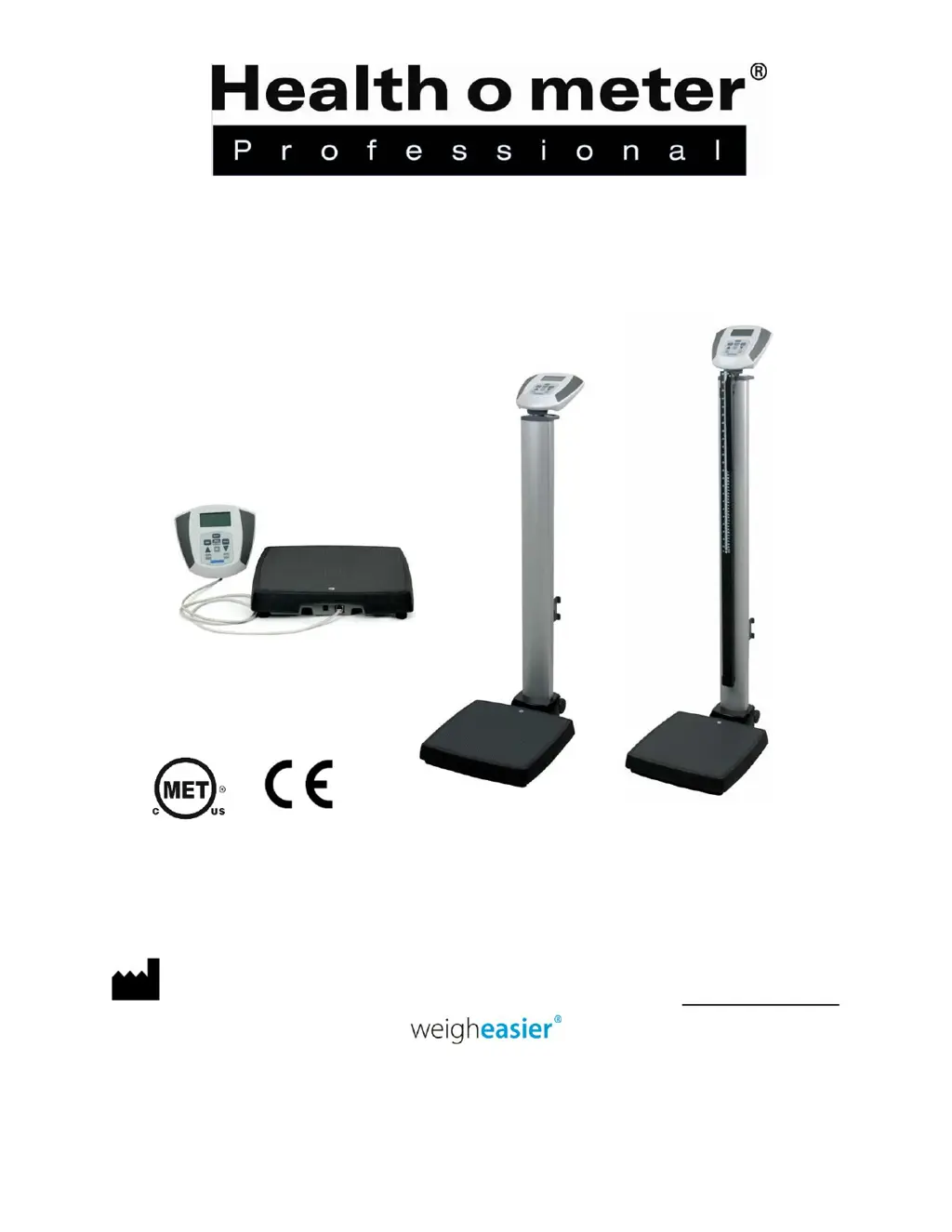
597KL / 597KG Heavy Duty Eye Level Digital Scale
599KL / 599KG Heavy Duty Waist High Digital Scale
752KL / 752KG Heavy Duty Remote Display Scale
USER INSTRUCTIONS
PELSTAR, LLC 9500 West 55
th
St. McCook, IL 60525-7110 USA www.homscales.com
© Pelstar, LLC 2018
E112697
0459

Other manuals for Health O Meter 599KL

Questions and Answers

  • C
    Courtney WilliamsAug 19, 2025
    How to fix Health O Meter 599KL Scales that won't turn on?
    • D
      Dawn MartinezAug 19, 2025
      If your Health O Meter Scales won't turn on, the first thing to check is the batteries. If they are dead, replace them following the instructions on page 13. Also, try using a different electrical outlet to rule out a faulty outlet. If you use an adapter, check the LED light at the back of the display module to see if the adapter is working; if not, replace it.
  • D
    Derrick VelezAug 21, 2025
    Why my Health O Meter 599KL Scales shows questionable weight?
    • J
      johnsoncarrieAug 21, 2025
      If your Health O Meter Scales displays questionable weight or fails to zero, it could be due to several reasons. First, check for any external objects interfering with the scale and remove them. Second, ensure the display showed 0.0 before weighing; if not, have the patient step off, zero the scale, and restart the process. Third, verify the scale is placed on a level floor. Finally, the scale might be out of calibration, so check the weight using a known weight value.
  • F
    fvaughanAug 23, 2025
    How to fix Health O Meter Scales that does not turn on?
    • J
      John DavisAug 23, 2025
      If your Health O Meter Scales isn't turning on, there are a few potential causes. First, the battery might be dead; replace it following the instructions on page 13. Second, the electrical outlet could be faulty; try using a different outlet. Third, there might be an issue with the power supply; check the LED light at the back of the display module to see if the adapter cord is working, and replace the adapter if necessary.
  • V
    victoriamcgrathAug 26, 2025
    What to do if Health O Meter Scales do not turn on?
    • M
      Mr. Richard Cannon Jr.Aug 26, 2025
      If your Health O Meter scales do not turn on, there are a few potential causes. First, the batteries may be dead, so try replacing them. Second, the electrical outlet could be faulty; try using a different outlet. Finally, the power supply might be bad; in this case, replace the adapter.
  • C
    collinsandreaAug 28, 2025
    What to do if Health O Meter 599KL Scales display shows “OVER”?
    • E
      Eric GordonAug 28, 2025
      If your Health O Meter Scales display shows “OVER”, it means the load on the scale exceeds its capacity (600 lb / 272 kg). Remove the excess weight to continue using the scale within its specified limits.
  • M
    madison89Aug 30, 2025
    What to do if Health O Meter 599KL Scales displays “OVER”?
    • M
      Mark CruzAug 30, 2025
      If your Health O Meter Scales displays “OVER”, it means the load on the scale exceeds its capacity of 600lbs. You should remove the excess weight to ensure you are using the scale within its specified limits.
  • T
    Tina FletcherSep 1, 2025
    What to do if Health O Meter 599KL display shows “LO Bat” message?
    • C
      Christian JonesSep 1, 2025
      If the display on your Health O Meter scales shows a “LO Bat” message, it means the batteries are dead. Replace the batteries according to the provided instructions.
  • N
    Nicholas RoachSep 3, 2025
    How to fix Err 5 on Health O Meter 599KL?
    • K
      Kelli WardSep 3, 2025
      Err 5 on Health O Meter scales means calibration is disabled. Toggle the calibration switch to enable it.
  • A
    Andrew HendricksSep 5, 2025
    Why Health O Meter Scales show questionable weight or do not zero?
    • M
      Michael MaldonadoSep 5, 2025
      If your Health O Meter scales are showing a questionable weight or not zeroing, consider these possibilities: First, an external object might be interfering with the scale; remove any such objects. Second, the display may not have shown ‘000.00’ before weighing; in this case, have the patient get off the scale, zero it, and begin the weighing process again. Third, the scale might not be on a level floor; place it on a level surface and restart the weighing process. Finally, the scale may be out of calibration; check the weight with a known weight value.
  • M
    Ms. Karen MarshallSep 7, 2025
    What does Err 6 mean on Health O Meter Scales?
    • V
      Vincent DixonSep 7, 2025
      Err 6 on Health O Meter scales indicates a high saturation state (high A/D). This means the load cell is not connected correctly. Check the connection, cables, and mechanical connection. If the problem persists, replace the set of load cells.

Summary

CAUTIONS AND WARNINGS

INTENDED USE

Defines the primary purpose and scope of the scale's operation.

SPECIFICATIONS FOR THIS SCALE

Definition of Symbols

Explains the meaning of various symbols used in the manual and on the scale.

CERTIFICATIONS; CONNECTIVITY; DISPOSAL

Scale Connectivity Information

Details how the scale can connect to computers or other electronic devices for data transfer.

Scale Disposal

Provides instructions on how to properly dispose of the electronic scale as waste.

597 KL;597 KG;599 KL;599 KG ASSEMBLY INSTRUCTIONS

Tools Required

Lists the tools that are necessary but not included for assembly of specific models.

752 KL;752 KG ASSEMBLY INSTRUCTIONS FOR TABLE TOP USE

752 KL;752 KG DISPLAY ASSEMBLY WALL MOUNT INSTRUCTIONS

Required Parts and Tools (Not Included)

Lists the necessary tools and parts not supplied with the unit for wall mounting the display.

SET-UP INSTRUCTIONS

Powering the Scale

Explains how to connect the scale to power using AC adapter or batteries.

Battery Installation

Provides step-by-step instructions for inserting C-cell batteries into the scale.

Locking the Weight Measuring Unit in KG

Guides users on how to configure the scale to display weight exclusively in kilograms.

Deactivating KG Lock

Details the procedure to remove the KG-only restriction and allow unit switching.

OPERATING INSTRUCTIONS

Using the Keypad

Describes the function of each key on the scale's keypad for operation.

Weighing a Patient

Outlines the procedure for weighing a patient and reading the weight measurement.

To Obtain BMI

Explains how to calculate and display the patient's Body Mass Index (BMI) using the scale.

597 KL;597 KG HEIGHT MEASUREMENT INSTRUCTIONS

Height Rod Warnings

Highlights crucial safety precautions for operating the height rod to prevent damage or injury.

Note on Minimum Height

Specifies the minimum patient height required for accurate measurement with the height rod.

MAINTENANCE AND CLEANING

Cleaning and Disinfecting

Provides recommended methods and solutions for cleaning and disinfecting the scale safely and effectively.

Replacement Parts

Lists part numbers and descriptions for various replaceable components of the scale.

CALIBRATION

OPERATOR ACTION

Step-by-step guide for performing calibration using specific key presses and weight inputs.

ERROR LIST

Lists common error codes, their definitions, and recommended troubleshooting steps.

TROUBLESHOOTING

WARRANTY

What does the Warranty Cover?

Details the types of defects and timeframe covered by the manufacturer's warranty.

Who is Covered?

Specifies who is eligible to receive warranty service and what proof is required.

What is Excluded?

Lists conditions, usage, or events that are not covered under the product warranty.

To get Warranty Service

Provides instructions and contact information for obtaining warranty repair or replacement.

Extended Warranty Available

Informs users about the option to purchase an extended warranty program for additional coverage.

Health O Meter 599KL Specifications

General IconGeneral
Resolution0.2 lb / 0.1 kg
Auto-On FeatureYes
Low Battery IndicatorYes
TypeDigital
DisplayLCD
Unitslb, kg
FunctionsWeight measurement

Related product manuals