VER1.0B1 HeartCheck HANDHELD ECG MONITOR
- 17 -
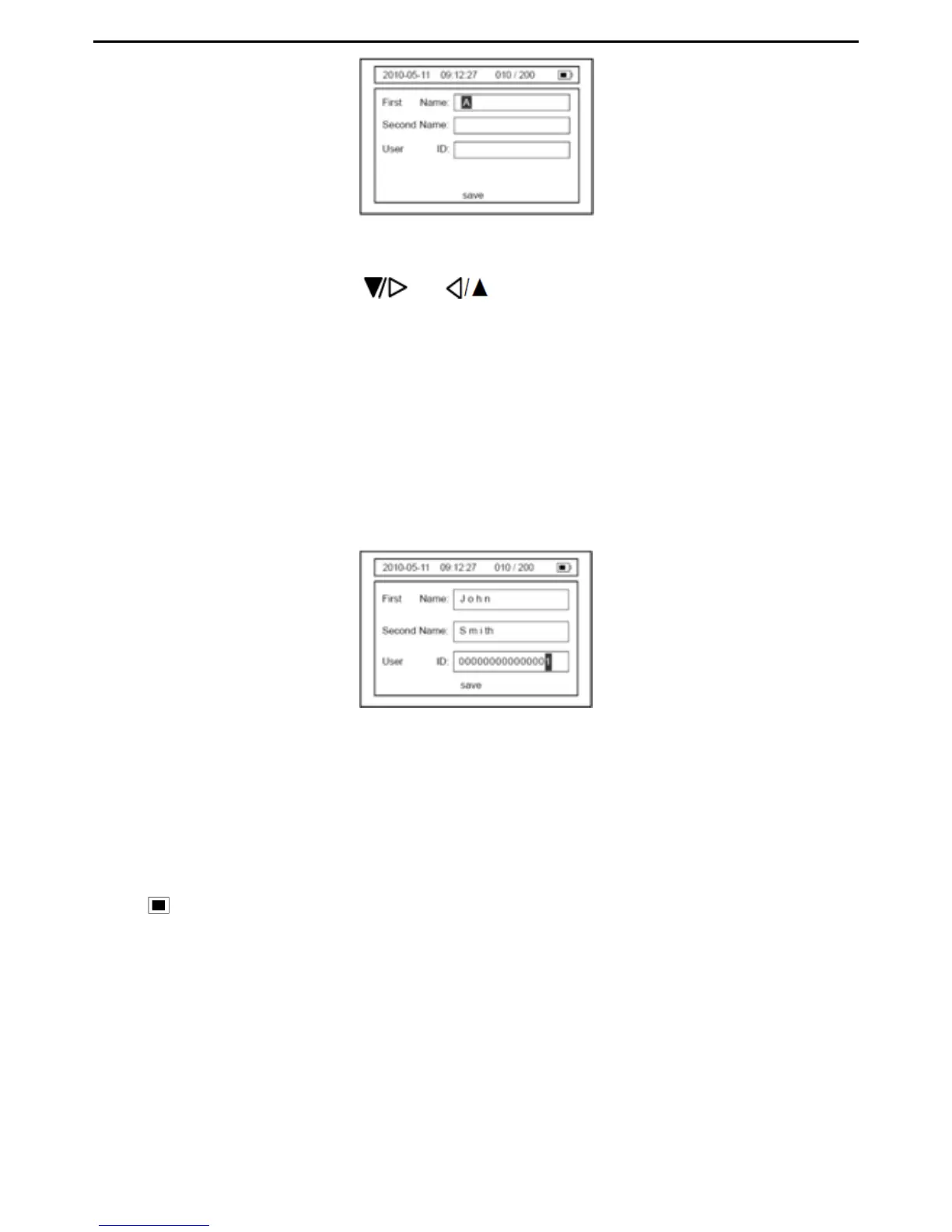
Picture 4-14
To input the first name, press or button to change the character from A to
the required letter (such as J in John) and then press the OK button to move the cursor
to the next space. Set each character of the first name based on the afore mentioned
steps. When the first name is complete, press the MENU button to move the cursor to
the “Second Name” field.
Enter the second Name and User ID following the steps used for the First Name
selection (see instructions above).
Note: Each field is large enough to accommodate 15 characters or numbers.
Picture 4-15
To save the information, press the MENU button to move the cursor to the “Save”
location and then press the OK button to save patient information and exit the current
interface.
The device can save 200 30-second ECG records. When the device memory is full, the
icon “
” will appear on the upper right of the LCD screen (shown in Picture 4-16 &
Picture
4-17). Once the device memory is full an alert will be shown to indicate that no
further records can be stored (shown as Picture
4-17). Before being able to record new
ECGs delete unnecessary records from the device memory.


 To Next Page