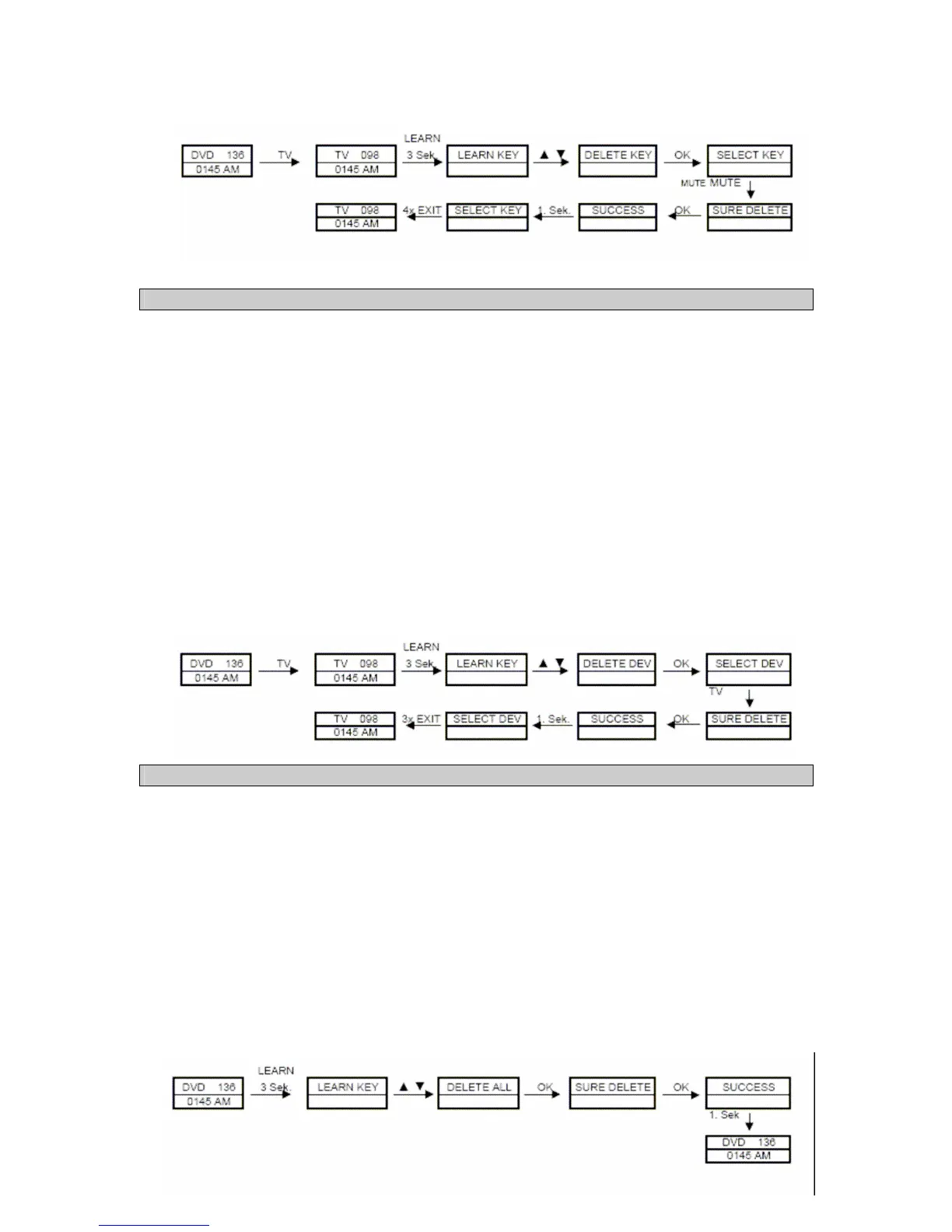
5.3 Delete all keys on a device (Delete DEV)
All of the previously learned key commands on a device can be deleted in order to restore the
default functions of the individual keys.
1. Press and hold the LEARN button for approx. 3 seconds.
or
Press and hold the SET button for approx. 3 seconds until the system menu appears.
Navigate to the LEARNING menu item with the help of the ▲and ▼ keys and press the OK
button.
2. Subsequently select the DELETE DEV menu item with the help of the ▲and ▼ keys and
press the OK button. The SELECT DEV message is now shown on the display.
3. Press the desired device selection key (e.g. TV) of the device that you want to delete. SURE
DELETE appears on the display.
4. If you are sure that you want to delete all of the keys for the selected device, please press the
OK button. SUCCESS appears on the display for approx. 1 second. Subsequently you can
delete another device key.
5. When you are finished with the delete process or you wish you quit the learning function menu
after deleting, press the EXIT button.
5.4 Delete keys on all devices (Delete All)
All of the previously learned key commands for all of the devices can be deleted in order to restore
the default functions for the individual keys.
1. Press and hold the LEARN button for approx. 3 seconds.
or
Press and hold the SET button for approx. 3 seconds until the system menu appears.
Navigate to the LEARNING menu item with the help of the ▲and ▼ keys and press the OK
button.
2. Subsequently select the DELETE ALL menu item with the help of the ▲and ▼ keys and press
the OK button. The SURE DELETE message is now shown on the display.
3. If you are sure that you want to delete all of the keys for all of the devices, please press the
OK button again. SUCCESS appears on the display for approx. 1 second. Afterwards the
menu quits automatically.
4. If you want to abort the delete process, press the EXIT key.



 To Next Page