OPERATING INSTRUCTIONS TREND SERIES
SETTING HIGH - LOW TOLERANCE LIMITS
Every TREND system features tolerance alarms which are used to establish a “quality window” that the
process will operate within. These alarms are set as a percentage of the forming force and automatically
adjusted each time a sample is taken or a new job is started.
The ability to establish alarms in percent eliminates the need to re-adjust settings for each job change. For
example, with high and low tolerance settings of 10%, a 100 ton job has alarms automatically set at 110 tons
high and 90 tons low. A 40 ton job has alarms automatically set at 44 tons high and 36 tons low.
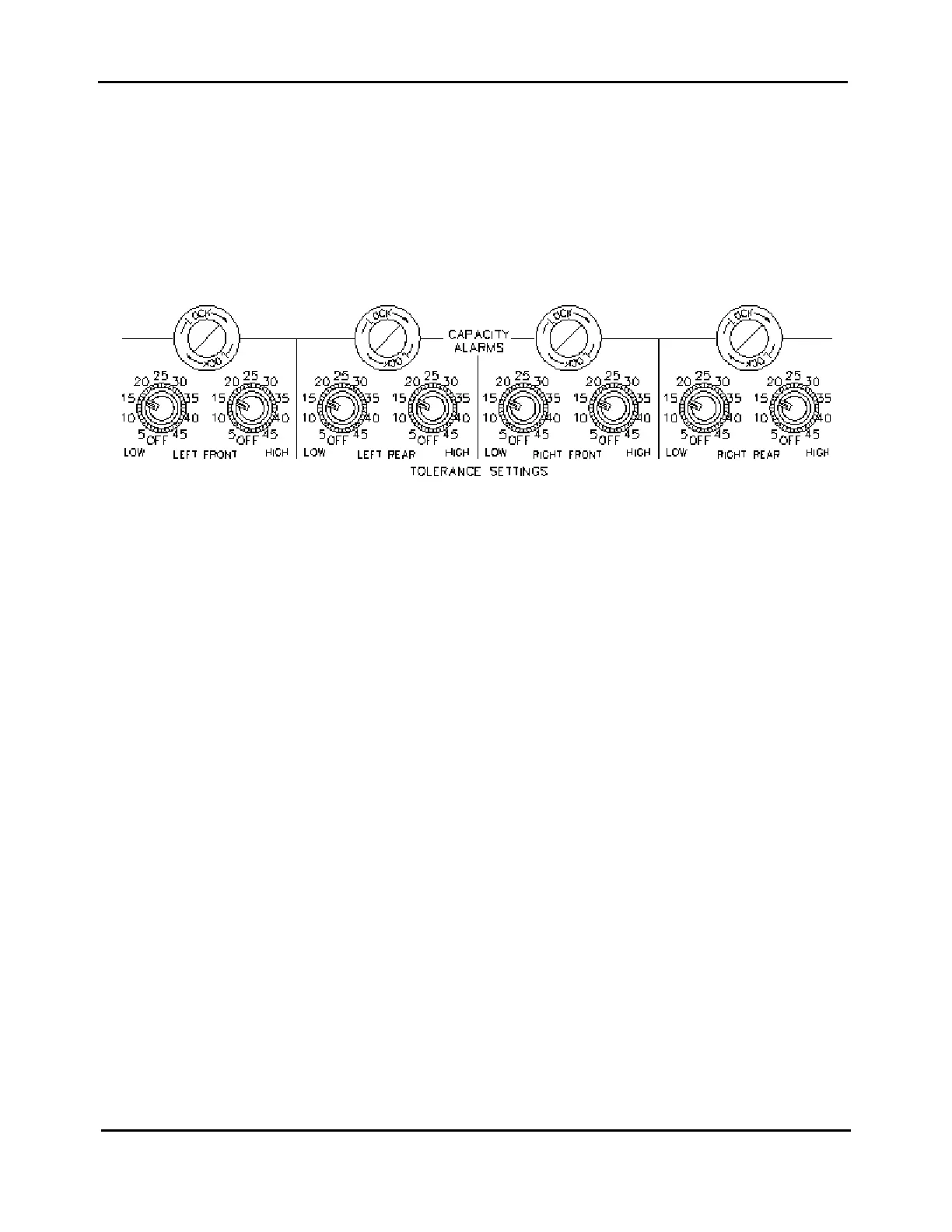
There are two switches for each channel of monitoring; one to establish the LOW alarm setting and one for
the HIGH alarm setting. Each switch is selectable from 5% to 45%, in increments of 5%. There is also a
position to turn the alarms off.
A tolerance setting of plus 5% on an individual channel will cause an alarm when the load level increases
5% above the sampled load.
A tolerance setting of minus 45% on a particular channel will cause an alarm when the load decreases 45%
from the sampled load.
ESTABLISHING OPTIMUM TOLERANCE SETTINGS
A good baseline starting point is 25%, high and low. With the instrument in Monitor Parts mode, watch the
trend lights during a production run. Begin lowering tolerance percents until the center green (GOOD) LED
starts flashing one LED up and down from center.
12



 To Next Page