Quick Start Guide NETL ink® PRO Compact
General Information:
The functions described here are related to 32- and 64-bit Windows
2)
operating systems.
1. The NETL ink® PRO Compact is shipped as standard
with the IP address: 192.168.4.49 and the subnet mask:
255.255.0.0.
If the NETL ink® PRO should be incorporated in an Intra-
net, check using the „ping“ command at the command
prompt (cmd) whether a network participant with this
address already exists.
Note: First, ask your network administrator whether the
default values are compatible with and freely available
for your network.
2. For the initial commissioning, we recommend a
separate PC to NETL ink® PRO Compact connection
without integration in the company network. Using the
dKREQPȨIpEQOOCPF[QWECPGIGCUKN[FKURNC[VJG
settings of your LAN network card.
For the setting of the computer network card shown
here, the IP address range is adapted to the default
value of the NETL ink® PRO Compact.
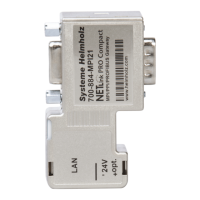
3. Connect the NETL ink® PRO Compact to the MPI or
PROFIBUS interface of your automation system. In the
normal case, the required 24 Volts are available at the
bus interface.
Alternatively, an external 24 Volt DC power source can
also be connected.
4. Connect the network connection of your computer
(LAN card) and the LAN socket of the NETL ink® PRO
Compact using a CAT5 Ethernet cable (a 3 m cable is
included in the scope of delivery).


 To Next Page