Quick Start Guide NETL ink® PRO Compact
Adapt the IP address of your computer
A) If you have to adapt the IP address of your computer to access the NETL ink® PRO Compact, use the
setting options of the network environment and carry out the following steps.
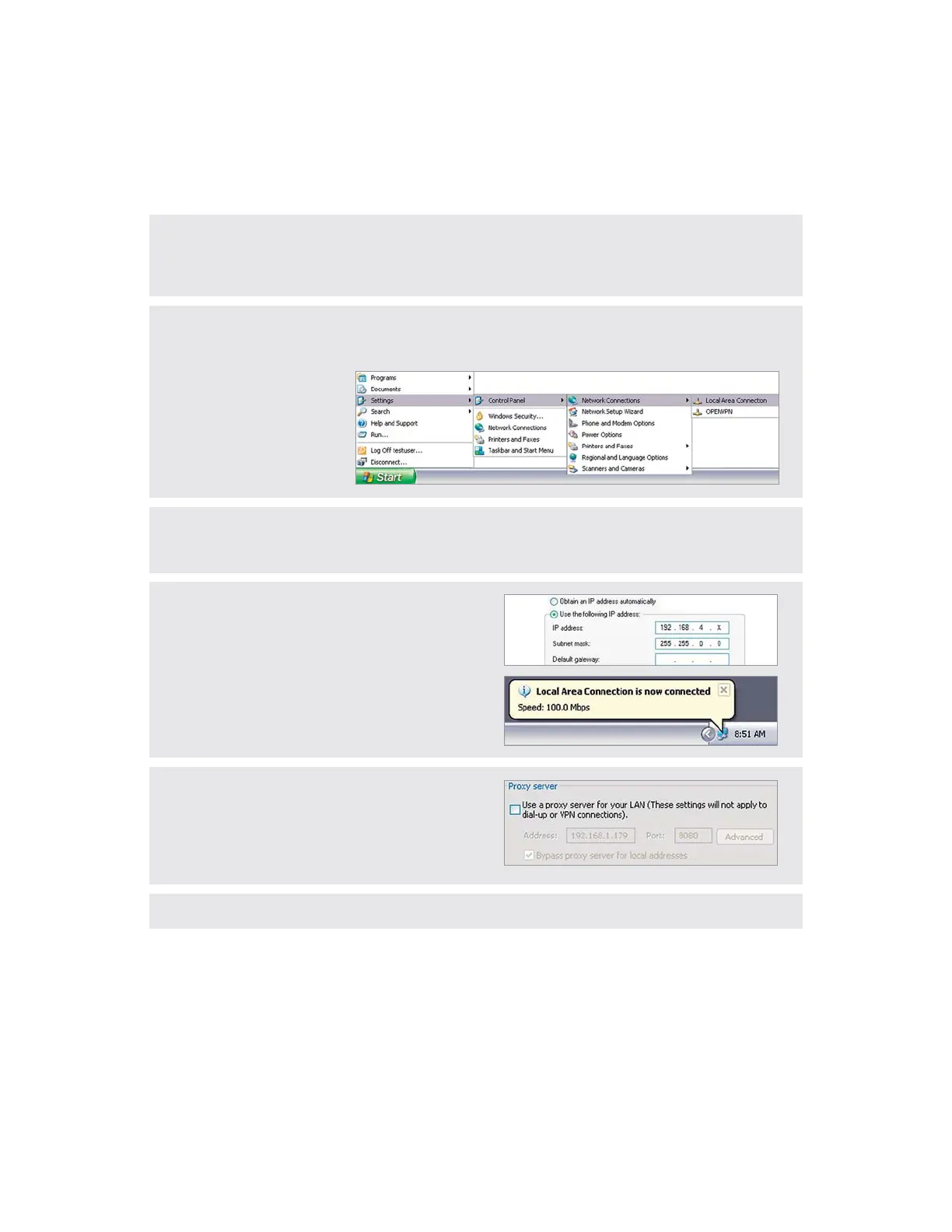
B) Open the properties of your LAN connection for this (Start -> Control Panel -> Network Connections).
You can adapt the IP address of your computer under the properties of the Internet Protocol (TCP/IP).
C) The NETL ink® PRO Compact is shipped with the IP address: 192.168.4.49.
Therefore, you must assign the same address range to your computer. This applies not only for the IP
address but also for the subnet mask.
D) Your IP address must be in the address range
„192.168.4.x“ the subnet mask should be identical to
that of the NETL ink® PRO Compact (255.255.0.0).
In the case of a standard gateway and preferred DNS
server, no entries have to be made.
The „LAN connection“ should be recognised after
applying the settings.
Continue with Step I to integrate the NETL ink® PRO Compact in the PG/PC interface.
Information
If your PG/PC is used in a network with proxy, it can be
necessary that you have to deactivate the proxy server
HWPEVKQPKPVJGEQPȨIWTCVKQPQH[QWTDTQYUGTKPQTFGT
to be able to establish a connection to the NETL ink®
PRO Compact.


 To Next Page