Quick Start Guide NETL ink® PRO Compact
Integration of the NETL ink® PRO Compact in the PG/PC interface of the Simatic
1)
Engineering Software:
I. Please install the NETL ink-S7-NET driver from the enclosed CD or download the current version from
the World Wide Web at www.helmholz.com.
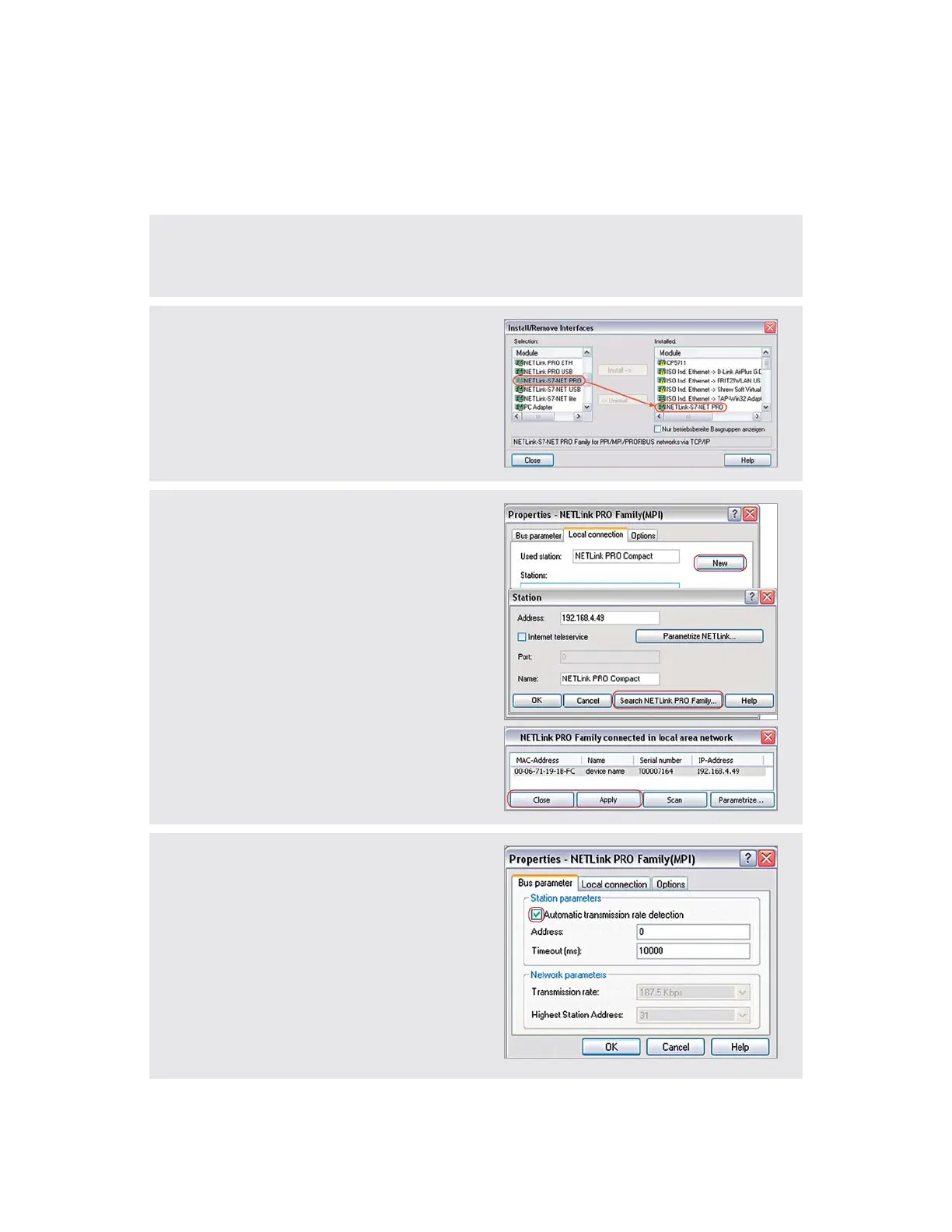
II. You must add the interface NETL ink-S7-NET PRO for
the installation of the driver (this step is not required for
XP SP3 and Windows 7
2)
operating systems).
Afterwards, the corresponding driver instances are
available in the PG/PC interface.
Note: Even for the TIA
1)
portal you need to set the general
allocations in the PG/PC interface (accessible via the
Windows
2)
Control Panel).
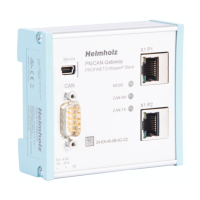
III. In order to integrate the NETL ink® PRO Compact in
the PG/PC interface, open this and select the properties
of „NETL ink PRO Family“.
In the „Local Connection“ tab, you can now add the
adapter using the „New“ button. You can input the IP
and the name of the adapter manually or you can use
the integrated search function of the driver.
Click on the button „Search NETL ink PRO Family...“
for this. Your adapter is displayed in the list as an active
station when you press the „Apply“ and „Close“
button.
IV. The access path to the connected controllers is now
FGȨPGFYKVJVJKUUGVVKPICPFKVKURQUUKDNGVQYQTMYKVJ
the Simatic
1)
Engineering Software.
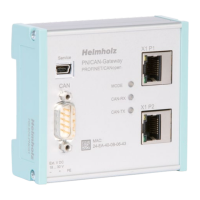
Note: The „Automatic transmission rate detection“ is
active after the installation.
There are also CPUs (or passive participants) which do
not send any bus parameters. If this is the case, an error
message is displayed during establishment of the connec-
tion and the network-related parameters must be adapted
manually (clear checkmark).


 To Next Page