Helvar 435 BACnet Gateway: User Guide
3
1.2.1. Front panel LEDs
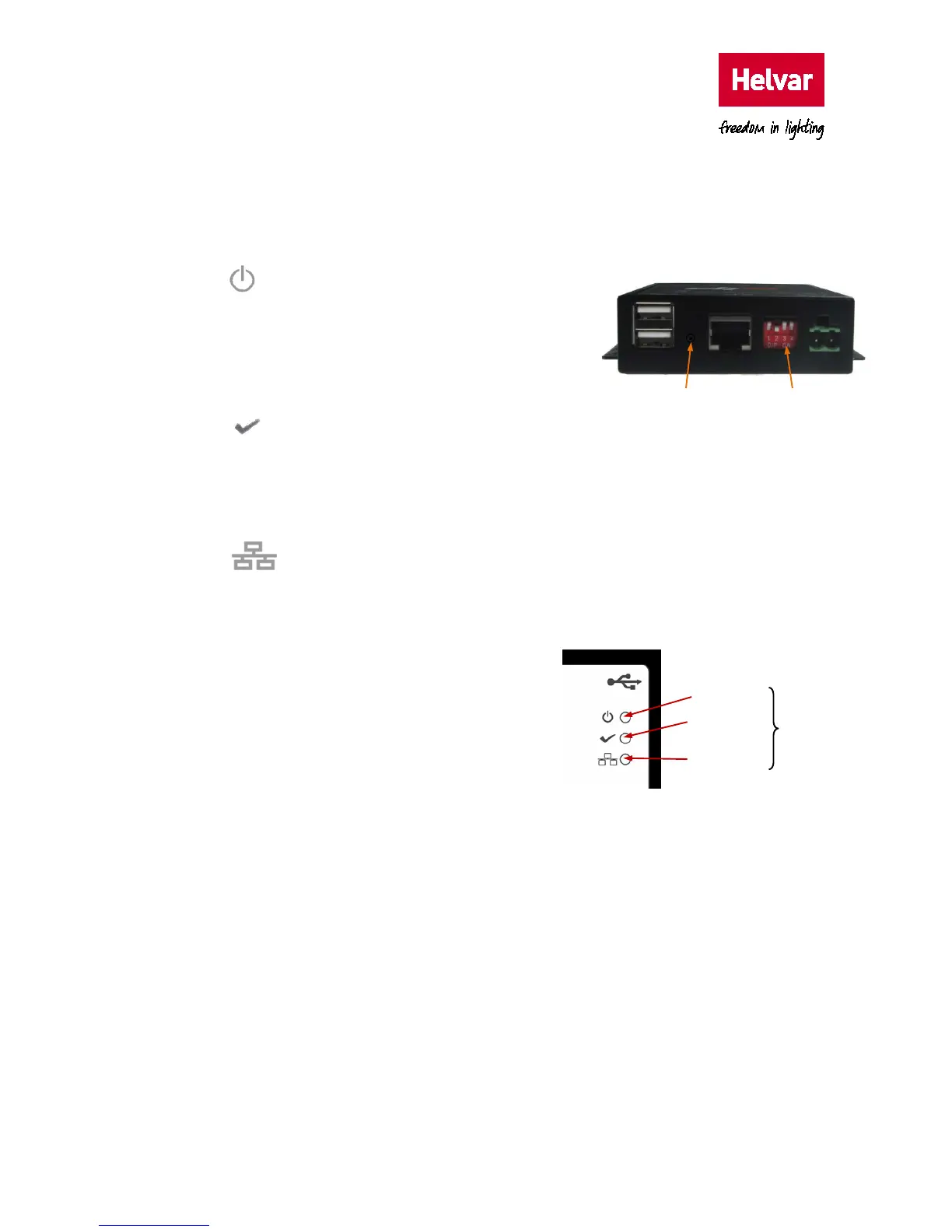
The LEDs on the unit indicate the general status of the BACnet Gateway, including power, ready
and LAN communication activity.
• Power LED
This LED shows the current status of the power applied
to the unit.
‘On’ indicates that the 24 VDC power is supplied. ‘Off’
indicates that the power is not supplied or has failed.
• Ready LED
This LED shows the status of the boot-up process.
‘On’ indicates that the required files have been loaded to the RAM disk and that the unit has
successfully booted up. ‘Off’ indicates that the unit is not ready or has failed to boot up.
• Ethernet Activity LED
This LED shows the communication between the unit and the supervisory computer or
controller connected via the Ethernet.
‘On’ indicates incoming communications traffic.
‘Off’ indicates outgoing communications traffic.
1.2.2. Button and switches
The BACnet Gateway is fitted with a recessed button
for rebooting the unit, and with a bank of four DIP
switches. The bank of DIP switches is not functional in
this version.
While the reset button does not erase any configuration, we recommend that you use it only if the
software reboot fails.
DIP switches
(not used)
Reset button
Ethernet
Activity LED
Status
LEDs
Power LED
Ready LED



 To Next Page