Service Instructions HERAsafe HS/12/18
• 20 • Valid: 05.2001 / 50060091 / A
4.3 Cover plate
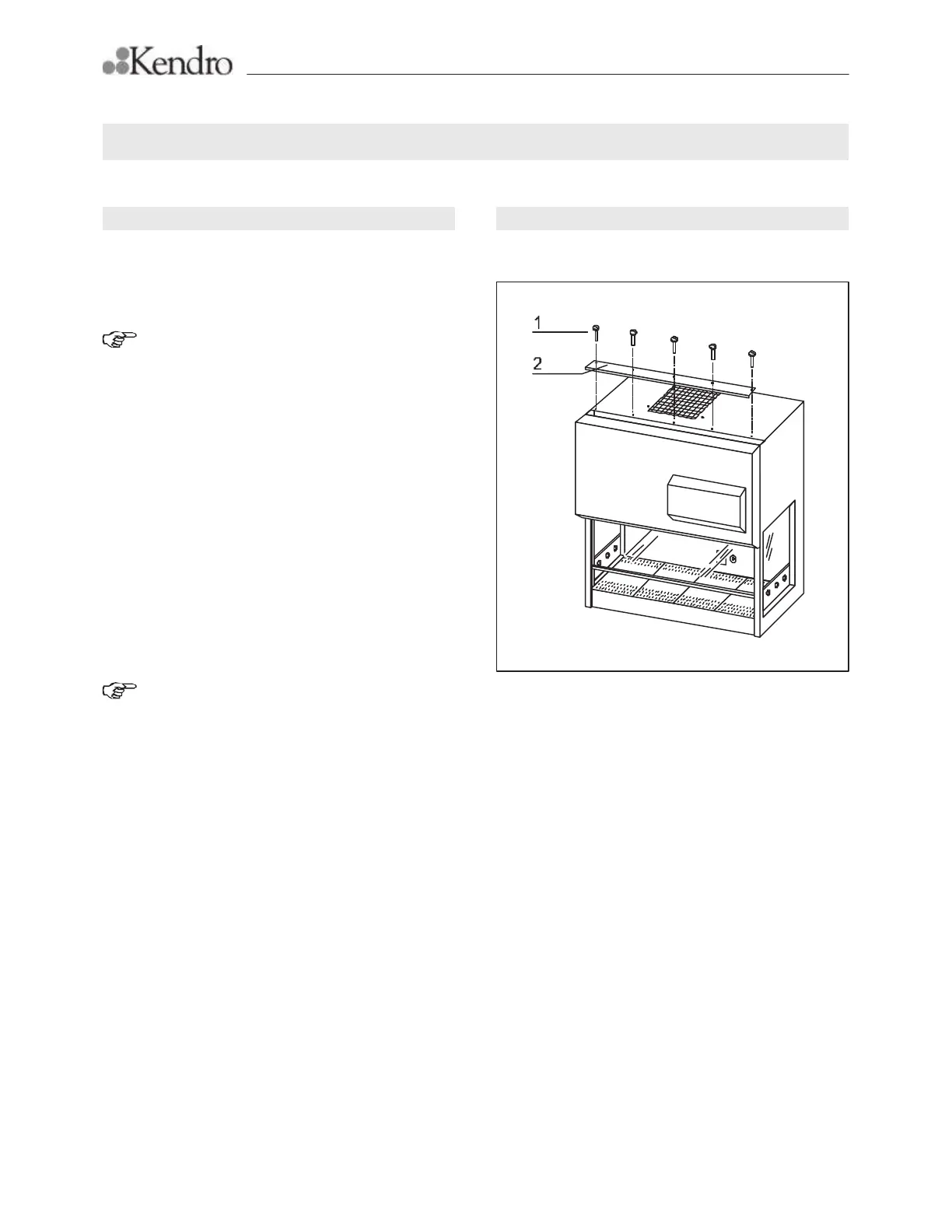
Removal and installation of the cover plate:
NOTE - Safety precautions:
Observe the safety instructions!
Check decontamination of the unit!
Removal:
1. Switch the cabinet off using the Power/Function
Key switch; disconnect the two power supply ca-
bles from the mains supply and protect them
against accidental reconnection.
2. Remove the five retaining screws [1] from the top
of the housing.
3. Remove the cover plate [2].
Installation:
4. Place the cover plate [2] on top of the housing so
that the left side is flush.
5. Secure the cover plate to the top of the housing
using the five retaining screws [1].
NOTE - Unit commissioning:
Prior to the commissioning of the unit:
Perform test run!
Check safety devices for proper opera-
tion!
4. Replacement of defined spare parts
Figure 8
Fig. 8, Removal and installation of the cover plate







 To Next Page