EasyManua.ls Logo

Hercules DJ Monitor 5 - User Manual

Hercules DJ Monitor 5
10 pages
Print Icon
To Next Page IconTo Next Page
Loading...
ESPAÑOL
PORTUGUÊS
РУССКИЙ
ENGLISH
FRANÇAIS
DEUTSCH
NEDERLANDS
ITALIANO
TÜRKÇE
POLSKI
ΕΛΛΗΝΙΚΑ
DJ Monitor 5
User manual1/10
CONTENTS
1. INTRODUCTION .................................................................................................................2
1.1. Box contents ................................................................................................................2
1.2. Technical specifications ...............................................................................................2
1.3. Recommendations .......................................................................................................3
2. INSTALLATION ..................................................................................................................4
2.1. Positioning your DJ Monitor 5 ......................................................................................4
2.2. Overview of front and rear panels ................................................................................6
3. USING YOUR DJ MONITOR 5 ...........................................................................................7
4. TECHNICAL SUPPORT .....................................................................................................8
5. CONSUMER WARRANTY INFORMATION .......................................................................9
Additional warranty provisions ...............................................................................................9
Liability ...................................................................................................................................9
Question and Answer IconNeed help?

Do you have a question about the Hercules DJ Monitor 5 and is the answer not in the manual?

Summary

Introduction

Box Contents

Lists items included in the DJ Monitor 5 package.

Technical Specifications

Details the technical parameters and features of the DJ Monitor 5.

Usage Recommendations

Provides essential advice and safety precautions for using the speaker.

Installation

Speaker Positioning

Guides on optimal placement for best sound monitoring and mix preparation.

Front and Rear Panel Overview

Details the functions and connections of the speaker's front and rear interfaces.

Using Your DJ Monitor 5

Technical Support

Consumer Warranty Information

Additional Warranty Provisions

Outlines specific warranty terms for the US and Canada, including liability limitations.

Product Liability

States disclaimers regarding damages caused by misuse or improper handling of the product.

Copyright and Environmental Notice

Environmental Protection Recommendation

Advises on proper disposal of the product as WEEE for recycling.

Summary

Introduction

Box Contents

Lists items included in the DJ Monitor 5 package.

Technical Specifications

Details the technical parameters and features of the DJ Monitor 5.

Usage Recommendations

Provides essential advice and safety precautions for using the speaker.

Installation

Speaker Positioning

Guides on optimal placement for best sound monitoring and mix preparation.

Front and Rear Panel Overview

Details the functions and connections of the speaker's front and rear interfaces.

Using Your DJ Monitor 5

Technical Support

Consumer Warranty Information

Additional Warranty Provisions

Outlines specific warranty terms for the US and Canada, including liability limitations.

Product Liability

States disclaimers regarding damages caused by misuse or improper handling of the product.

Copyright and Environmental Notice

Environmental Protection Recommendation

Advises on proper disposal of the product as WEEE for recycling.

Overview

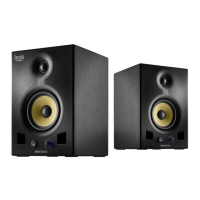
The Hercules DJ Monitor 5 is a bi-amplified, 2-way powered monitoring speaker designed to deliver consistent, precise sound for DJs of all experience levels. It allows users to accurately prepare mixes and monitor all details of their audio creations.

Function Description:

The DJ Monitor 5 functions as a studio monitor speaker, providing accurate audio reproduction for mixing and monitoring purposes. It features a bi-amplified design, meaning separate amplifiers power the woofer and tweeter for optimized sound quality. The speaker includes various input options (RCA, TRS, XLR) to connect to different audio sources such as mixing consoles, computers, and professional equipment. On the rear panel, several switches allow users to fine-tune the speaker's frequency response to suit their listening environment and preferences. These include controls for low frequency, high frequency, and low cutoff. The front panel features a volume knob that also serves as a power LED indicator, and a dedicated ON/OFF button. Bass reflex ports on the front improve the rendering of low frequencies.

Important Technical Specifications:

  • Type: Bi-amplified, 2-way powered monitoring speaker
  • Woofer (low frequency driver): 5-inch, Kevlar cone, magnetically shielded
  • Tweeter (high frequency driver): 1-inch, silk dome, magnetically shielded
  • LF amplification: 50 W
  • HF amplification: 30 W
  • Total power: 80 W
  • Frequency response: 50 Hz – 20 kHz
  • Signal-to-noise ratio: > 95 dB
  • Input impedance: 20 kohms (balanced), 10 kohms (unbalanced)
  • Inputs:
    • 1 RCA input (unbalanced -10 dBV)
    • 1 TRS input and 1 XLR input (balanced +4 dBu)
  • Controls:
    • Low Freq switch (-2 dB, 0 dB, +2 dB)
    • High Freq switch (-2 dB, 0 dB, +2 dB)
    • Low Cutoff switch (56, 80 and 100 Hz)
  • Dimensions: 310 cm (H) x 218 cm (W) x 230 cm (D)
  • Weight: 6.830 kg
  • Power supply: 100-120V~60 Hz and 220-240V~50 Hz (selectable via voltage selector)

Usage Features:

  • Positioning: For optimal monitoring, speakers should be placed on a flat surface, free of obstacles. A minimum distance of 1.50 m from walls or corners is recommended to avoid excessive bass amplification. Ideally, the speakers and listening position should form an equilateral triangle with 60° angles. The user's ears should be at the same level as the tops of the woofers. Elevating the speakers relative to a mixing desk or table is recommended to minimize reflections.
  • Connectivity: The DJ Monitor 5 offers versatile input options including RCA (Cinch) for main input, TRS (6.35 mm jack) for balanced input, and XLR for balanced input, catering to various audio setups and professional equipment.
  • Power Management: A voltage selector allows users to switch between 230 V (for 220-240 V power supply) and 115 V (for 110-120 V power supply). The power cable connects via a dedicated power connector. The ON/OFF button controls the speaker's power, with the volume knob's LED indicating power status. It is recommended to power on the speakers last in an audio system chain and power them off first.
  • Sound Customization:
    • Low Freq switch (8): Adjusts the level of the low frequency range. Options include +2 dB (increases by 2 dB), 0 dB (uniform frequency response), and -2 dB (decreases by 2 dB).
    • High Freq switch (9): Adjusts the level of the high frequency range. Options include +2 dB (increases by 2 dB), 0 dB (uniform frequency response), and -2 dB (decreases by 2 dB).
    • Low Cutoff switch (10): Provides three cutoff frequencies for a low-cut filter: 56 Hz, 80 Hz, and 100 Hz, allowing users to tailor bass response.
  • Volume Control: A dedicated volume knob (3) allows precise adjustment of the output level.

Maintenance Features:

  • Cleaning: Disconnect the speaker kit before cleaning. Use a damp cloth and avoid using aerosol cleaners.
  • Safety Precautions:
    • Never open the speaker kit, as this risks damaging internal components.
    • Keep the speaker kit away from rain, humidity, and all fluids (water, chemical products).
    • Avoid placing the speaker near heat sources (heaters, stoves, amplifiers) or in direct sunlight.
    • Do not expose the speaker kit to drips or splashes of water, and never place liquid-filled objects on it.
    • Unplug the power cable if not using the speaker kit for an extended period. Always pull the plug, not the cable, to disconnect.
    • Ensure the power plug connected to an electrical outlet remains easily accessible, as it serves to power off the device.
    • Prolonged listening at full power with headphones may cause damage to hearing.
  • Environmental Protection: At the end of its working life, the product should not be disposed of with standard household waste. It should be dropped off at a collection point for the disposal of Waste Electrical and Electronic Equipment (WEEE) for recycling, as indicated by the symbol on the product, user manual, or packaging. The materials may be recycled, contributing to environmental protection. Users should contact local authorities for information on the nearest collection point.

Hercules DJ Monitor 5 Specifications

General IconGeneral
BrandHercules
ModelDJ Monitor 5
CategoryDJ Equipment
LanguageEnglish

Related product manuals