EasyManua.ls Logo

Hercules HE041 - User Manual

Hercules HE041
16 pages
Print Icon
To Next Page IconTo Next Page
Loading...
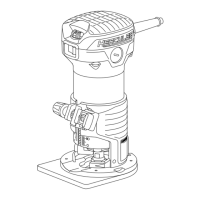
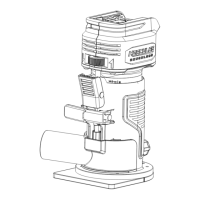
Variable Speed Fixed Base Router
with Plunge Base Kit
Model
HE041
Owners Manual &
Safety Instructions
22a
WARNING: To prevent serious injury, User must read and
understand Owners Manual. SAVE THIS MANUAL.
When unpacking, make sure that the product is intact and undamaged.
If any parts are missing or broken, please call 1-888-866-5797
as soon as possible. Reference 792363573689.

Questions and Answers

  • B
    Bobby HarrisonAug 13, 2025
    How to improve performance of my Hercules HE041 Power Tool that decreases over time?
    • B
      Bryan ColemanAug 13, 2025
      If the performance of your Hercules Power Tool decreases over time, consider these potential causes: * **Worn or damaged carbon brushes:** Have a qualified technician replace the brushes. * **Dull or damaged cutting bit:** Use sharp bits and replace them as needed.
  • A
    austin80Aug 16, 2025
    What to do if my Hercules HE041 Power Tool will not start?
    • A
      ariel97Aug 17, 2025
      If your Hercules Power Tool won't start, there are several potential causes: * **Cord not connected:** Check that the cord is properly plugged in. * **No power at the outlet:** Verify the outlet has power. If it doesn't, turn off the tool and check the circuit breaker. If the breaker is tripped, ensure the circuit has the correct capacity for the tool and isn't overloaded. * **Thermal reset breaker tripped:** Turn off the tool, let it cool down, and then press the reset button on the tool (if equipped). * **Internal damage or wear:** If none of the above steps work, internal components like carbon brushes or the power switch may be damaged. In this case, have a qualified technician service the tool.
  • S
    Sarah ByrdAug 20, 2025
    Why is my Hercules HE041 overheating?
    • N
      Natalie DavisAug 20, 2025
      There are several reasons why your Hercules Power Tool might be overheating: * **Forcing the tool to work too fast:** Allow the tool to operate at its own pace. * **Dull or damaged cutting bit:** Use sharp bits and replace them when needed. * **Blocked motor housing vents:** Clean the motor housing vents by blowing out dust with compressed air. Wear ANSI-approved safety goggles and a NIOSH-approved dust mask/respirator while doing so. * **Motor strained by extension cord:** Avoid using an extension cord. If necessary, use a cord with the correct diameter for its length and the tool's load.
  • M
    Melissa BrownAug 25, 2025
    What to do if my Hercules Power Tool operates slowly?
    • L
      lcrosbyAug 25, 2025
      If your Hercules Power Tool is operating slowly, consider the following: * **Forcing the tool to work too fast:** Allow the tool to work at its own rate. * **Extension cord issues:** Eliminate the use of an extension cord if possible. If you must use one, ensure it has the proper diameter for its length and the tool's load.
  • E
    Elizabeth MartinAug 28, 2025
    Why is my Hercules HE041 making excessive noise or rattling?
    • B
      Brandon McgeeAug 28, 2025
      Excessive noise or rattling in your Hercules Power Tool could be due to internal damage or wear, such as in the carbon brushes or bearings. Have a qualified technician service the tool.
  • J
    Jordan StricklandAug 31, 2025
    Why is my Hercules HE041 operating slowly?
    • A
      alexandria57Aug 31, 2025
      If your Hercules Power Tool operates slowly, it is likely because you are forcing the tool to work too fast. Allow the tool to work at its own rate.
  • B
    Brian StoneSep 4, 2025
    What to do if my Hercules HE041 Power Tool is making excessive noise?
    • H
      harperdavidSep 5, 2025
      If your Hercules Power Tool is making excessive noise or rattling, this could be due to internal damage or wear, such as with the carbon brushes or bearings. Have a technician service the tool.
  • S
    Sharon WatsonSep 8, 2025
    How to fix a Hercules Power Tool that will not start?
    • E
      Erin MendozaSep 8, 2025
      If your Hercules Power Tool will not start, it may be due to internal damage or wear, such as with the carbon brushes or the switch. Have a technician service the tool.

Summary

IMPORTANT SAFETY INFORMATION

General Power Tool Safety Warnings

General safety rules to prevent injury when operating power tools.

Work area safety

Keep work area clean and well lit to prevent accidents.

Electrical safety

Avoid electrical hazards like shock from wet conditions or damaged cords.

Personal safety

Maintain alertness, use PPE, and avoid unintentional starting.

Power tool use and care

Proper usage, maintenance, and care to ensure safe operation and longevity.

Service

Guidelines for maintaining the tool through qualified repair and part replacement.

Safety instructions for routers

Specific safety precautions when operating router tools.

Vibration Safety

Precautions and health advice for users exposed to tool vibration.

Grounding

Grounding Wire Connection

Critical steps to prevent shock from incorrect grounding wire connections.

Grounded Tools

Details on tools requiring grounding and their three-prong plug connections.

Double Insulated Tools

Information on tools with double insulation and their grounding requirements.

Extension Cords

Guidelines for selecting and using extension cords safely and effectively.

Manual Information and Symbols

Symbology

Explanation of symbols used in the manual for clarity and understanding.

Warning Symbols and Definitions

Definitions and explanations of various safety alert symbols used in the manual.

Specifications

Technical details and ratings of the power tool.

SET UP - BEFORE USE

Assembly

Instructions for assembling key components of the power tool.

Dust Extraction Adaptor Attachment

Steps to attach the dust extraction adaptor for both base types.

Chip Shield Attachment

Instructions for attaching the chip shield to the fixed and plunge bases.

Dust Extraction Setup

How to connect a dust collection system for a cleaner workspace.

Functions

Edge Guide Assembly

Steps for assembling and installing the edge guide.

Work Area

Guidelines for preparing a safe and effective work environment.

OPERATING INSTRUCTIONS

Tool Set Up

Procedures for setting up the tool before operation.

Changing the Collet

How to change the collet for different shank sizes of cutting bits.

Installing the Cutting Bit

Instructions for safely and correctly installing cutting bits into the tool.

Tool Assembly and Setup

Installing the Motor Housing

Steps to install the motor housing onto the fixed or plunge base.

Edge Guide Installation

Procedures for installing the edge guide on both base types.

Setting and Testing

Depth Adjustment - Fixed Base

Detailed steps for setting depth on the fixed base.

Depth Setting with Depth Rod;Depth Stop Turret

Using the depth rod and turret for precise depth settings.

Depth Adjustment - Plunge Base

Detailed steps for setting depth on the plunge base.

Micro Adjustment with Depth Rod;Depth Stop Turret

Fine-tuning plunge depth using the adjustment rod and turret.

Workpiece Set Up

How to properly secure workpieces for safe and effective cutting.

General Instructions for Use

Operating the Router

Step-by-step guide on how to use the router for cutting operations.

Adjusting Router Speed

How to select the appropriate speed based on material and bit size.

Cutting Techniques

Best practices for moving the router during cuts for different edge types.

MAINTENANCE AND SERVICING

Cleaning, Maintenance, and Lubrication

Procedures for cleaning, routine maintenance, and lubrication of the tool.

Pre-Use Inspection

Checks to perform before each use to ensure safe operation.

Post-Use Cleaning

Steps for cleaning the tool after each use.

Periodic Maintenance

Regular tasks like cleaning vents and lubricating parts.

Troubleshooting

Tool Will Not Start

Diagnosing and resolving issues when the tool fails to power on.

Tool Operates Slowly

Identifying causes and solutions for slow tool operation.

Performance Decreases

Troubleshooting steps when tool performance declines over time.

Excessive Noise or Rattling

Diagnosing and fixing abnormal noises or rattling during operation.

Overheating

Addressing issues related to the tool overheating during use.

LIMITED 90 DAY WARRANTY

Hercules HE041 Specifications

General IconGeneral
BrandHercules
ModelHE041
CategoryPower Tool
LanguageEnglish

Related product manuals