CUSTOMER MAINTENANCE PROCEDURES (Cont.)
Before the colorants purge, a box will appear asking you to “Insert can remove cap”. At this
point, remove the cup and sponge for cleaning. Do this before initiating the purge process.
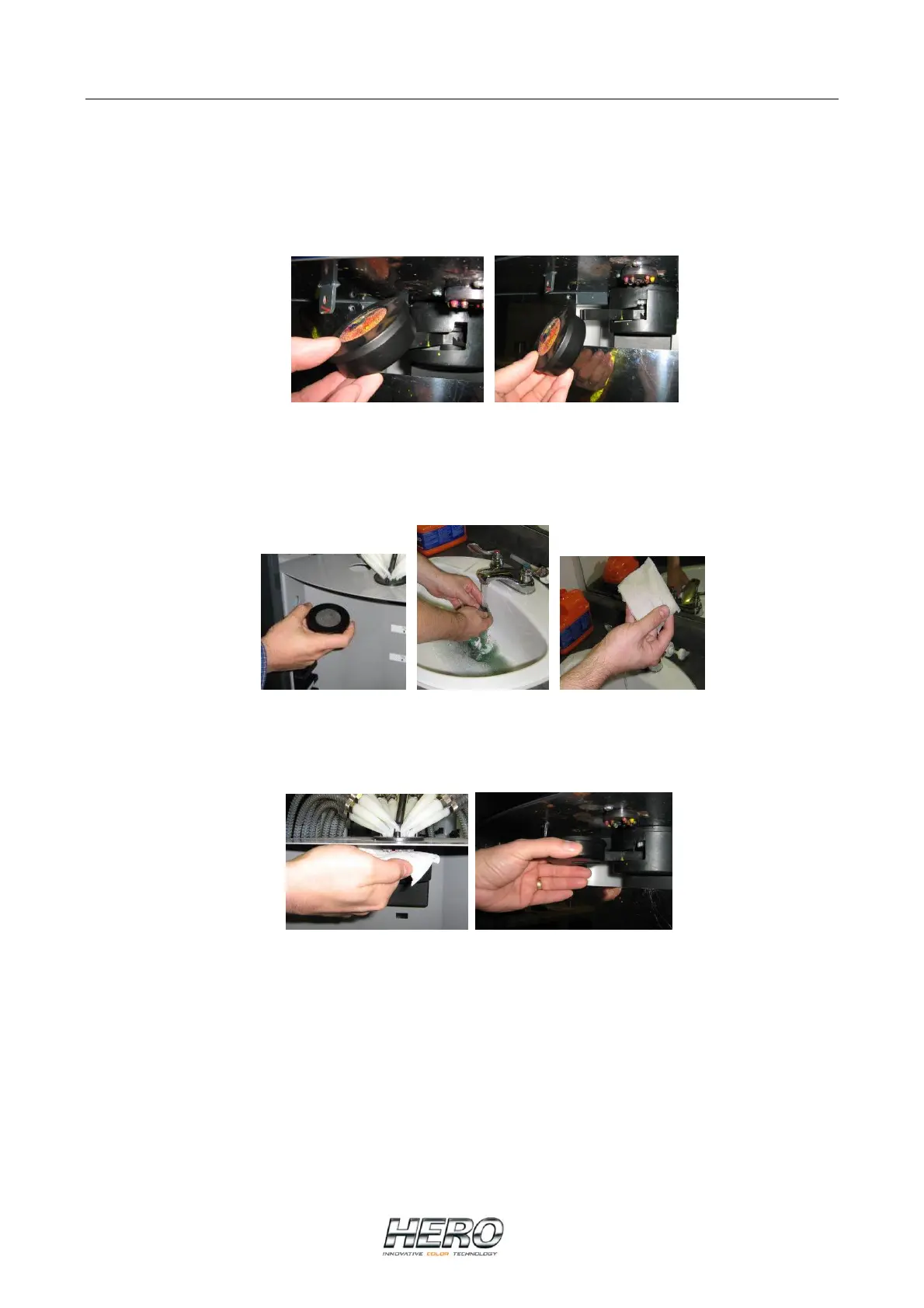
To remove the cup, hold the front portion and pivot it downwards so that the sponge faces
you. The cup will separate from the arm.
Pivot front of cup downwards Cup will separate from arm
Once the cup and sponge have been removed, take them to a sink and wash them with
warm water leaving the sponge damp. At this point you should also get a piece of paper
toweling, fold it into a square and moisten it.
Cup and sponge Washing the sponge Moistened paper towel
Take the moistened paper towel and dab the nozzles with it and then push the cup and
sponge assembly back onto the capper arm.
Dab the nozzles Push cup back onto capper arm
Making sure the purge can is in place, select the “OK” button on the “Insert cap remove can”
message. The dispenser will purge all colorants automatically. Once the purge process has
been completed, select the “Exit” button on the canister selection screen and you’re ready to
start your day.


 To Next Page