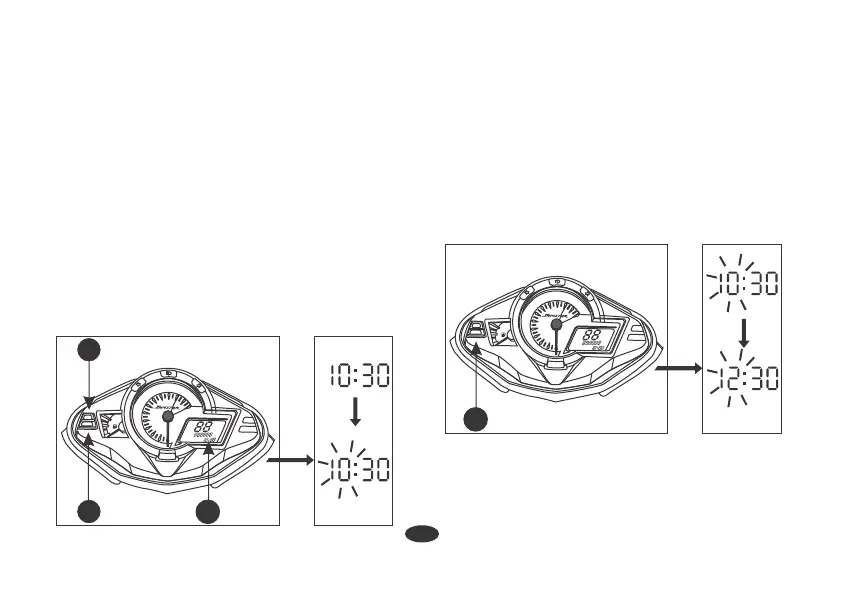
Digital Clock
Digital Clock (1) shows hour and minute.
To adjust the time, proceed as follows :
1. Turn the ignition switch "ON".
2. Press and hold Select Button (2) and
Reset Button (3) simultaneously for
more than 2 seconds. The clock will be
set in the adjust mode with the hour's
digit display blinking.
3. To set the hour, press Reset Button (3)
until the desired hour is displayed.
• The time advances fast when the
button is pressed and held.
• AM will change to PM after 12.
• The time is advanced by 1 hour
each time the button is pressed.
13
x1000r/min
8
7
6
5
4
F
3
2
1
0
9
10
11
12
N
SELECT
RESET
AM
PM
km
2
3
LCD PANEL
1
x1000r/min
8
7
6
5
4
F
3
2
1
0
9
10
11
12
N
SELECT
RESET
AM
PM
km
3






 To Next Page