14
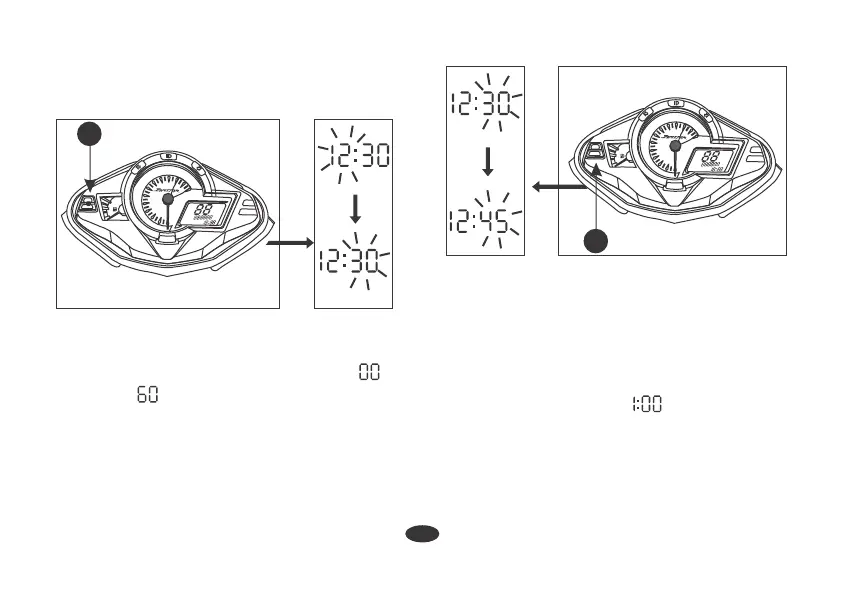
6. To end the adjustment press Select Button
(2). The display will stop flashing
automatically and the adjustment will be
saved or if the button is not pressed for
about 30 seconds.
NOTE :
The clock will reset " " if the battery is
disconnected.
• The time advances fast when the button
is pressed and held.
• The time advances by 1 minute, each
time the button is pressed.
AM :
x1000r/min
8
7
6
5
4
F
3
2
1
0
9
10
11
12
N
SELECT
RESET
AM
PM
km
3
4. Press the Select Button (2). The minutes
display starts blinking.
5. To set the minute press Reset Button (3)
until the desired minute is displayed.
The minute display will return to " "
when " " is reached without affecting
the hour display.
x1000r/min
8
7
6
5
4
F
3
2
1
0
9
10
11
12
N
SELECT
RESET
AM
PM
km
2
Odometer / Tripmeter
The Odometer (1) shows accumulated
distance traveled.





 To Next Page