(7) Air cleaner assembly
(8) Mounting clamp
(5) Air cleaner cover screws
(6) Air cleaner cover
5
6
32
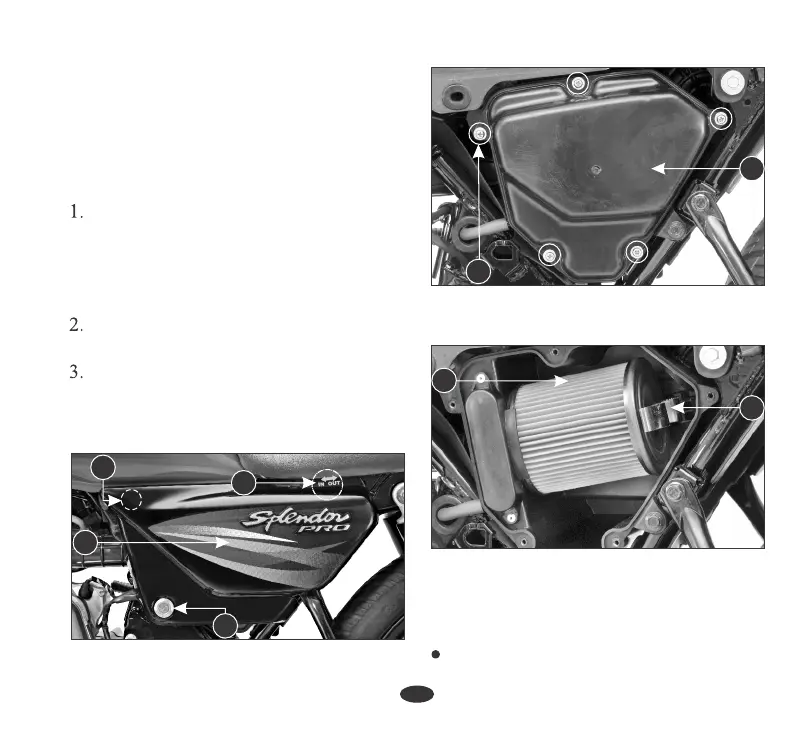
Insert the ignition key into the side
cover lock (1). Remove the side cover
(2) by turning the key clockwise. Pull
out lug (3) from the grommet and slide
the cover as per direction indicator (4).
Remove the air cleaner cover screws
(5) and the cover (6).
Press the mounting clamp (8) to release
the air cleaner assembly from the
housing and remove the air cleaner
assembly (7).
AIR CLEANER
The air cleaner element is of Dry Paper
Pleated type it should be serviced at regular
intervals (page 28). When riding in dusty
areas, more frequent service may be
necessary.
7
8
2
(3) Lug (4) Direction indicator
(1) Side cover lock (2) Side cover
3
4
Remove the Air Cleaner Element (9)
from the Element Holder (10).
4. Air Cleaner Cleaning
1





 To Next Page