Herrtronic
®
MD Series
Installation, Operation, & Maintenance Manual
25
www.herrmidifier-hvac.com
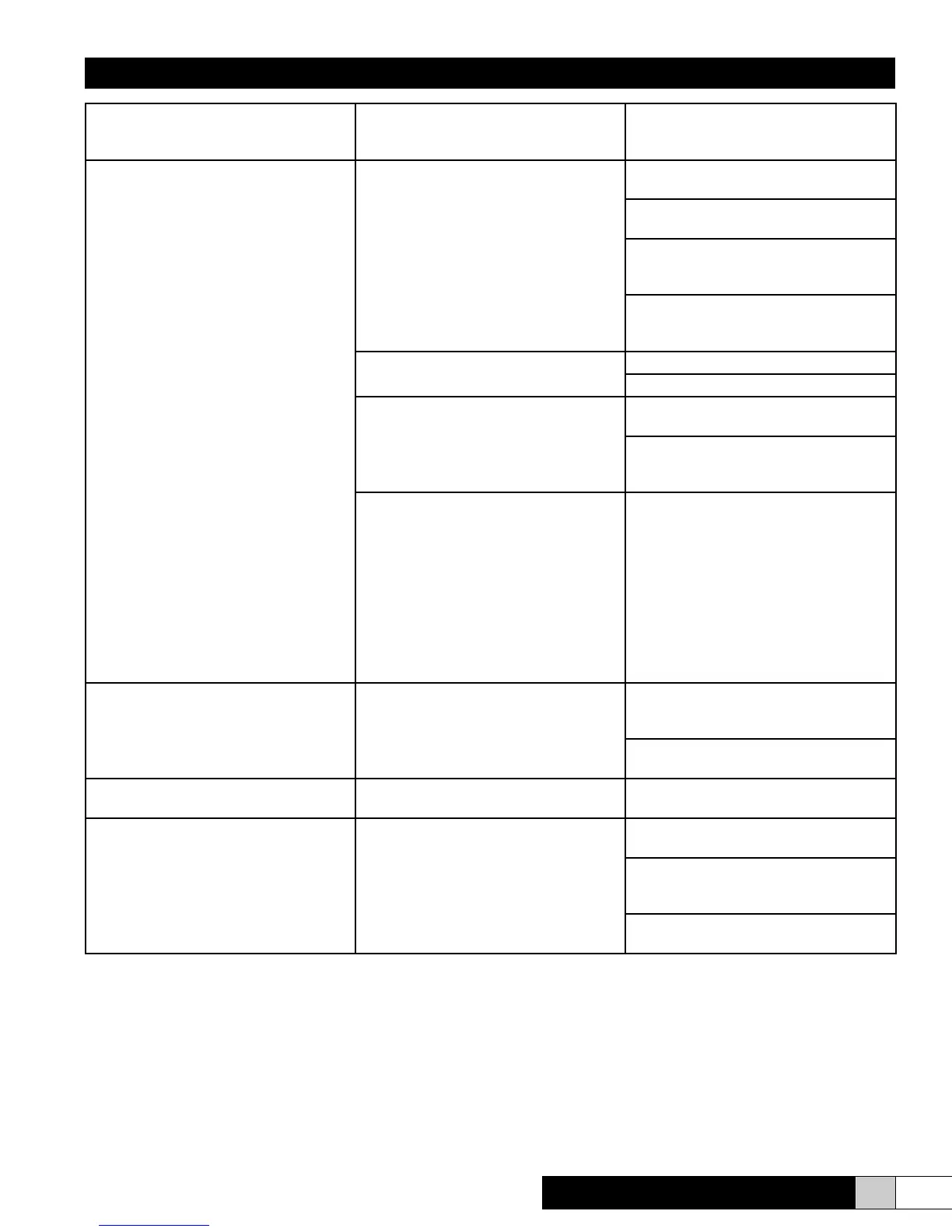
Communications Fault
A short has been detected in the RS-485
communications loop.
Maintenance is required.
Green power lamp and LCD are not illu-
minated.
Blown 24 VAC control fuse
Short in control wiring or microprocessor
board if fuse blows immediately.
Short in contactor or control wiring if fuses
blow as unit energizes contactor.
Short in ll valve or wiring if fuses blow
after unit is attempting to energize the ll
valve.
Short in drain valve or wiring if fuses blow
after unit has cycled and is now attempt-
ing to energize the drain valve.
Blown high voltage fuses
Spike in power supply.
Short in terminal blocks or contactor
Main transformer failure
Check for 24 VAC on secondary side of
transformer between X1 and X2.
If secondary side is insufcient and proper
voltage is being supplied to primary side
of transformer, replace transformer.
Incorrect voltage to primary side of trans-
former
Conrm voltage supplied compared to tap
on transformer and data plate.
Measure AC voltage across the primary
of the transformer for supplied voltage
If insufcient, check path through terminal
blocks, contactor and fuses for a potential
drain.
If every point of connection within the
humidier reads the same insufcient
number, then the disconnect should be
checked.
Unable to turn unit on after pressing “on/
off” button
Open door and press “on/off” button again.
If unit comes on, place 1 and 2 wires to the
opposite side of the door interlock switch.
Poles 1 & 3 on the controls terminal strip
need to be jumped.
Water always draining when drain sole-
noid is closed
Obstruction keeping the drain solenoid
from closing
Clean and/or replace.
Display shows erroneous number and
titles (such as “%*#~?/*@”)
Press reset button on the back of the PC
board
Check for proper ribbon cable connec-
tions to LCD and PC board (see page 22,
Item E)
Replace ribbon connector, LCD and PC
board.


 To Next Page