Need help?
Do you have a question about the Herschel MD2 and is the answer not in the manual?
Lists the main capabilities and advantages of the MD2 thermostat, including connectivity and operational modes.
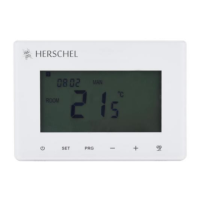
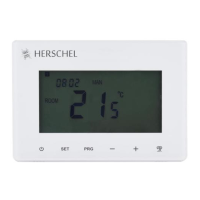
Details the various display elements and physical buttons on the thermostat for user interaction.
Guide to obtaining and setting up the companion mobile application for remote control.
Step-by-step instructions for connecting the MD2 thermostat to the SmartLife app via Wi-Fi.
Procedure for configuring the current time and day directly on the thermostat keypad.
How to choose between Manual, Eco, and Program modes for heating control.
Instructions for setting a specific temperature for the energy-saving Eco mode.
Guide to creating a custom heating schedule with 4 daily periods and temperature settings.
Enabling and using the keypad lock to prevent unauthorized changes to settings.
How the thermostat detects open windows to automatically stop heating and save energy.
Details on device parameters, their ranges, and default values for customization.
Details on the thermostat's physical size and requirements for mounting boxes.
Crucial guidance for safely connecting the MD2 thermostat to mains power.
Overview of the physical process for installing the MD2 thermostat.
Key technical data including frequency, power supply, ambient range, and sensor type.
List of compliance standards and certifications the MD2 thermostat meets.
The Herschel iQ MD2 is a wired thermostat designed to control Herschel infrared heaters, enabling efficient and smart heating management. It can handle up to 3.6 kW of heating load, making it suitable for various applications from residential rooms to commercial spaces like hot yoga studios. The MD2 connects directly to the mains circuit that powers the heaters and features built-in Wi-Fi for internet control via the SmartLife App, offering both stand-alone and remote operation capabilities.
The primary function of the MD2 thermostat is to regulate room temperature by turning Herschel heaters ON when the temperature falls below a desired setpoint and OFF when it reaches or exceeds that setpoint. It offers three main temperature modes: Manual (Constant), Eco, and Program modes, providing flexibility in heating schedules and energy saving.
In Manual Mode, users can set a specific temperature that the thermostat will maintain until a different mode is selected or the temperature is manually changed. This mode is ideal for situations where a constant temperature is desired without a fixed schedule.
The Eco Mode is designed for energy saving, allowing users to set a lower-than-normal temperature. This can be used for frost protection, when on holiday, or simply to reduce energy consumption during periods of less occupancy. The Eco temperature can also be manually overridden if needed.
The Program Mode offers a 7-day timer with four programmable periods per day. This allows for detailed scheduling of heating based on daily routines, such as setting different temperatures for wake-up, daytime setback, late afternoon/early evening, and nighttime setback. The MD2 is designed to heat the "Thermal Mass" of the room, meaning it's more economical to avoid significant temperature drops, recommending overnight setback temperatures no lower than 14°C and daytime temperatures of 16°C and above. The thermostat aims to achieve the desired temperature by the programmed time, suggesting users consider starting the program an hour earlier (e.g., 06:00 a.m. for a 07:00 a.m. target). Any manual override in Program Mode will remain in effect only until the next scheduled period.
A key energy-saving feature is the Open Window Detect function. When enabled, if the system detects a temperature drop of 2°C within a 15-minute period (when the ambient temperature is above 14°C), it automatically stops heating for 60 minutes, displaying "OP" on the screen. This prevents energy waste from heating a room with an open window. Pressing any button during this 60-minute period will exit the function and resume normal operation. This feature is off by default but can be configured in the parameter settings to adjust the temperature drop detected, the detection period, and the duration the heater remains off.
The MD2 also includes an open window technology to further enhance energy efficiency.
The MD2 features a large LCD display for easy readability and operation. It can be installed on a wall, requiring a single gang 46mm deep pattress box for recessing and access to the mains circuit. For optimal performance, it should be positioned far enough from the Herschel infrared heaters to accurately sense an average room temperature.
Time and Day Setting: Users can easily set the current time (24-hour clock) and day of the week using dedicated buttons, with options to adjust minutes, hours, and days.
Mode Selection: A dedicated button allows users to cycle through Manual, Eco, and Program modes, providing quick access to different heating strategies.
Temperature Adjustment: In any mode, the desired temperature setpoint can be adjusted using plus and minus buttons. In Eco mode, the setpoint temperature will flash while it is saved before returning to display the current room temperature.
Keypad Lock: To prevent unauthorized tampering with settings, the MD2 includes a keypad locking feature. This is indicated by a padlock symbol on the display and is off by default. Users can temporarily unlock the keypad for adjustments by pressing a specific button for 5 seconds; it will relock once the display backlight switches off. This feature can also be configured in the parameter settings.
SmartLife App Integration: The MD2's built-in Wi-Fi allows for remote control and management via the SmartLife App. After downloading and installing the app, users can register an account and pair their MD2 thermostat. The app provides a comprehensive interface for managing the thermostat, including:
The pairing process involves connecting the mobile device to a 2.4GHz Wi-Fi signal (5GHz signals or network extenders can cause pairing failure), adding the device as a "Thermostat" under "Small Home Appliances" in the app, and then activating the MD2's Wi-Fi connection mode. Pairing is confirmed when the Wi-Fi status symbol on the MD2 stops blinking and shows a solid connection.
While the manual primarily focuses on operational features, the MD2 includes several settings that can be considered maintenance-related for optimal performance and longevity:
Temperature Calibration: The thermostat allows for temperature calibration for both the internal room sensor and an external sensor (if connected). This ensures accurate temperature readings, which is crucial for efficient heating and comfort. Calibration ranges from -8°C to +8°C.
Max/Min Temperature Setpoint: Users can define maximum and minimum temperature setpoints (5°C to 45°C) to prevent the thermostat from being set to extreme temperatures, which can be useful in commercial settings or to protect vulnerable individuals.
Sensor Select: The MD2 can operate with the room sensor only, an external sensor only, or both. This flexibility allows for tailored temperature sensing based on the specific installation and heating requirements.
Frost Protection Temp: A specific frost protection temperature (5°C to 15°C) can be set, which is particularly useful for maintaining a minimum temperature to prevent freezing in unoccupied spaces.
Overheat Protection Setting: An overheat protection setting (20°C to 80°C) is available, likely to prevent the system from operating at dangerously high temperatures, though the exact mechanism is not detailed.
Dead Zone: A dead zone setting (0-3°C) can be configured, which refers to the temperature differential before the heating system reactivates. This helps prevent rapid cycling of the heater, potentially extending its lifespan and improving energy efficiency.
Factory Reset: The MD2 offers a factory reset option, allowing users to revert all settings to their default values. This can be useful for troubleshooting or when reconfiguring the thermostat for a new application.
The MD2 is designed for durability, with housing made from ABS to UL94-5 fire retardant plastic, and comes with a 24-month warranty, indicating a commitment to product quality and reliability.
 General
| Dimensions | 86mm x 86mm x 13mm (Wall Plate: 86mm x 86mm x 35mm) |
|---|---|
| Display | LCD |
| Temperature Range | 5°C to 30°C |
| Accuracy | ±0.5°C |
| Mounting | Wall-mounted |
| Power Source | 24V AC/DC |

 To Next Page