14
3. Tighten the lock nut back against the preload adjustment
nut.
4. Check if the other lock nut, which tightens the rod into the
metal eye (inside the pedal arm), is still tight against the eye.
Throle only – pedal force
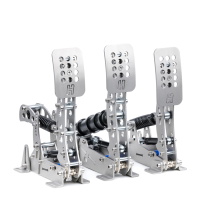
In the arm of the throttle pedal you’ll find an adjustment
(slider) to (mainly) change the slope of the pedal force curve.
In the highest position, you’ll need more force to reach the
end of pedal travel compared to the lowest setting. It also
slightly raises the overall amount of force required.
The adjustment is made as follows:
1. Loosen (do not remove) the bolts on the adjustment slider.
2. Slide the adjustment bolt to the desired position.
3. Re-tighten the bolts.
Throle & Clutch – pedal travel
The pedal travel is limited by the blue end-stop which
is located in the pedal base. You can adjust the travel as
follows:
1. Using a 5mm hex key, loosen the bolts on each end of the
blue end stop.
2. Move the end-stop to the desired position. Then retighten
the bolts.
3. You must re-calibrate in SmartControl after adjusting the
travel of the pedal.
Throle & Clutch - pedal spring preload
Next to the metal coil spring you will find an adjustment to
change the spring preload. By making the spring length in the
rest position shorter or longer, you change the initial amount
of force required to move the pedal. The slope of the force
curve will remain identical.
The adjustment is made as follows:
1. Use the supplied 10mm wrench to remove the lock nut
from the preload adjustment nut.
2. Set the desired preload by turning the preload adjustment
nut. Make sure that you don’t turn the preload adjustment
nut beyond the thread of the rod.


 To Next Page
 Loading...