17
2. Using a hex key and wrench, remove the bolt and nut
which form the hinge of the swing arm. Note the washer
which sits between the swing arm and the side arm, this
should also be removed for now.
3. Pick a new position for the swing arm.
4. Re-install the bolts and nuts which form the hinge.
5. Re-install the metal coil spring assembly.
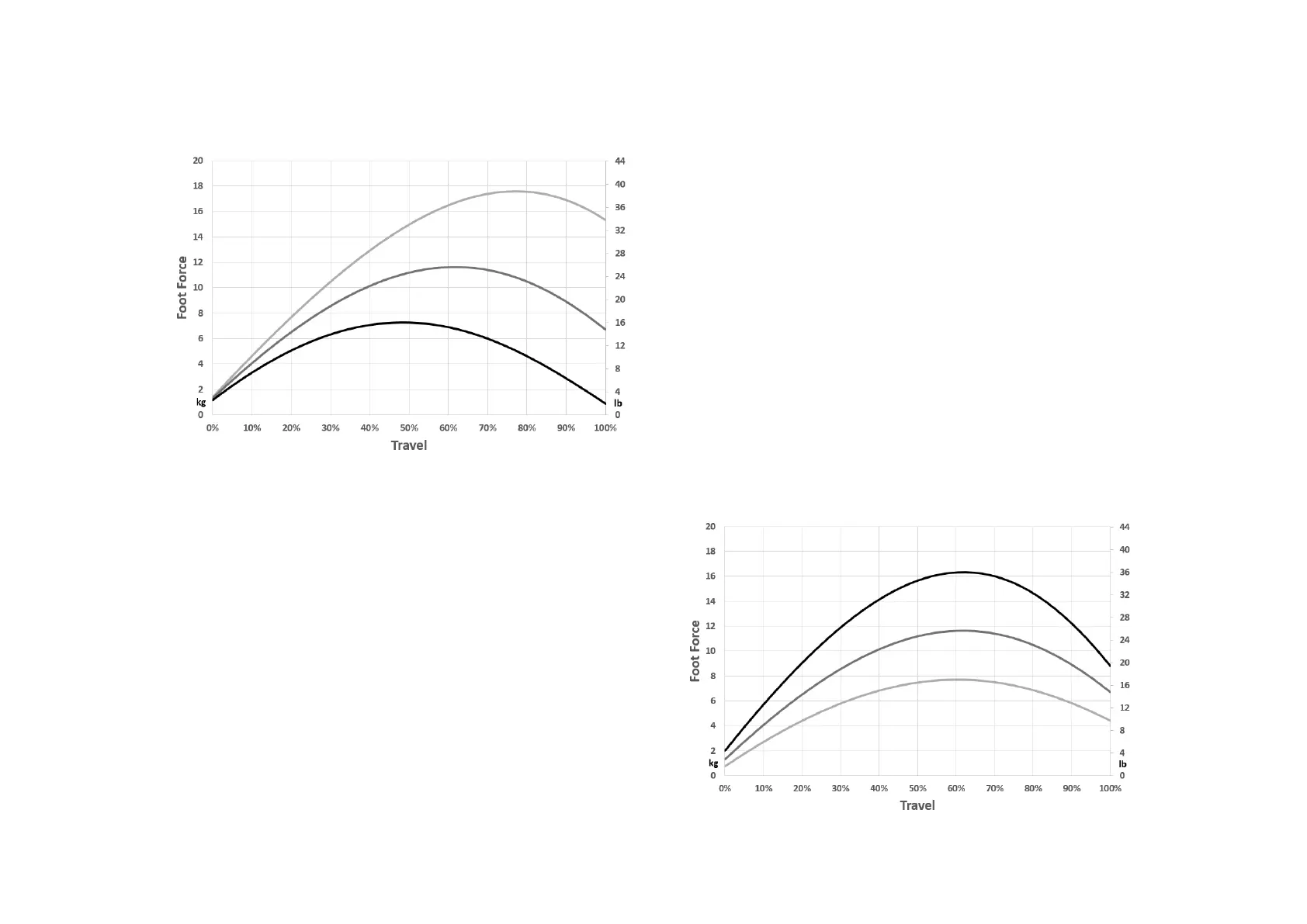
The top hole sets the most concave force curve. The bottom
hole sets the flattest force curve. The following image shows
the flattest concave, medium and most concave force curve.
Clutch only – pedal force curve shape
At the rear of the clutch pedal arm is swing arm. This is the
part which at the fronts pivots relative to the side arms, and
at the rear holds the backplate which supports the metal coil
spring. The exact position of this swingarm in one of the 7
holes determines the shape of the force curve.
You can adjust this curve as follows.
1. Remove the metal coil spring assembly:
First remove all preload from the metal coil spring.
Then use a hex key to remove the 2 bolts in the slider in the
front arm. Take note of the position of washers, spacers and
bearings. Remove the eye joint with the axis connected to it
and the spring.
Minimum, average and maximum clutch force.


 To Next Page