The Cube Power Module Voltage Calibration
The power module inside The Cube package supports up to 8S voltage, 30 A continuous current and 100 A
burst current. If higher load is needed, please replace for another power module with higher current limit.
Connecting Power Module
Connect the XT60 male connector to the battery (female on the other side for motors or ESC) and JST
connector to the POWER1 port on The Cube.
Dual input redundant power is also supported. You may connect the second battery to POWER2 to monitor 2
batteries at the same time.
Battery Monitor Calibration
Connect The Cube to power module and turn it on. Connect The Cube to Mission Planner via telemetry or
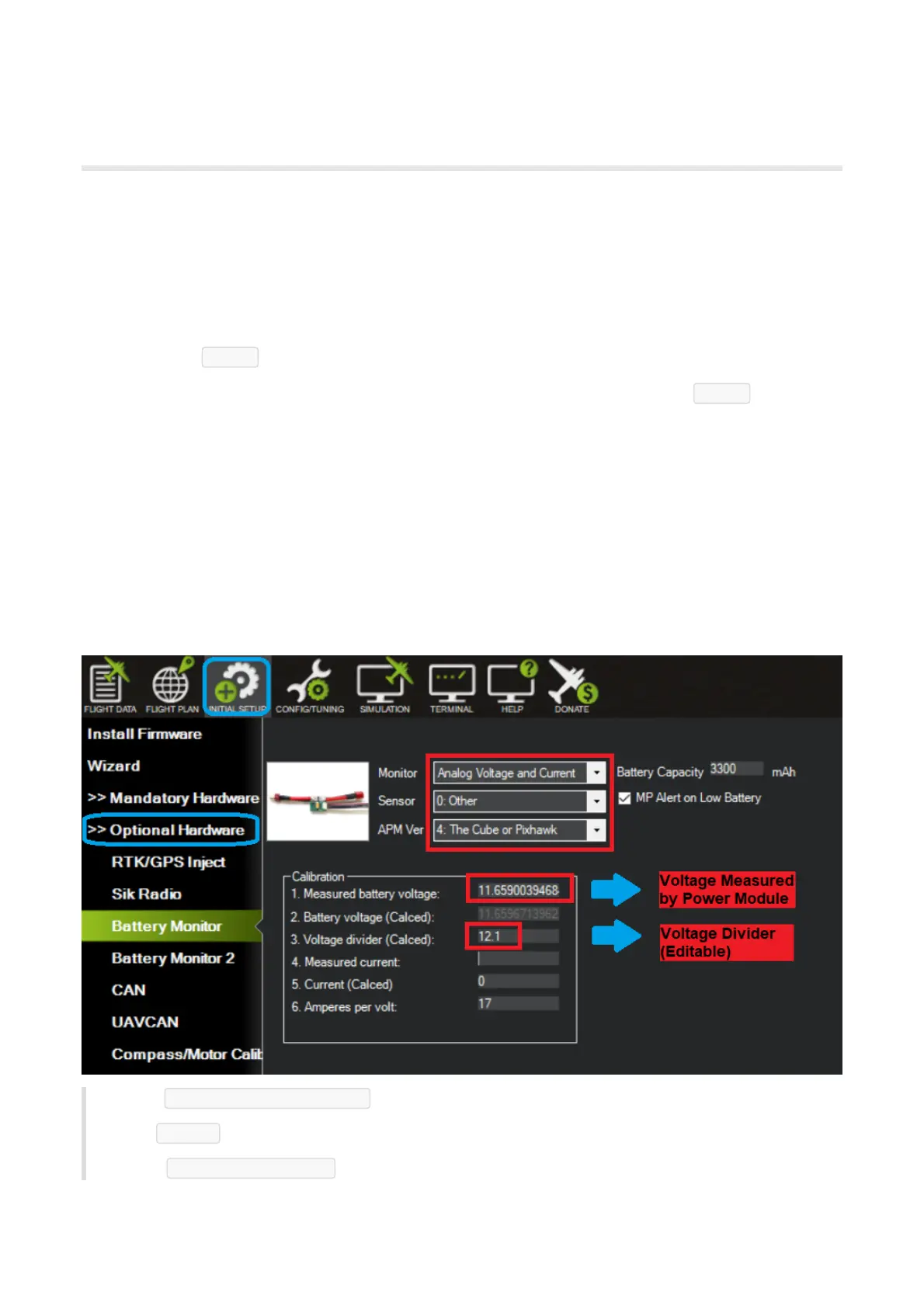
USB cable. Battery measurement is primarily set up in the "Initial Setup > Optional Hardware > Battery
Monitor" screen.
Enter the properties your module can measure, the type of module, the type of flight controller, and the
battery capacity:
Monitor Analog Voltage and Current ; Current monitor is currently not supported
Sensor 0.Other ;
APM Ver 4.The Cube or Pixhawk .


 To Next Page