4.7 Ethernet configuration
4.7 Ethernet configuration
Network connectivity to the LD8 is essential for configuration and implementing changes. The following
sub-sections detail how to check and change the present IP address settings.
4.7.1 IP configuration via WebUI
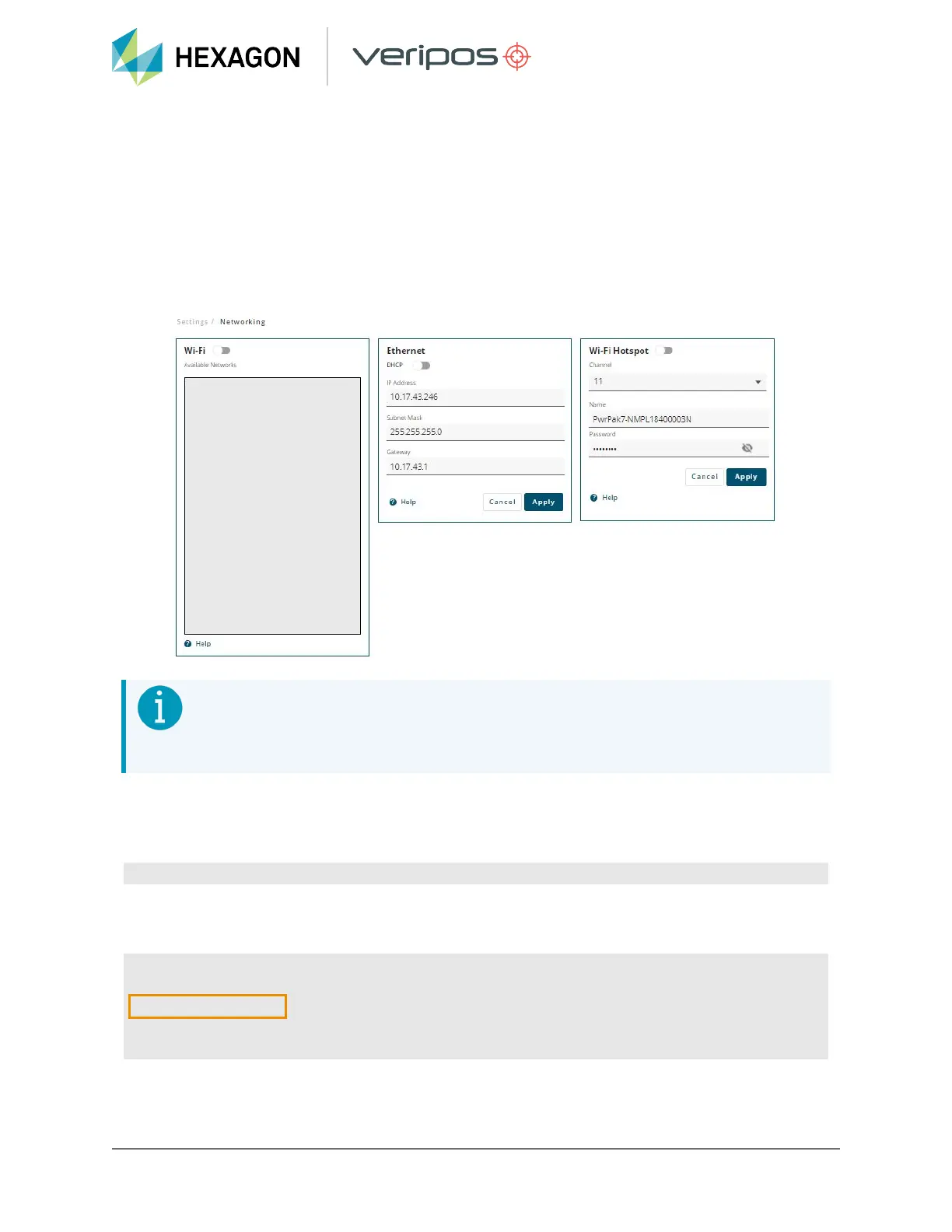
IP addresses can be checked and configured by navigating to Settings > Networking. Within the
Ethernet Window, the DHCP setting can be toggled to Off or On. Toggling DHCP to Off will allow for
Static IP address details to be input. Note the Wi-Fi related features are unavailable at present.
NOTE
If no connectivity via Ethernet is available, commands can also be sent through the
Serial COM ports.
4.7.2 Checking IP and subnet status via terminal
To check the current IP settings of the LD8 enter the command below:
LOG IPSTATUSA ONCE
IP and subnet settings will be returned, proceeded by ETHA, within quotation marks as highlighted
below:
IPSTATUSA,WCOM1_
30,0,65.0,FINESTEERING,2043,203989.000,02008020,7fe2,14970;2,ETHA,
"192.168.1.123"
,"255.255.255.0","192.168.1.1",WIFI,"192.168.19.1,"255.255.255.0","
",1,"0.0.0.0"*d9d1437c
28
LD8 Operations Manual


 To Next Page