4.8 Output configuration
4.8.3 Message output rate via WebUI
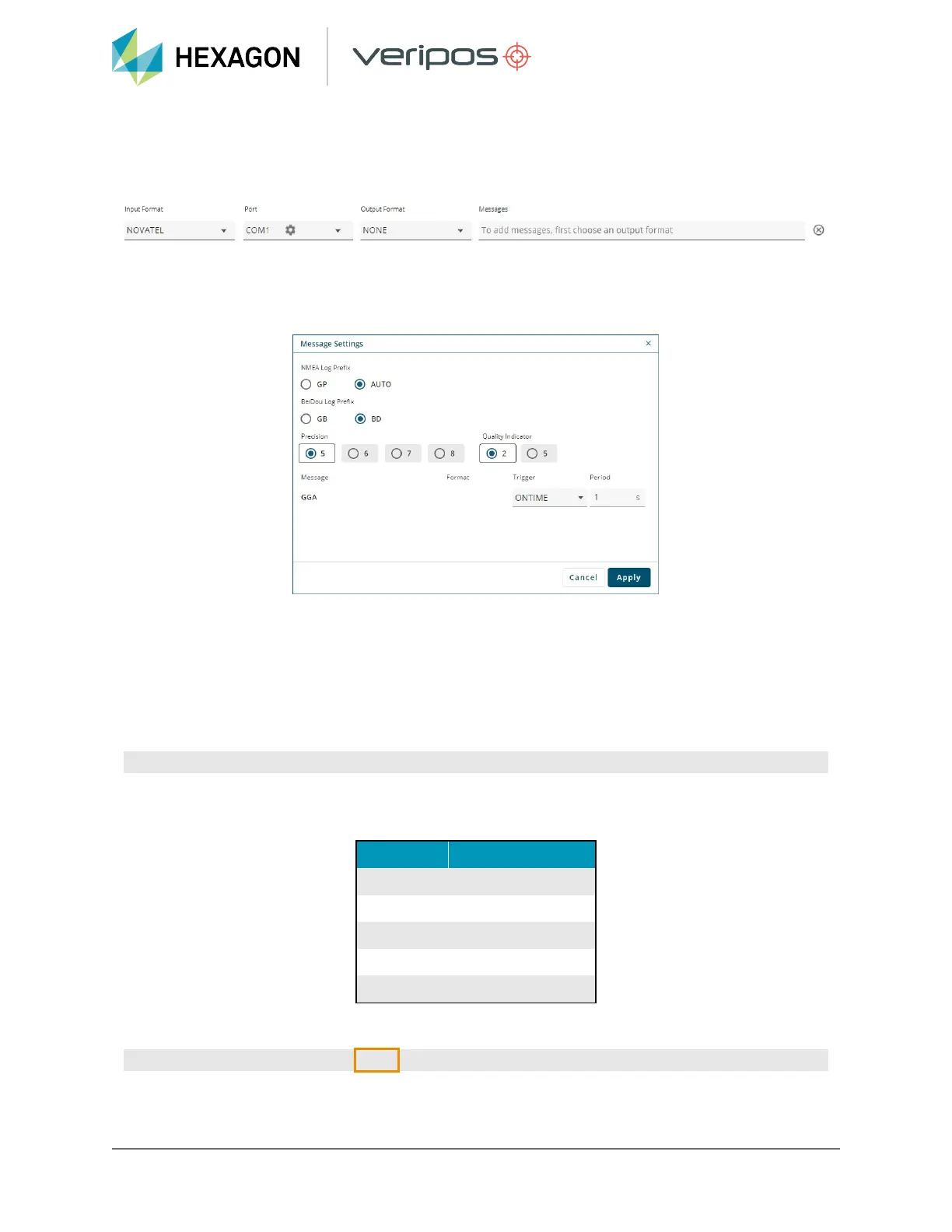
Once a NovAtel command variable has been specified a cog wheel will appear within the right hand
corner of the Messages field:
Clicking on the settings cog will open a Message Settings window where an output rate can be specified
in the Period field. LD8 receivers are capable of outputting messages at rates of 1Hz, 2Hz, 5Hz, 10Hz
and 20Hz. Enter the required rate in seconds as per table below and click Apply:
4.8.4 Enabling message outputs via terminal
To enable a message, a single command must be sent for each message on each port. Message types
can be output on COM 1-3, ICOM 1-3, or USB 1-3. This, along with the message command variable,
should be entered in the command line. The command to be used is given below with COM1 and
GPGGA used as an example:
LOG COM1 GPGGA ONTIME 1
LD8 receivers are capable of outputting messages at rates up to 20Hz. The last value as part of the LOG
message is the output rate field. See below table for the output rates and the command variables:
Output rate Command variable
1Hz 1
2Hz 0.5
5Hz 0.2
10Hz 0.1
20Hz 0.05
An example of the command for outputting GGA on COM 1 at 20Hz:
LOG COM1 GPGGA ONTIME 0.05
32
LD8 Operations Manual


 To Next Page