To Next Page
J
Jennifer JonesSep 8, 2025
How to fix zone tamper-proof issue on HIKVISION AX PRO DS-PWA96-M-WE Security System?
- RRoberto PughSep 9, 2025
To resolve a zone tamper-proof issue, ensure the tamper-proof button of the detector is held down.


How to fix zone tamper-proof issue on HIKVISION AX PRO DS-PWA96-M-WE Security System?
To resolve a zone tamper-proof issue, ensure the tamper-proof button of the detector is held down.
What to do if I failed to send a test mail on HIKVISION Security System?
If you've failed to send a test mail, it's likely due to incorrect configuration of mailbox parameters. Edit the mailbox configuration information, as shown in table 1/1.
What to do if the HIKVISION AX PRO DS-PWA96-M-WE Security System zone is triggered or shows a fault?
If a zone is triggered or shows a fault, reset the detector.
What to do if HIKVISION AX PRO DS-PWA96-M-WE Security System failed to send mail during use?
If sending mail fails during use, the mailbox server may have restricted access. Log in to the mailbox to check if it is locked.
Why doesn't the alarm clearing operation produce an alarm clearing report on HIKVISION Security System?
If there is no alarm, no report will be uploaded for arm clearing.
 General
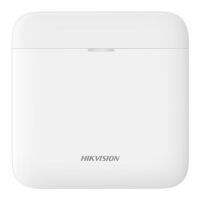
| Model | DS-PWA96-M-WE |
|---|---|
| Brand | HIKVISION |
| Category | Security System |
| Type | Control Panel |
| Communication | Wireless |
| Wireless Frequency | 868 MHz |
| Two-Way Communication | Yes |
| Zones | 96 |
| Partitions | 8 |
| Keyfobs | Up to 8 |
| Wireless Sirens | Yes |
| Wireless Repeaters | Yes |
| Onboard Camera | No |
| Voice Prompt | Yes |
| Tamper Protection | Yes |
| Battery Life | Up to 12 hours |
| Operating Humidity | 10% to 90% (non-condensing) |
| Mobile App | Hik-Connect |
| Wireless Protocol | Tri-X, Cam-X |
| Wireless Range | 1600 m (Open Area) |
| Protocols | SIA-Contact ID |
| Power Supply | DC 12V |
| Backup Battery | Lithium battery |
| Operating Temperature | -10°C to 55°C |
| Wireless Range Open Space | 1600 meters |
Covers legal disclaimers, symbol meanings, and regulatory compliance statements.
Details the AX PRO system's features, capabilities, and technical specifications.
Describes the physical layout and indicators of the AX PRO control panel.
Guides through the initial device setup, network connection, and physical installation.
Covers user roles, invitation, permissions, and access level management.
Explains setup via Hik-ProConnect, Hik-Connect, and Web Client interfaces.
Details wired, Wi-Fi, cellular network, and communication parameter configurations.
Covers video settings, permissions, maintenance, system options, and operational procedures.
Provides solutions for communication, zone, arming, and mail delivery problems.
Includes input/output types, event codes, access levels, signalling, and SIA/CID codes.