
 Need help?
Do you have a question about the HIKVISION DS-PEA22-F and is the answer not in the manual?
Covers device usage compliance, voltage, overload prevention, and proper connection.
Provides instructions and diagrams for connecting the power supply to the device.
Illustrates the process of connecting the device to the network via a switch.
Guides on activating the device using the SADP tool for network security and IP configuration.
Explains the process of activating the device using client software like iVMS-4200 for network security.
The Hikvision Panic Alarm Station is a versatile and robust device designed for emergency situations, offering a comprehensive solution for alarm aid and monitoring. This series of active panic alarm stations supports multiple network configurations, ensuring reliable communication and integration within various security infrastructures.
At its core, the Panic Alarm Station provides a critical communication link during emergencies. It supports live view capabilities, allowing for visual verification of events, and features two-way audio, enabling direct communication between the person in distress and monitoring personnel. The device also offers customized audio input, which can be tailored for specific alarm messages or instructions. A key functionality is its ability to link with surrounding cameras and external devices such as lamps and sound boxes, creating a coordinated response system. This integration helps to enhance situational awareness and facilitate effective alarm aid.
The station is equipped with a 2MP HD IR camera, providing video collection and all-day monitoring, even in low-light conditions thanks to its infrared capabilities. A built-in omnidirectional microphone ensures clear two-way audio communication, capturing sound from all directions. For data management, the device supports audio and video file storage, allowing for recording and review of incidents.
Network connectivity is a strong suit, with support for multiple network protocols including TCP/IP, RTSP, and SADP, ensuring broad compatibility with existing network systems. It also supports standard SIP, Ehome, and Ezviz protocols, further expanding its integration possibilities. For models like the Box Panic Alarm Station and Pole Panic Alarm Station, the design incorporates features such as waterproofing, anti-electromagnetic interference, tamper-proof mechanisms, and explosion-proof construction, making them suitable for deployment in challenging outdoor or high-risk environments. The standard Panic Alarm Station, however, does not include waterproofing.
The mainboard of the panic alarm station is designed for extensive connectivity and expandability. It includes multiple ports for network connections, a Micro SD Card Slot for local storage, and a SIM Card Slot for 4G module integration (sold separately), providing flexible communication options. There are dedicated inputs for voice and a panic button, along with outputs for a bell, lamp, and general alarms, allowing for the connection of external alarm devices. An extension module and a telephone module (both sold separately) can further enhance its capabilities. The alarm input wiring supports normally open configurations, enabling integration with various detectors.
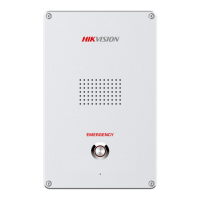
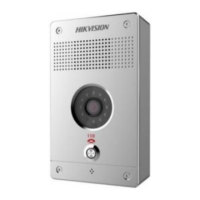
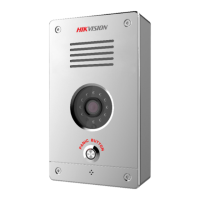
The Panic Alarm Station is designed for ease of use and quick deployment. The "One-touch Panic Alarm Station" model, for instance, features a prominent panic alarm button, making it intuitive for users to trigger an alarm in an emergency. It also includes a loudspeaker and microphone for clear audio communication, IR light for night vision, a camera for visual monitoring, and a light sensor for adaptive operation.
The "Box Panic Alarm Station" and "Pole Panic Alarm Station" models share similar core components but are housed in more robust enclosures suitable for different installation scenarios. These models typically include an audible alarm lamp, loudspeaker, IR light, camera, light sensor, panic alarm button, and microphone. The audible alarm lamp provides a clear visual signal when an alarm is active, drawing attention to the emergency.
Installation instructions emphasize safety and proper wiring. For power supply, the device can be connected to an external power source (100-120V/200-240V) or utilize internal power, with clear diagrams illustrating the wiring for the loudspeaker and power interface. Network wiring diagrams show how to connect the device to a switch, utilizing its multiple ports for robust network integration. Wiring for audible and visual alarms, such as sirens and lamps, is also detailed, ensuring proper connection to the mainboard's BELL, GND, and LAMP terminals. Alarm input wiring, typically for normally open detectors, is shown with a 2.2K Ω resistor, indicating standard sensor integration.
For the Pole Panic Alarm Station, detailed dimensions are provided for both configurations: without a speed dome bracket and with a speed dome bracket. These dimensions are crucial for planning the physical installation. Grounding cage dimensions are also specified, including details for concrete, conduit diameter, reinforced rebar, and foundation bolts, highlighting the importance of a secure and stable installation, especially for outdoor pole-mounted units.
Maintaining the Panic Alarm Station involves several key considerations to ensure its longevity and optimal performance. The manual provides important safety instructions that double as maintenance guidelines. Users are advised to use the device in compliance with local laws and electrical safety regulations, and to ensure the input voltage conforms to IEC60950-1 standards (SELV and Limited Power Source). It is crucial to avoid connecting multiple devices to a single power adapter to prevent overheating and fire hazards. The power plug must be properly connected, and in case of smoke, odor, or noise, the device should be immediately powered off and serviced.
Physical handling and environmental conditions are also important. The device should not be dropped or subjected to physical shock. Cleaning should be done gently with a clean cloth and a small quantity of ethanol, if necessary. The camera lens should never be aimed at the sun or other bright lights to prevent damage. When laser equipment is in use, care must be taken to ensure the device lens is not exposed to the laser beam. The device should be protected from high electromagnetic radiation, extreme temperatures (-40°C to 60°C), dust, or damp environments, and placed in a dry, well-ventilated area. Non-waterproof models should be kept away from liquids.
For transportation, the device should be kept in its original or similar packaging. Regular replacement of certain components, such as electrolytic capacitors, is recommended as their average lifespan varies; users are advised to contact their dealer for details. Battery replacement, if applicable, should be done with the same or equivalent type to avoid explosion hazards, and used batteries must be disposed of according to manufacturer instructions. Disassembly of the device is explicitly discouraged.
Activation of the control panel is a critical initial setup and security measure. The device requires activation upon first connection to a network to protect personal security and privacy and enhance network security. This can be done via SADP software or client software (iVMS-4200 or Guarding Vision). The activation process involves setting a strong password (minimum 8 characters, including upper case, lower case, numbers, and special characters) and confirming it. Regular password resets are recommended, especially in high-security systems, to further protect the product. After activation, the IP address can be modified to match the network subnet. These activation and network configuration steps are essential for the device's secure and functional operation.
 General
| Model | DS-PEA22-F |
|---|---|
| Category | Security System |
| Channels | 32 |
| HDD Slots | 2 |
| Operating Temperature | -10 °C to +55 °C (14 °F to 131 °F) |
| Video Output | 1x HDMI, 1x VGA |
| Network Interface | 1, RJ45 10M/100M/1000M self-adaptive Ethernet interface |
| USB Interface | 2x USB 2.0 |
| Power Supply | 100 to 240 VAC, 50 to 60 Hz |
| Operating Humidity | 10% to 90% (relative humidity, non-condensing) |





 To Next Page