DS-7600 Series NVR User Manual
82
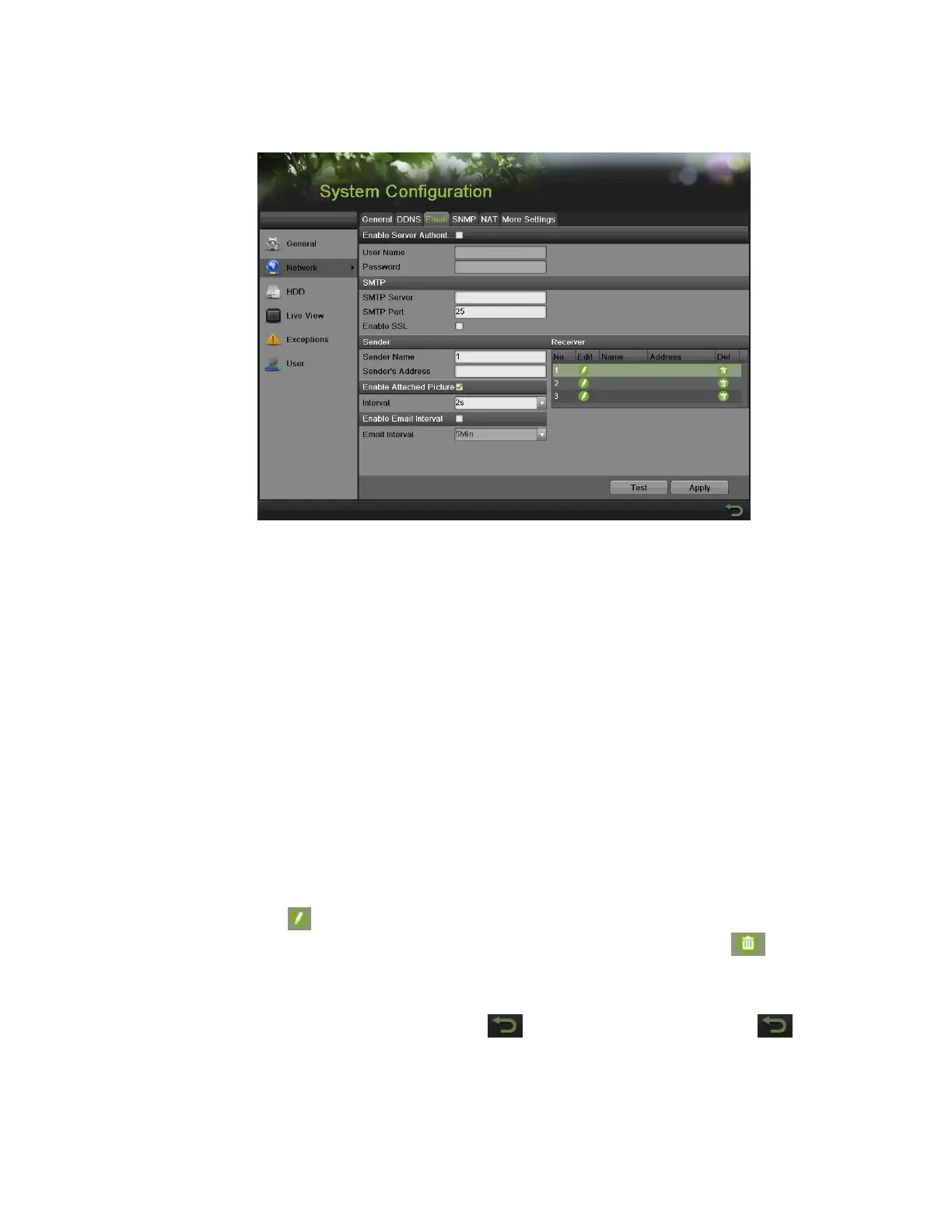
2. Select the E-mail tab, as shown in Figure 106, E-Mail Configuration Menu.
Figure 106, E-Mail Configuration Menu
3. In this tab, enter all pertinent e-mail information, including:
• Enable Server Authentication: Enable if e-mail server requires authentication. Enabling Server Authenticating will enable
the User Name and Password fields.
• User Name: User name to use for server authentication.
• Password: Password to use for server authentication.
• SMTP Server: Address for SMTP server.
• SMTP Port: Port for SMTP server.
• Enable SSL: Enable Secure Sockets Layer (SSL) for out-going e-mail.
• Sender Name: The sender name to use when an e-mail is sent out from the NVR.
• Sender’s Address: The sender’s address to use when an e-mail is sent out from the NVR.
• Enable Attached Picture: Enabling will attach a small picture segment (Interval can be set below the Enable Attached
Picture checkbox) to the outgoing e-mail.
• Enable E-mail Interval: Enabling will let e-mail be sent between a specified time interval.
• Receiver: Click to edit Receiver Settings. Input the receiver’s name and address. Click Apply to save the settings. The
e-mail address will be added to the Receiver list. You can also delete the receiver by using the button.
4. Test the e-mail settings by clicking the Test button. If the settings have been properly configured, the recipient will successfully
receive a test e-mail.
5. Select the Apply button to save the e-mail settings and select to return to the previous menu. Selecting without clicking
Save will quit the menu without saving settings.


 To Next Page
 Loading...