This document is a Quick Start Guide for a Hikvision Mobile Digital Video Recorder (DVR). It provides essential information for installation, activation, basic operation, and troubleshooting of the device.
Function Description
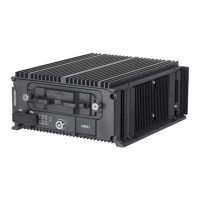
The Hikvision Mobile DVR is designed for video recording in mobile environments, such as vehicles. It supports various functionalities including video surveillance, wireless communication (3G/4G and Wi-Fi), GPS positioning, and alarm input. The device can store video temporarily on an SD card if HDDs are not installed or fail, and it supports the management of IP cameras. It is capable of remote access via a mobile surveillance platform.
Important Technical Specifications
- Power Input: The device requires an input voltage that meets SELV (Safety Extra Low Voltage) and Limited Power Source standards, specifically 9 to 32 VDC, according to IEC60950-1.
- Default IP Address: 192.168.1.64
- Default User Name: admin
- Password Requirements: Passwords must be 8-16 characters long and include at least two kinds of characters from numbers, lowercase letters, uppercase letters, and special characters for strong security.
- Alarm Input: Supports high/low-level electrical signals triggering (high level: 6 to 36 VDC; low level: 0 to 5 VDC). Voltage ranging from 5 to 6 VDC will not trigger an alarm to avoid error reports from voltage fluctuation.
- Antenna Interfaces:
- M-ANT: Main 3G/4G antenna
- AUX: Aux Wi-Fi antenna
- WIFI: Main Wi-Fi antenna
- GNSS: Positioning antenna
- Storage: Supports SD card for temporary video storage (when HDDs are not installed or fail). A factory-recommended HDD should be used for primary storage.
- Network Priority (when device and platform are not in the same network segment): 3G/4G network > Wi-Fi > wired network.
Usage Features
- Installation Flexibility: The device can be installed in various parts of a vehicle, such as behind the driver's or passenger's seat, or in an electric cabinet for rail traffic, prioritizing areas with weak vibration and good heat dissipation. It requires horizontal placement.
- SIM Card Installation: Supports pluggable 3G/4G wireless communication modules, requiring SIM card installation for wireless communication.
- SD Card Installation: Provides temporary video storage capability using an SD card, useful when HDDs are unavailable or malfunctioning.
- Antenna Placement: Guidelines for optimal antenna placement are provided, including installing 3G/4G antennas in non-metallic objects at least 50 cm away from metal, and vertically installing positioning antennas on the automobile roof without shelter. For internal installation, the positioning antenna can be placed on a platform under the front windshield, secured with neutral silica gel.
- Power Cord Wiring: Detailed instructions for connecting the power cord, including the use of a fuse for safety.
- Shutdown Delay: The device supports automatic startup when the automobile ignites and shutdown after the automobile is off, controlled by the positive pole ignition switch. Wiring instructions are provided for this feature.
- Scheduled Shutdown: The device can be configured for scheduled shutdowns, with wiring instructions similar to the shutdown delay.
- Alarm Input Connection: The device can integrate with various alarm triggers using high/low-level electrical signals.
- Sensor-In Wiring: Supports connection to automobile signals like braking, reversing, left-turn, and right-turn.
- Device Activation: For first-time access, the device requires activation by setting an admin password. This can be done via web browser, SADP, or client software.
- Login: Access to the device is via a web browser using the default IP address and user credentials.
- 3G/4G Dialing: Configuration options for 3G/4G dialing, including enabling the feature, setting dial parameters (Dial Mode, Network Mode, Access Number, User Name, Password, APN, MTU, Verification Protocol), and viewing dialing status.
- Mobile Surveillance Platform Connection: The device can be connected to a mobile surveillance platform for remote access. Configuration involves enabling the feature, selecting the platform access mode (e.g., Ehome Platform), and entering server details (IP Address/Domain Name, Port, Device ID).
- IP Camera Management: Supports activation, addition, and editing of IP cameras. Activation requires setting a strong password for the IP camera. IP cameras can be added if they are in the same network segment as the DVR, or their address can be modified if they are in a different segment. The virtual host function can be enabled for visiting IP cameras via the recorder if it has dual network cards.
Maintenance Features
- Indicator Lights: Various indicator lights (PWR, RDY, REC, GNSS, ANT, ALM) provide visual feedback on the device's status, including power, readiness, recording, positioning, dialing, and alarm occurrences.
- Troubleshooting (FAQ):
- Startup Failure: Check power supply specifications, fuse installation, and ensure the dummy HDD is locked if the PWR indicator is red.
- Dialing Failure: Verify 3G/4G antenna connection, ensure the antenna is away from metal objects, check SIM card balance, and confirm 3G/4G dial parameters are correct.
- Positioning Failure: Ensure the positioning antenna is installed vertically on the automobile roof without shelter and that the vehicle is in a location with good GPS signal (check GPS signal status in Menu > Status > Position).
- Beeping Sound: This often indicates an issue with the HDD. Solutions include installing and formatting at least one HDD, checking HDD status in the management interface and replacing faulty HDDs, or disabling the beeping sound in exception settings if the device is to be used without an HDD.
- Security Best Practices: Emphasizes the importance of strong passwords (8-16 characters, mixed types) and regular password resets (monthly or weekly) to enhance product security.
- Battery Disposal: Instructions for proper disposal of used batteries according to the battery manufacturer's guidelines, highlighting that improper use or replacement may result in an explosion hazard.

 Need help?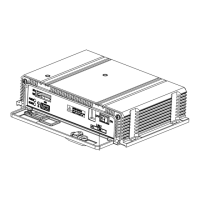




 To Next Page
 General