© Copyright 2020, Hill Laboratories
Basic Table Operation
3.1 Preparing the AFT for your patient
Plug your table into any 115 volt
grounded outlet (or 230 volt - international).
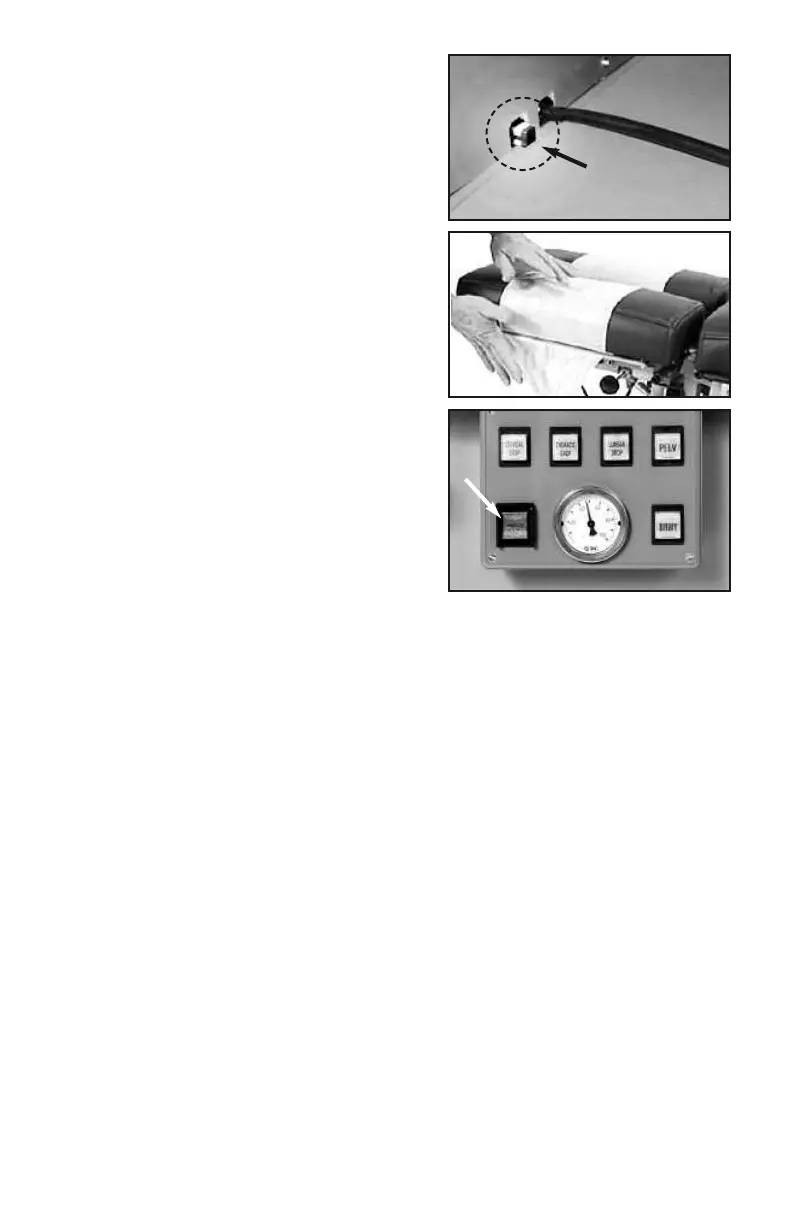
The Power Switch is located where the
power cord exits the table (photo 1). It
ships in the “OFF” position. After the
table is plugged in, press the button in to
turn the power on.
Paper Roll - Feed the paper through the
face cutout, around the paper bar (just
below the cutout) and over the headpiece
as shown. Close the paper cutter located on
the side of the headpiece (photo 2) and tear
off the excess.
Preparing the Air System (option)
For air models, press the Power button of
the main Control Panel (photo 3). Each of
the function buttons will light consecutively
and then turn off. The table’s air-compressor may also turn on to replenish the air-
supply. The compressor will stop when the pressure reaches 90 lbs.* See 4.2,
“Using Air-Drops” for air-feature instructions.
*If the air-compressor runs for more than 2-3 minutes, call for service (see page 11).
Note: The AFT is equipped with an Auto Shutdown mode which will power
down the main control board if the table is inactive for 2 hours. Press the
green power button to power the board back up.
3.2 Height Pedal
The basic AFT is equipped with a dual Rocker Foot Pedal (#11 under “Prod-
uct Features”) which controls the table height from either side of the base.
Press the right side of the pedal to elevate; the left side to lower.
Auto-Touch Foot Pedal (option)
The Auto-Touch Foot Pedal option maintains upward or downward motion even
after releasing the pedal. To operate:
- When the table is at minimum height, double-touch the “UP” arrow and release.
The table will continue upward until you tap either side of the pedal again.
- When the table is at maximum height, double-touch the “DOWN” arrow and re-
lease. The table will continue downward until you tap either side of the pedal again.
- When the table is at any starting height in between, a single-touch up or down
will start and stop the motion.
photo 3
photo 2
photo 1
Plug in, then push in
to turn
ON
4


 To Next Page