*2235358*
2235358 English 27
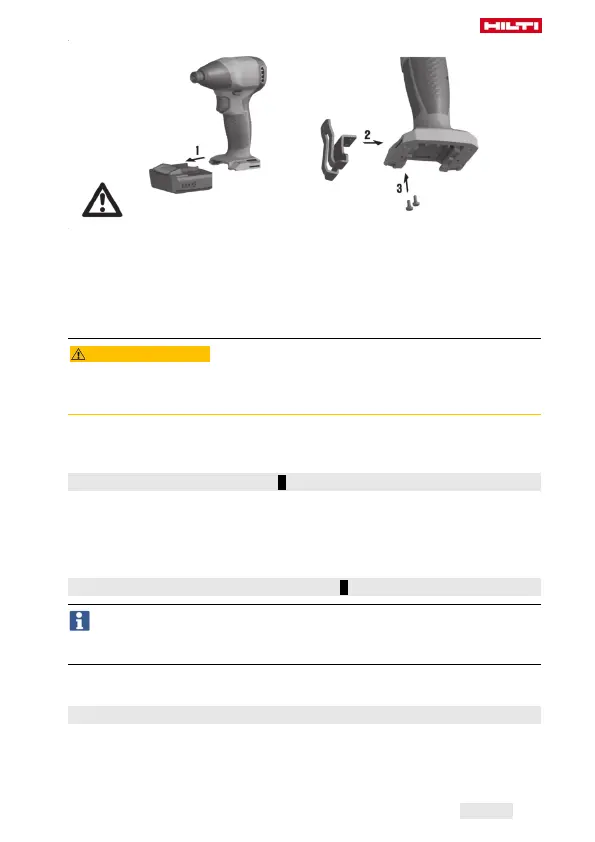
1. Remove the battery. → page 26
2. Insert the belt hook in the opening provided at the base of the screw-
driver’s grip.
3. Secure the belt hook with the 2 screws.
6 Types of work
CAUTION
Risk of damage by incorrect handling!
▶ Do not operate the switches for direction of rotation and/or function
selection during operation.
Observe the safety instructions and warnings in this documentation and on
the product.
6.1 Fitting the accessory tool 3
1. Set the forward/reverse switch to the middle position or remove the
battery from the power tool.
2. Insert the accessory tool into the chuck.
3. Check that the accessory tool is held securely.
6.2 Setting forward or reverse rotation 2
An interlock prevents switching while the motor is running.
The control switch is locked when the forward/reverse switch is in the
middle position (switch-on interlock).
▶ Set the forward/reverse switch to the desired direction of rotation.
6.3 Switching on
▶ Press the control switch.
▶ Speed of rotation is regulated by the distance the control switch is
pressed in.



 To Next Page