Press and hold “ ” for about 3s.
Power-on or Power-off
Power Level Selection
Light ON and OFF
During Riding
Please turn on the display as follows:
According to the selected power level, power exercise can help you step on the pedal.
Five power levels are optional:
Please select the power level as follows:
Turn on the controller
Press “+” again to select a higher power level.
Press “-” again to select a lower power level.
Please be sure to wear a helmet consistent with the latest certification standard during
riding. For adjustment, use and maintenance of helmet, please refer to the manufac-
turer’s specification. Most severe injuries are caused to the head during riding, which
can be prevented through wearing a helmet.
According to regulations on release of road traffic permit, the following equipment is
needed for riding a bicycle safely on public roads:
A bell
Two independent brake systems
White front light
Front white reflector
red rear light
rear red reflector
Two yellow reflectors are installed on the spoke of every wheel with a deviation angle
of 180° or a white reflector is installed on the tire.
A yellow reflector is installed on the front and rear pedals.
The batteries have been fully charged
The brake, chain guard and fender work normally
The handlebar is connected securely and adjusted properly
The saddle is connected securely and adjusted properly
The pedals are connected securely
The wheels are connected securely
The tires are connected securely
Tire pressure is correct
The lights are normal and are adjusted properly
The circuits are normal and are adjusted properly
The quick release screw, nut and operating lever are secure
The front light should be approved according to regulations of the host country/area.
Before riding, make sure that:
Press and hold “ ” for 3s to turn on the light.
Press and hold “ ” for 3s to turn off the light.
Please turn off the display as follows:
Press and hold “ ” again for about 3s.
Riding
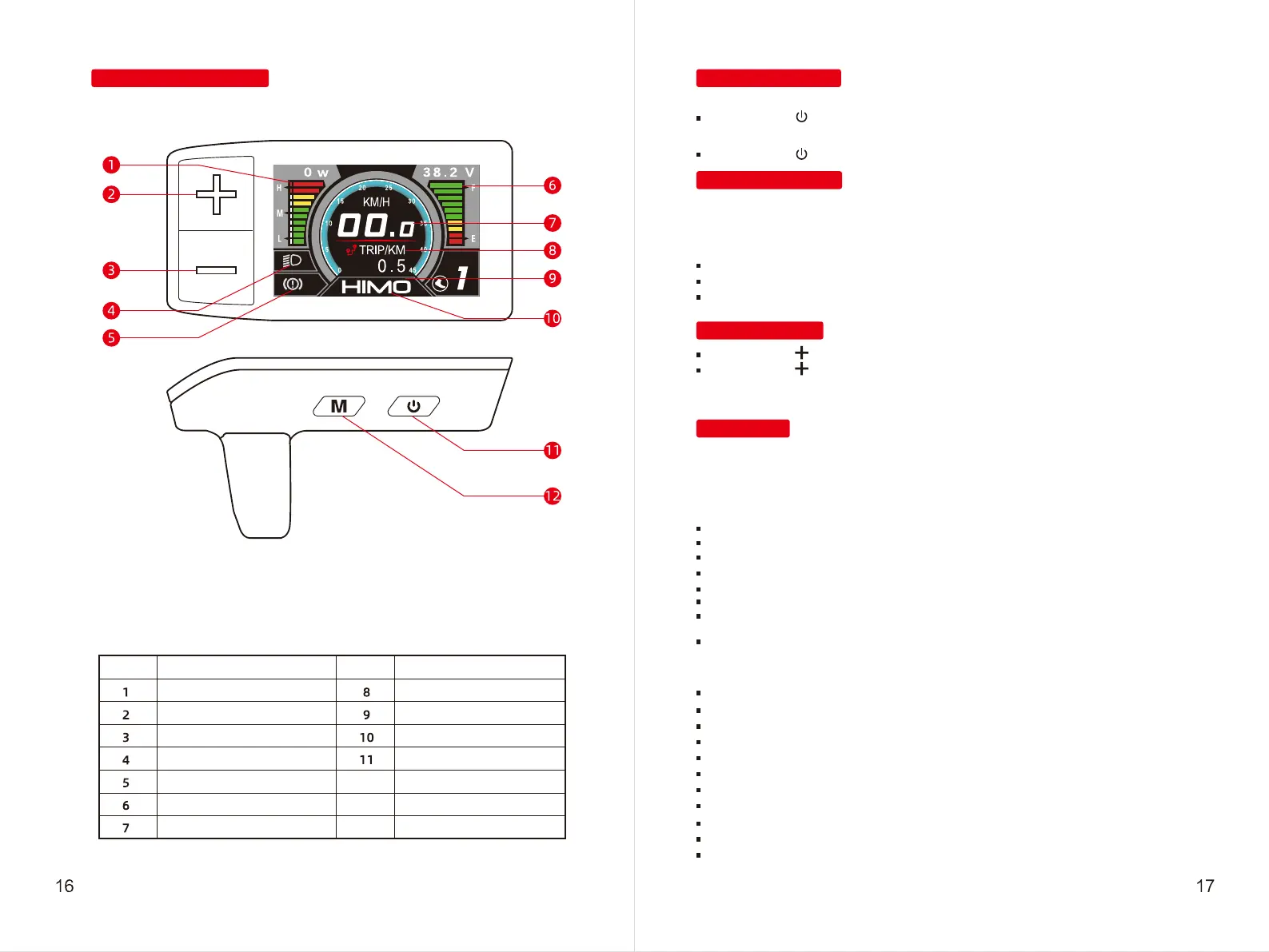
Display Specification-C30R
Part description
Power indicator
Up key
Down Key
Headlight indicator
Brake indicator
Battery level
Speed display
Mode and mileage display
Gear display
Logo and error code display area
Power key
Mode key
No.
Part description
No.
■ 1 ■ 2 ■ 3 ■ 4 ■ 5


 To Next Page