English
5
ARC
Connect an HDMI cable from an external digital audio system.
ARC enables the TV to directly output the digital sound through an HDMI cable.
Please note that it works only when the TV is connected to the audio receiver that
supports the ARC (Audio Return Channel) function.
When this port is used as the ARC function, it can't be used as signal input at the
same time.
Making Connections
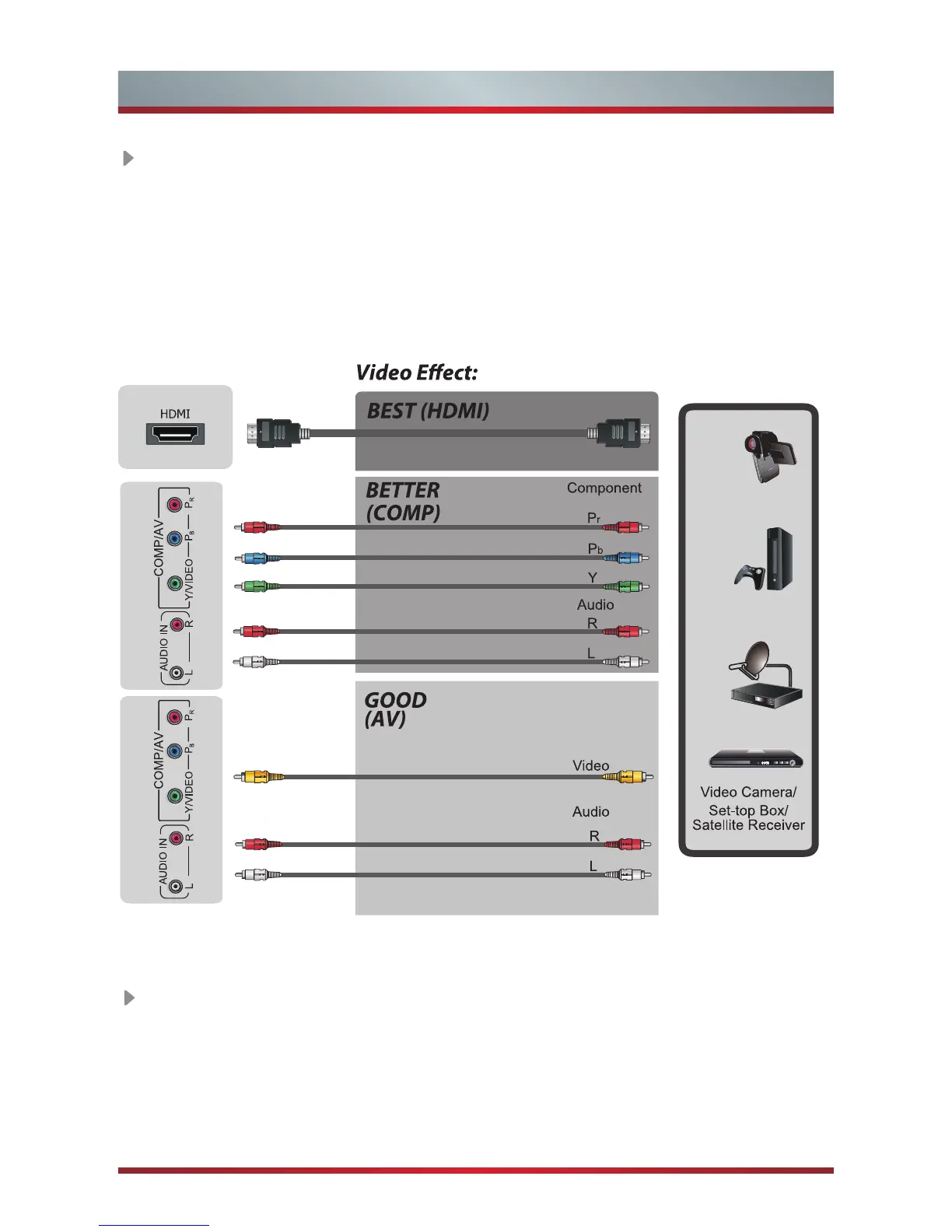
HDMI/COMP/AV
Connect a HDMI / Comp / AV cable from an external A/V equipment. No sound
connection is needed for HDMI to HDMI connection. If the signal resolution does not
match the specification table, you need to change the setting of device according to
the table. Please consult your device user manual for instruction.
·
To select the HDMI / Component / AV
Press [Source] button, when the list of input Source appears, press [
▲/
▼] to select
the source [HDMI] / [Component] / [AV], then press [OK] to connect.
Red(PR/CR)
Blue(PB/CB)
Green(Y)
Red(R)
White(L)
Yellow(Video)
Red(R)
White(L)



 To Next Page