2
Getting started
Step 1. Attach stand or mount
Before you start using your TV, attach your TV stand or mount it on the wall.
CAUTION:
• DisconnecttheACpowercordbeforeinstallingastandorawallmountbracket.
• TheLEDdisplayonyourTVisfragile.MakesuretheTVscreenisnotscratchedor
damaged by hard objects or from pressure.
• Aftertheinstallationiscomplete,makesuretheTVissteadyonatableorfirmly
attached to a wall mount, before removing all protective film, if any.
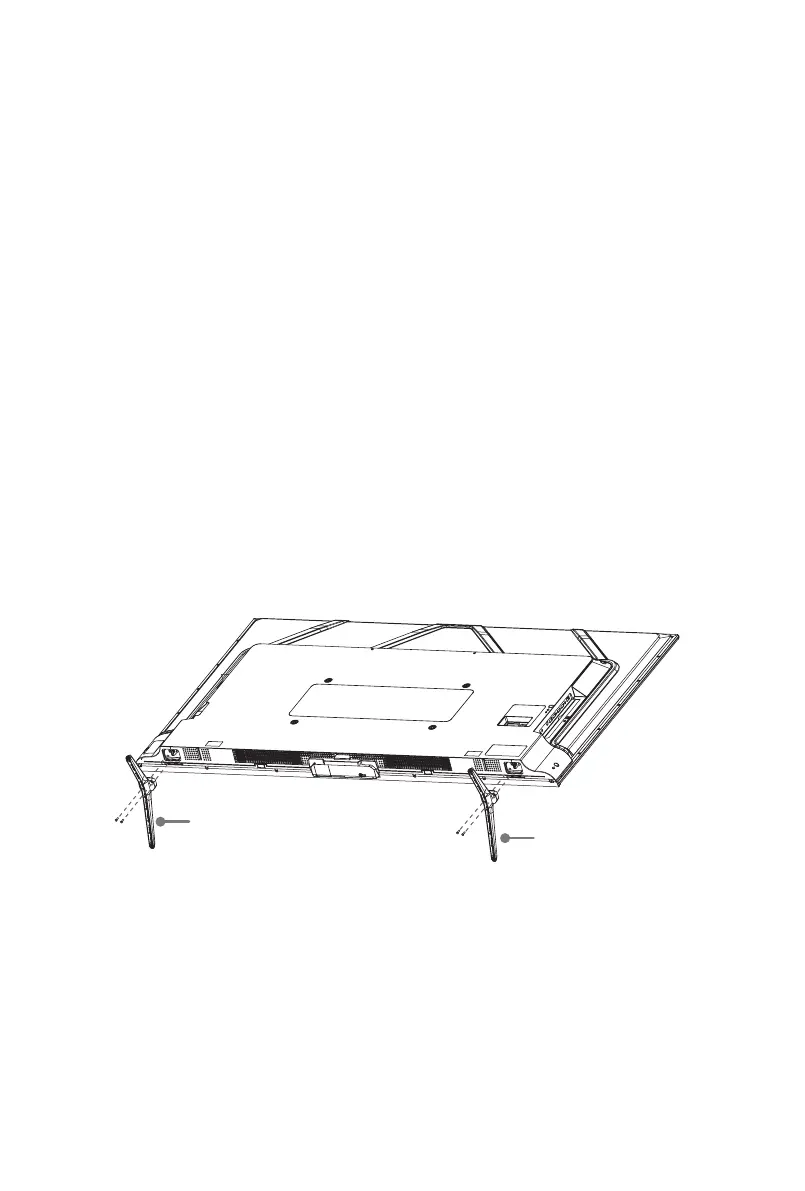
Attach the TV stand
To attach the TV stand legs to your TV:
1.CarefullyplaceyourTVfacedownonaclean,softandatsurface.
2. Insert the TV base stands into the bottom slots on your TV.
3.
Use the screws provided to secure each base stand tightly.
55" (139.7cm)
Screws:
M5×12
Base Stand
Base Stand
Screws:
M5×12



 To Next Page