16
Using your Freestanding Cooker
When set to Baking mode, the fan element and the fan operate providing a delicate
heat distributed uniformly throughout the oven. This mode is ideal for baking and
cooking delicate foods on multiple shelves, especially cakes that need to rise such
rolls and small portions of vegetables, etc.
The oven light will operate on all oven functions.
To set the time of day, press the “–” or“+” buttons. 15 seconds after the last
change, the will disappear, confirming the time has been set.
After the appliance has been electrically connected “00.00” will be displayed and
the will flash.
The oven is fitted with a 3 button programmable timer, you must set the time of
day before you can operate your appliance.
The first time you use your appliance, we recommend that you set the temperature
setting to the highest mark. Set the function switch control knob to a cooking mode
and leave the oven on for about 40-60 minutes with nothing in it and the oven door
shut. Then, open the oven door and allow the oven to cool. Any odour that may be
detected during this initial use is due to the evaporation of substances used to
protect the oven during storage.
Fan Oven
Oven light
Using your appliance for the first time
Note: The clock has a 24-hour display
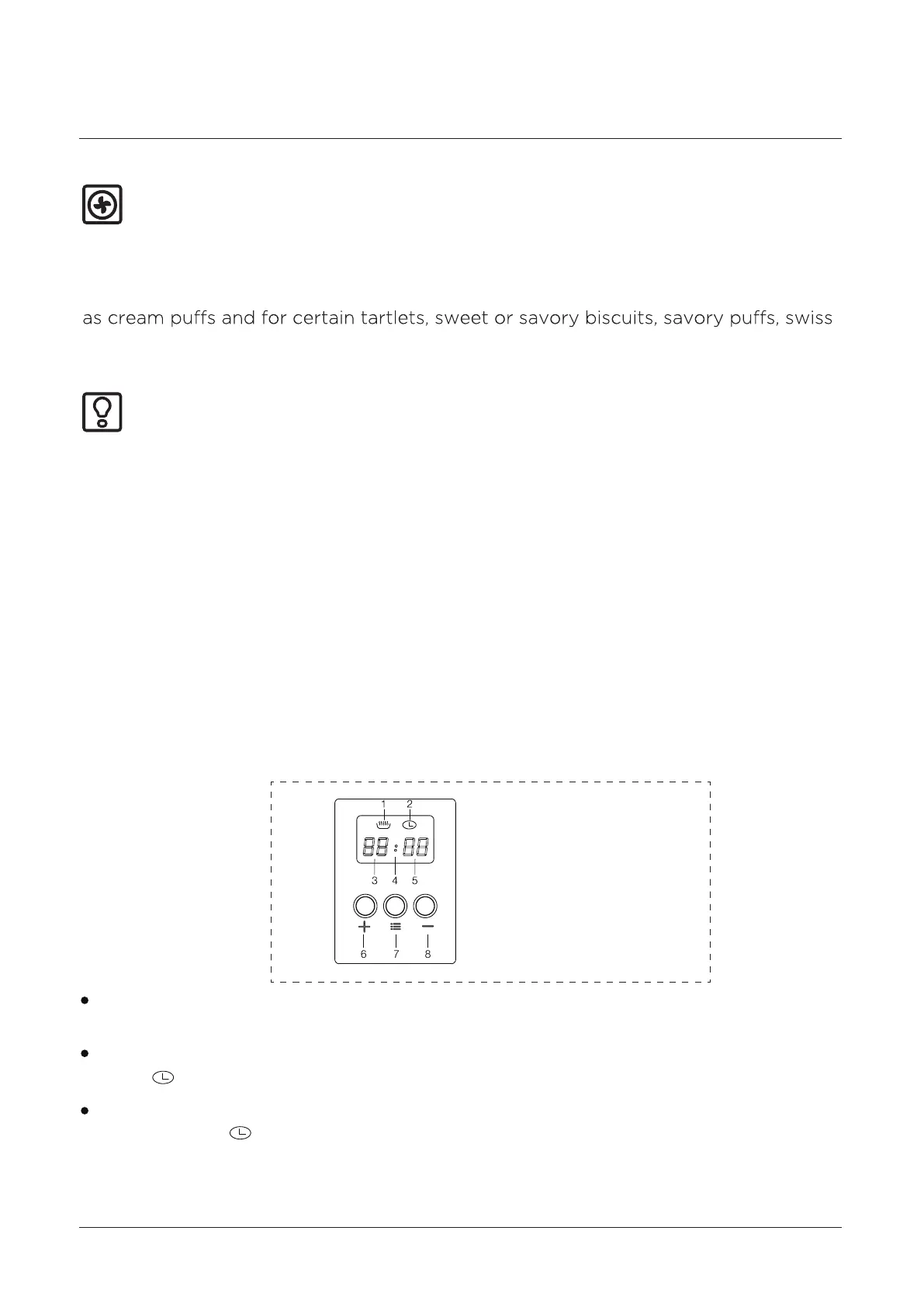
Digital Automatic Clock
1 Heating indication
2 Clock indication
3 Hour indication
4 Second indication
5 Minute indication
6 Up
7 Set
8 Down



 To Next Page