17
Gestures
Your tablet has a multi-touch display. You can touch the screen to operate the tablet.
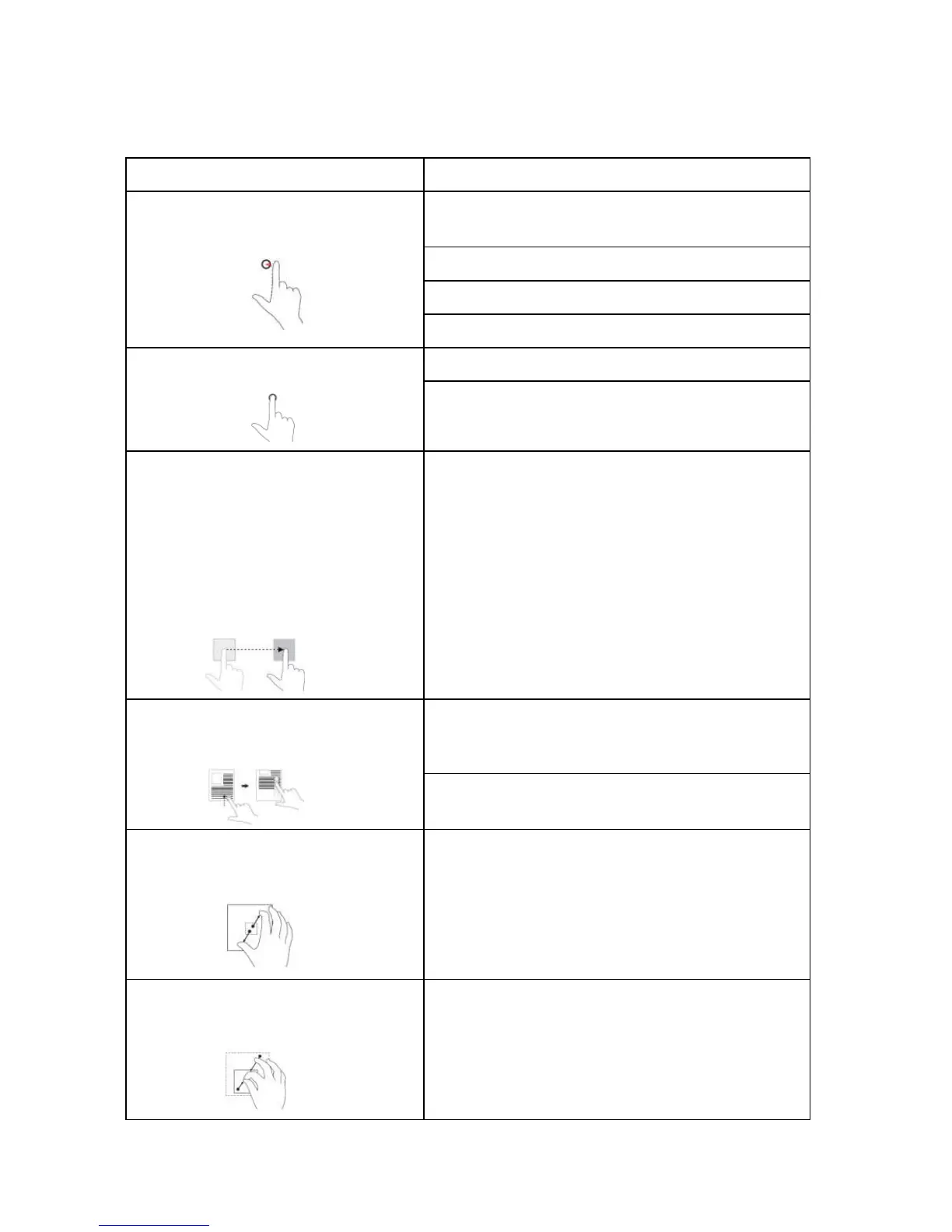
Finger Gesture You can do
Touch
Tap
gently on the display with your
fingertip.
Select items on the screen, including options, entries,
images, and icons.
Start apps.
Touch buttons
on the screen.
Input text
using the on-screen keyboard.
Touch
and Hold
Touch and hold your finger on the dis-
play.
Display detailed information about an item.
Open the cont
ext menu of an item to perform further
actions.
Drag
1. Touch and
hold your finger on an item
on the screen.
2. Keeping your finger in contact with the
display, move your fingertip to the
desired location.
3. Take your finger off the display to drop
the item in the desired location.
Move items such as images and icons on the screen.
Swipe
or Slide
Move your finger in a vertical or hori-
zontal direction on the display.
Scroll through the Start screen, web pages, lists, en-
tries, photos, contacts, and so on.
Close an app.
(Swipe the app to the bottom of the
display.)
Zoom i
n
Touch the display with two fingers and
then move the fingers apart.
Enlarge the view of an image or web page.
Zoom ou
t
Touch the display with two fingers and
then move the fingers closer.
Reduce the view of an image or web page.



 To Next Page