5
Getting Started
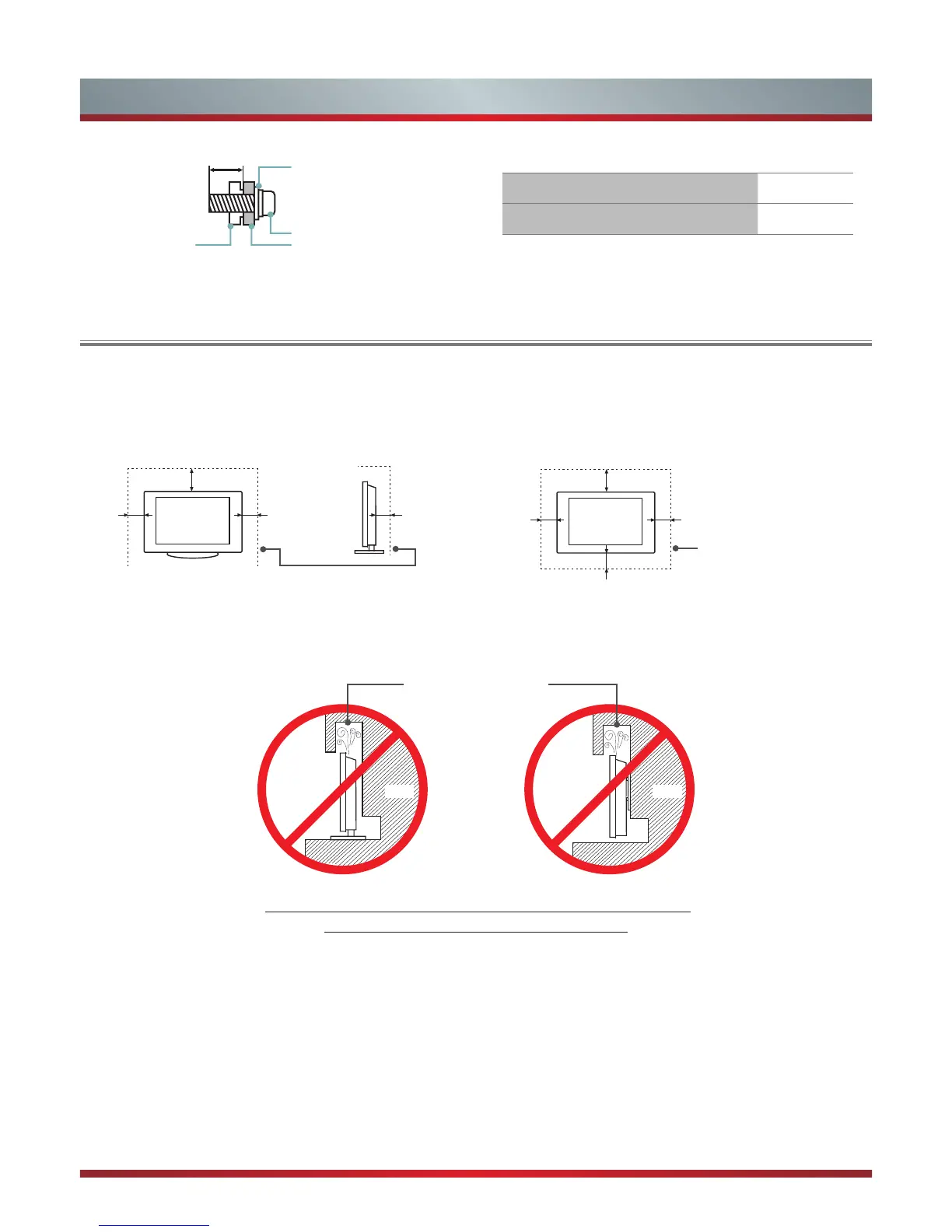
When Installing the TV Against a Wall or Enclosed Area
Install with stand
Never install the TV set as follows:
Install on the wall
Wall-Mount Bracket
10.5 ~ 11.5 mm
Screw
Spacerthe TV's rear cover
Wall-Mount hole pattern VESA (mm) 400 × 400
Wall-Mount screw size (mm) M6
Make sure that your TV has adequate air circulation. Allow enough space around the TV as shown below. Avoid operating the
TV at temperatures below Inadequate air 41°F (5°C).
Leave at least this much
space around the set.
Leave at least this much
space around the set.
4 inches
(10cm)
4 inches
(10cm)
4 inches
(10cm)
4 inches
(10cm)
4 inches
(10cm)
2
3
⁄
8
inches
(6cm)
12 inches
(30cm)
12 inches
(30cm)
Wall Wall
Air circulation is blocked.
Inadequate air circulation can lead to overheating of the TV and
may cause damage to your TV or cause a re.


 To Next Page