26
Advanced Features
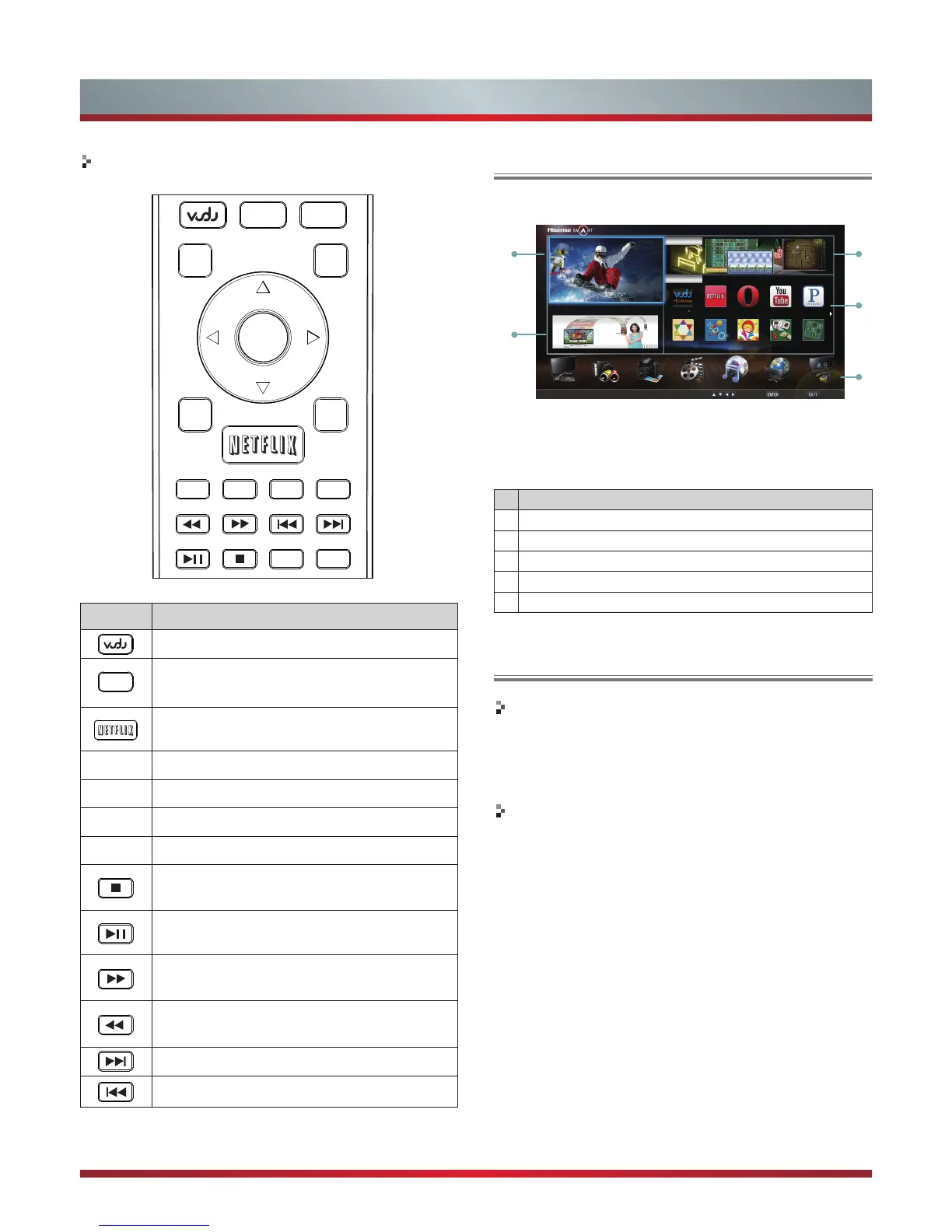
Operational buttons
Buttons
Description
Press to launch VUDU Movies App directly.
Opens the Hi-Smart Hub with links to various
Internet Services.
Press to launch Netflix App directly.
▲/▼/ /
Selects the on-screen menu items.
ENTER
Confirms selections.
EXIT
Closes the menu.
RETURN
Returns to the previous menu.
Stops playback and displays the movie title
screen.
Pauses playback. Press the button to return to
playback.
Displays the TrickPlay screen and fast forwards
playback.
Displays the TrickPlay screen and fast reverses
playback.
Plays the next video.
Plays the previous video.
1. Press the [Hi-Smart] button to display Hi-Smart Hub.
2. Press [▲
▲
▲
▲
▲
/▼/ / ] button to select the interface you
want to view and press [ENTER] to enter the following
description.
No
Interface description
1
Live TV
2
Information
3
Apps Market
4
My Applications
5
Quick Launcher Bar
Enter the Network Applications
▲
▲
VUDU HD Movies
Brief introduction
VUDU is an on-demand service that offers high-definition
movies on Web.
For enjoying more movies, please register and log in to
your account.
Operation instructions
You can access the VUDU HD Movies by the following
method:
1. Press the [Hi-Smart] button to display network main
menu.
2. Press [▲/▼/ / ] button to select the VUDU HD Movies
icon and press [ENTER] to enter it (Refer to “Enter the
network application”), or press [VUDU] button to enter
directly.
3. Select the Sign Up Now icon on the VUDU HD Movies
interface, and press [ENTER] to enter.


 To Next Page