CAUTION
OPERATION INSTRUCTIONS
28
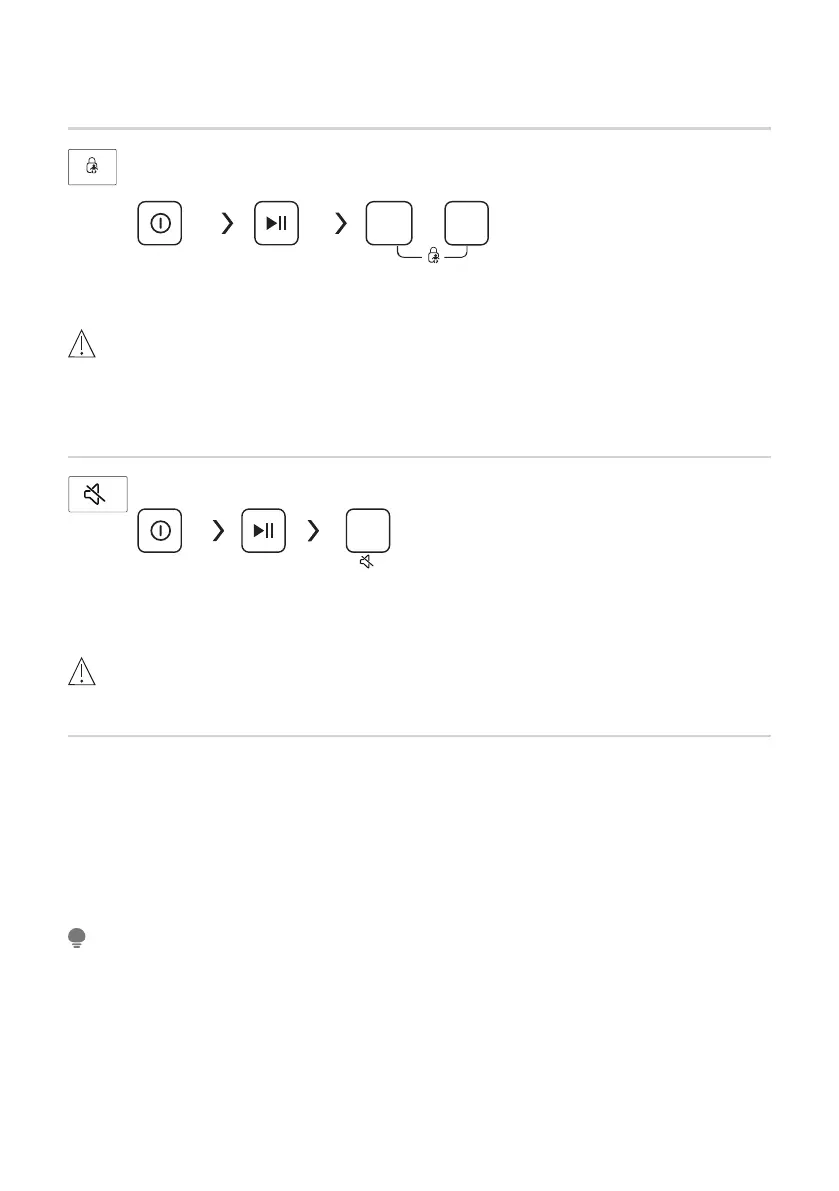
• Press the two button 3 sec. also to be released the function.
• The “Child Lock” will lock all buttons except [On/Off].
•
•
Cut off the power supply , the kid’s protection is to be released.
The child lock will remain effective when the power is resumed for some models.
Child Lock
To avoid mis operation by children.
Start/Pause
Press [Temp.] and [
Spin
]
3 sec. till buzzer beep.
On/Off
Temp.
Spin
Mute the buzzer
Temp.
On/Off
Start/Pause Press the [Temp.]button for 3sec.the buzzer is mute.
To act the buzzer function, press the button again for 3 seconds. The setting will be
kept until the next reset.
• After Muting the buzzer function, the sounds will not be activated any more.
CAUTION
Usage counter
2.Power on and within 10s, please press " Delay" and "Options" on control panel
simultaneously and continuously for around 5s until the device display shows digits--the value
can indicate the times of equipment usage.
3.Repeat step 1 again and customer can resume to normal operation.
1.Unplug the equipment for 10s and reconnect again.
NOTE



 To Next Page