- 24 -
replaced. Do you want to continue?
OSD will be displayed. Press OK to
confirm or select No to cancel.
Deleting the Channels in the Channel
List
Press
buttons to select the channel
that will be deleted.
Press
buttons to select the Delete
item on Channel List OSD.
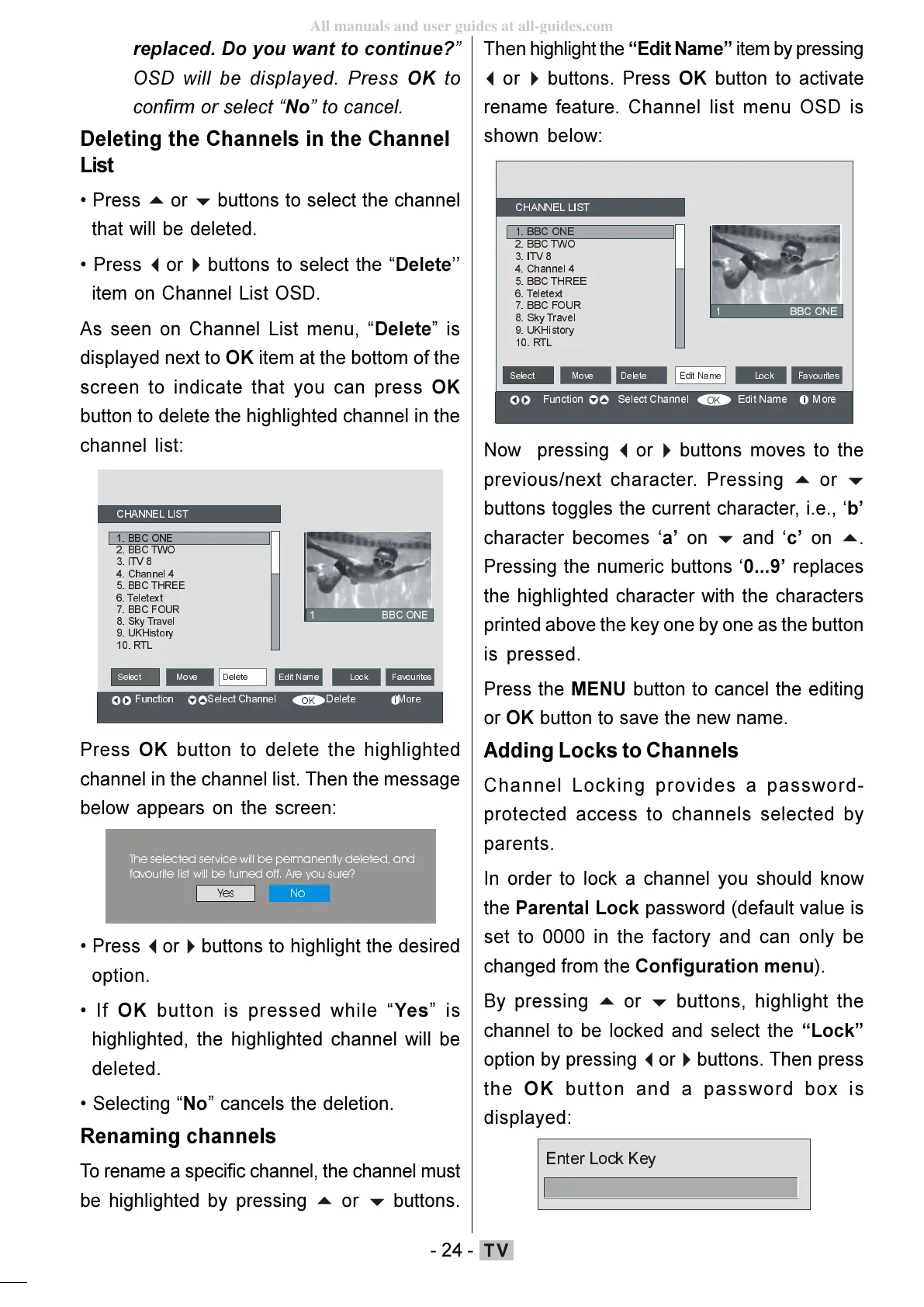
As seen on Channel List menu, Delete is
displayed next to OK item at the bottom of the
screen to indicate that you can press OK
button to delete the highlighted channel in the
channel list:
&+$11(//,67
%%&21(
%%&7:2
,79
&KDQQHO
%%&7+5((
7HOHWH[W
%%&) 2 85
6N\7UDYHO
8.+LVWRU\
57/
)XQ FWLRQ6HO HF W&KDQ QHO'HOH WH0RUH
%%&21(
6HOHFW
(GLW1DPH/RFN)DYRXULWHV0RYH
Press OK button to delete the highlighted
channel in the channel list. Then the message
below appears on the screen:
7KHVHOHFWHGVHUYLFHZLOOEHSHUPDQHQWO\GHOHWHGDQG
IDYRXULWHOLVWZLOOEHWXUQHGRII$UH\RXVXUH"
buttons to highlight the desired
option.
If OK button is pressed while Yes is
highlighted, the highlighted channel will be
deleted.
Selecting No cancels the deletion.
Renaming channels
To rename a specific channel, the channel must
be highlighted by pressing
buttons.
Then highlight the Edit Name item by pressing
buttons. Press OK button to activate
rename feature. Channel list menu OSD is
shown below:
&+$11(//,67
%%&21(
%%&7:2
,79
&KDQQHO
%%&7+5((
7HOHWH[W
%%&)285
6N\7UDYHO
8.+LVWRU\
57/
)X QF WLR Q 6 HOHFW&K DQ QHO ( G LW 1D PH 0 R UH
%%&21(
6HOHFW
buttons moves to the
previous/next character. Pressing
buttons toggles the current character, i.e., b
character becomes a on
.
Pressing the numeric buttons 0...9 replaces
the highlighted character with the characters
printed above the key one by one as the button
is pressed.
Press the MENU button to cancel the editing
or OK button to save the new name.
Adding Locks to Channels
Channel Locking provides a password-
protected access to channels selected by
parents.
In order to lock a channel you should know
the Parental Lock password (default value is
set to 0000 in the factory and can only be
changed from the Configuration menu).
By pressing
buttons, highlight the
channel to be locked and select the Lock
option by pressing
buttons. Then press
the OK button and a password box is
displayed:
(QWHU/RFN.H\
ENG-01-TV-22784W-1165UK-MB29-PEUIDTV-(1SCRT-AV-YPBPR-HP-SPDIF-STRLOUT-PCIN)-10060401-5013xxxx.p6511.10.2008, 17:3724
All manuals and user guides at all-guides.com








 To Next Page