- 25 -
Setting Favourites
You can set various channels as favourites
so that only the favourite channels are
navigated. To set a favourite you should
highlight the Favourites item at the bottom
of the Channel List menu.
To set a favourite you should highlight the
Favourites item at the bottom of the Channel
List menu. Then press OK button and Edit
Favourite Lists menu appears on the screen.
You can list your favourite channels using List
1, List 2, List 3, List 4 or List 5.
Using 5 lists enables listing channels for
different categories (sport, music etc.). And
by activating the favourites list number that
you want in Favourite Mode submenu of
Configuration menu, you enable only the
channels in the selected list.
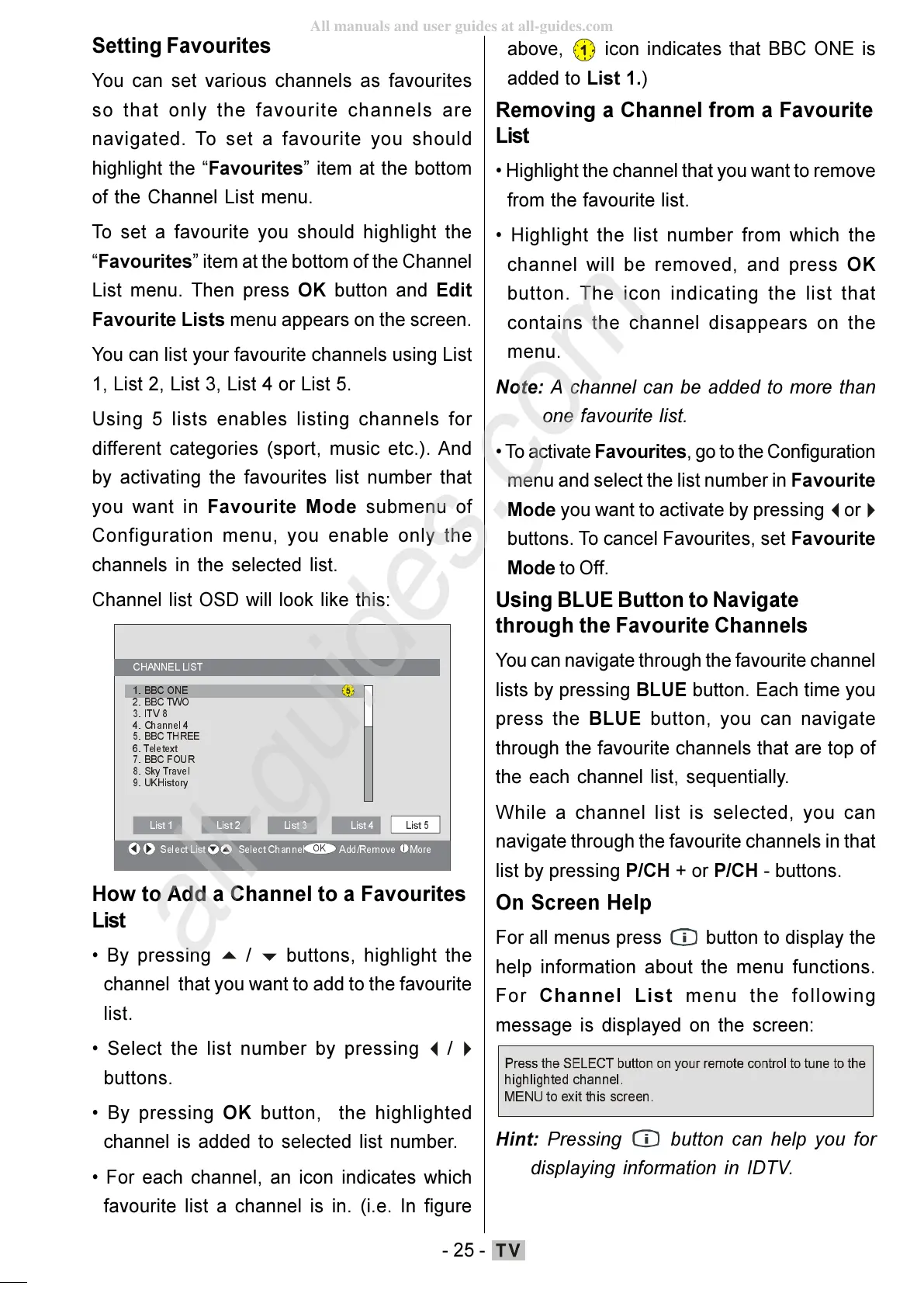
Channel list OSD will look like this:
&+$11 (//,67
%%&21(
%%&7:2
,79
&KDQQHO
%%&7+5((
7HOHWH[W
%%&)285
6N\7UDYHO
8.+LVWRU\
6HOHFW/LVW6HOHFW&KDQQHO$GG5HPRYH0 R UH
/LVW/LVW/LVW/LVW
/LVW
How to Add a Channel to a Favourites
List
By pressing
buttons, highlight the
channel that you want to add to the favourite
list.
Select the list number by pressing
buttons.
By pressing OK button, the highlighted
channel is added to selected list number.
For each channel, an icon indicates which
favourite list a channel is in. (i.e. In figure
above,
icon indicates that BBC ONE is
added to List 1.)
Removing a Channel from a Favourite
List
Highlight the channel that you want to remove
from the favourite list.
Highlight the list number from which the
channel will be removed, and press OK
button. The icon indicating the list that
contains the channel disappears on the
menu.
Note: A channel can be added to more than
one favourite list.
To activate Favourites, go to the Configuration
menu and select the list number in Favourite
Mode you want to activate by pressing
buttons. To cancel Favourites, set Favourite
Mode to Off.
Using BLUE Button to Navigate
through the Favourite Channels
You can navigate through the favourite channel
lists by pressing BLUE button. Each time you
press the BLUE button, you can navigate
through the favourite channels that are top of
the each channel list, sequentially.
While a channel list is selected, you can
navigate through the favourite channels in that
list by pressing P/CH + or P/CH - buttons.
On Screen Help
For all menus press button to display the
help information about the menu functions.
For Channel List menu the following
message is displayed on the screen:
KLJKO LJKWHGFKDQQHO
0(18WRH[LWWKLVVFUHHQ
Hint: Pressing button can help you for
displaying information in IDTV.
ENG-01-TV-22784W-1165UK-MB29-PEUIDTV-(1SCRT-AV-YPBPR-HP-SPDIF-STRLOUT-PCIN)-10060401-5013xxxx.p6511.10.2008, 17:3725
All manuals and user guides at all-guides.com
all-guides.com






 To Next Page