- 26 -
Installation
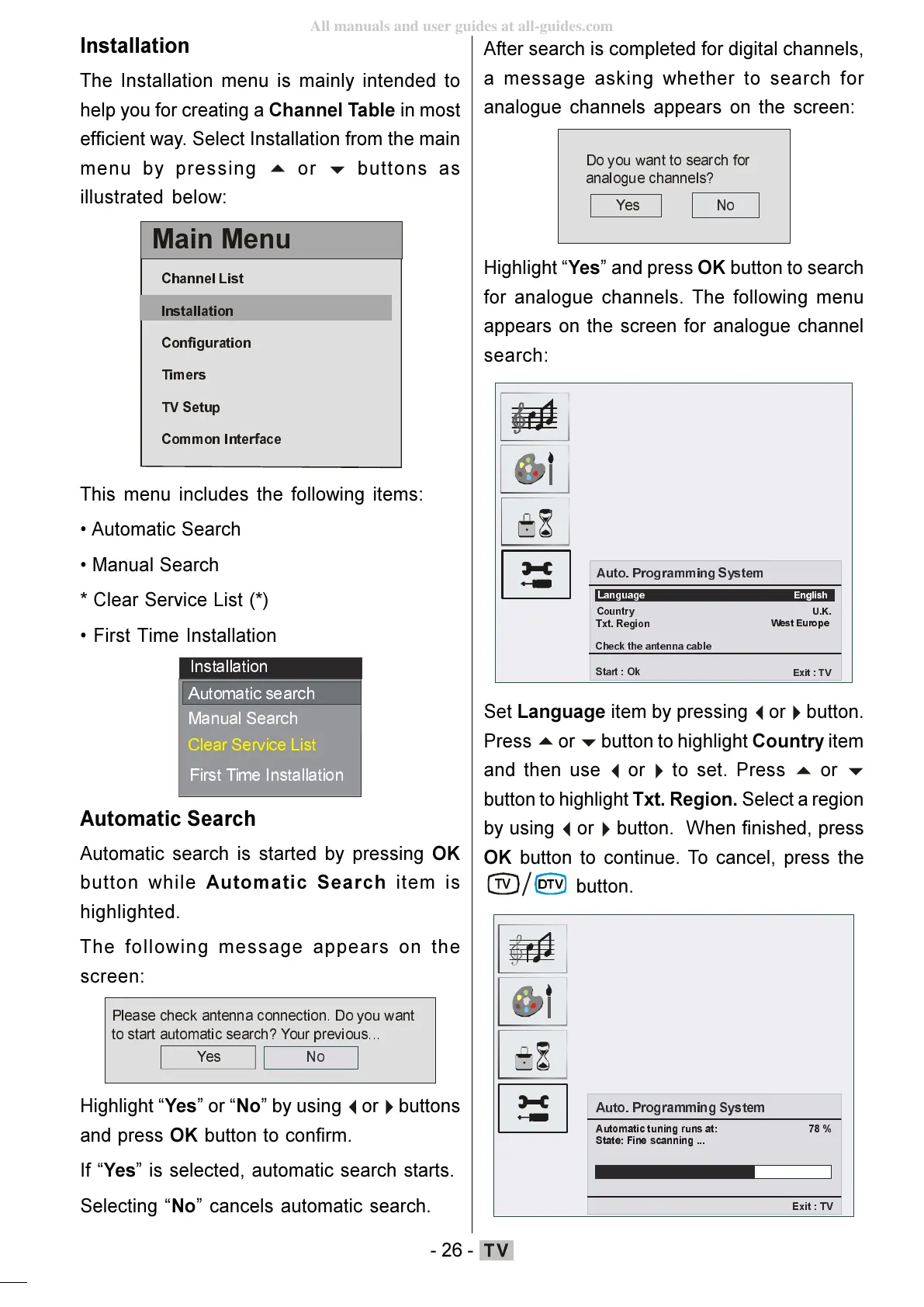
The Installation menu is mainly intended to
help you for creating a Channel Table in most
efficient way. Select Installation from the main
menu by pressing
buttons as
illustrated below:
0DLQ0HQX
&KDQQHO/LVW
,QVWDOODWLRQ
7LPHUV
796HWXS
&RPPRQ,QWHUIDFH
This menu includes the following items:
Automatic Search
Manual Search
* Clear Service List (*)
First Time Installation
,QVWDOODWLRQ
$XWRPDWLFVHDUFK
0DQXDO6HDUFK
&OHDU6HUYLFH/LVW
Automatic Search
Automatic search is started by pressing OK
button while Automatic Search item is
highlighted.
The following message appears on the
screen:
3OHDVHFKHFNDQWHQQDFRQQHFWLRQ'R\RXZDQW
WRVWDUWDXWRPDWLFVHDUFK"<RXUSUHYLRXV
<HV
Highlight Yes or No by using
buttons
and press OK button to confirm.
If Yes is selected, automatic search starts.
Selecting No cancels automatic search.
After search is completed for digital channels,
a message asking whether to search for
analogue channels appears on the screen:
<HV
'R\RXZDQWWRVHDUFKIRU
DQDORJXHFKDQQHOV"
1R
Highlight Yes and press OK button to search
for analogue channels. The following menu
appears on the screen for analogue channel
search:
$ XWR3URJUDPPLQJ6\VWHP
&RXQWU\
8.
&K HFNWKHDQWHQQDFDEOH
6WDUW2N
([LW79
/DQJXDJH
(QJOLVK
7[W5HJLRQ
Set Language item by pressing
button to highlight Country item
and then use
button to highlight Txt. Region. Select a region
by using
button. When finished, press
OK button to continue. To cancel, press the
79
$XWR3URJUDP PLQJ6\VWHP
$XWRPDWLF WXQLQJUXQVDW
6WDWH)LQHVFDQQLQJ
([LW79
ENG-01-TV-22784W-1165UK-MB29-PEUIDTV-(1SCRT-AV-YPBPR-HP-SPDIF-STRLOUT-PCIN)-10060401-5013xxxx.p6511.10.2008, 17:3726
All manuals and user guides at all-guides.com








 To Next Page