- 31 -
Receiver Upgrade
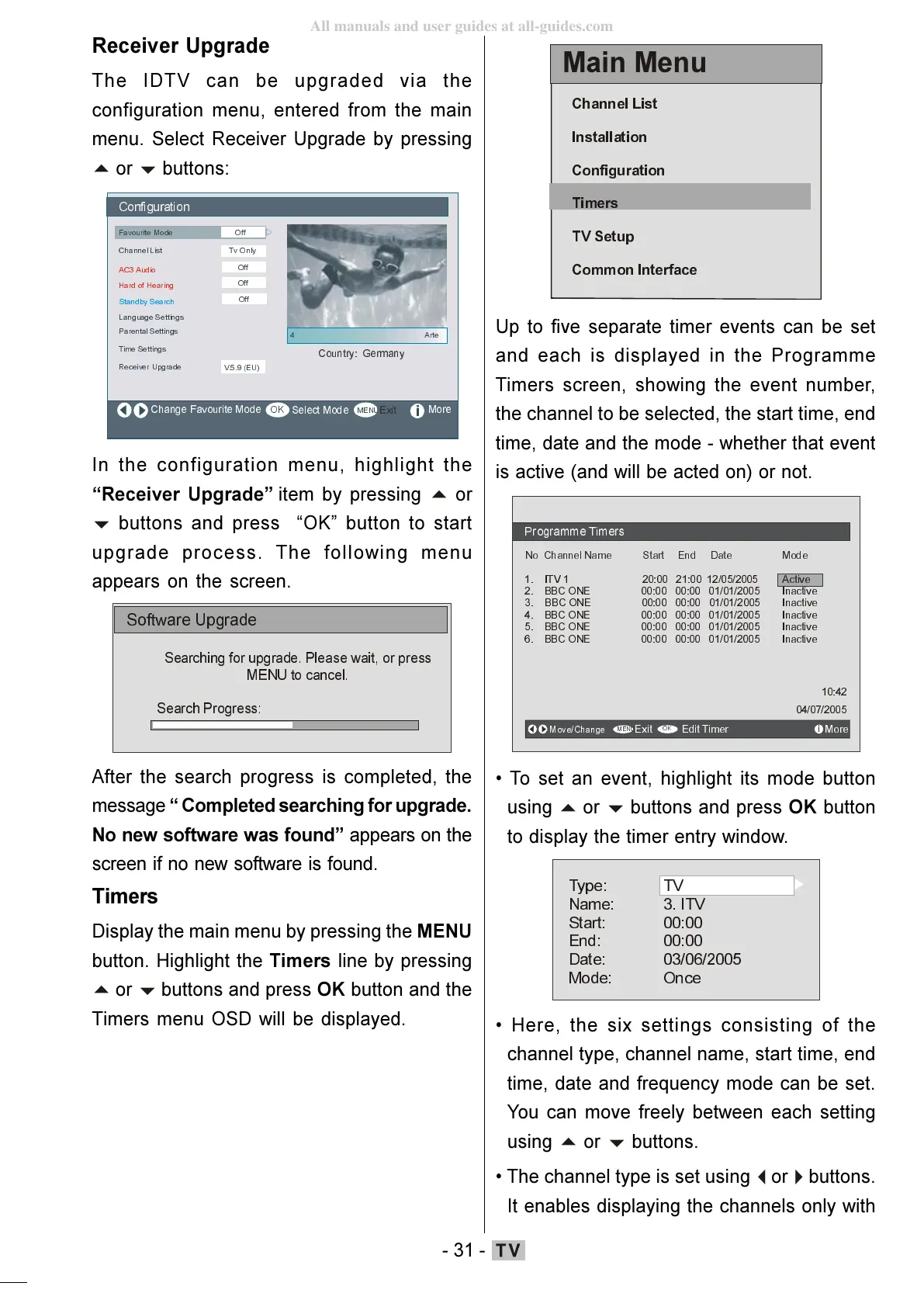
The IDTV can be upgraded via the
configuration menu, entered from the main
menu. Select Receiver Upgrade by pressing
buttons:
&RQILJ XUDWLRQ
)DYRXULWH0RGH
&KDQQHO/LVW
/DQJXDJH6HWWLQJV
7LPH6HWWLQJV
5HFHLYHU8SJUDGH
0RUH
7Y2QO\
9(8
2II
3DUHQWDO6HWWLQJV
$&$XGLR
2II
+DUGRI+HDULQJ
2II
6WDQGE\6HDUFK
2II
In the configuration menu, highlight the
Receiver Upgrade item by pressing
buttons and press OK button to start
upgrade process. The following menu
appears on the screen.
6RIWZDUH8SJUDGH
6HDUFKLQJIRUXSJUDG H 3OHDVH Z DLWRUSUHVV
0(18WRFDQFHO
6HDUFK3URJ UHVV
After the search progress is completed, the
message Completed searching for upgrade.
No new software was found appears on the
screen if no new software is found.
Timers
Display the main menu by pressing the MENU
button. Highlight the Timers line by pressing
buttons and press OK button and the
Timers menu OSD will be displayed.
0DLQ0HQX
&KDQQHO/LVW
,QVWDOODWLRQ
7LPHUV
796HWXS
&RPPRQ,QWHUIDFH
Up to five separate timer events can be set
and each is displayed in the Programme
Timers screen, showing the event number,
the channel to be selected, the start time, end
time, date and the mode - whether that event
is active (and will be acted on) or not.
1R&KDQQHO1DP H6WDUW(QG'DWH0RGH
,79$FWLYH
%%&21(,QDFWLYH
%%&21(,QDFWLYH
%%&21(,QDFWLYH
%%&21(,QDFWLYH
%%&21(,QDFWLYH
0RY H&KDQJH
([LW
(GLW7LPHU 0RUH
2.
To set an event, highlight its mode button
using
buttons and press OK button
to display the timer entry window.
6WDUW
(QG
'DWH
0RGH
79
,79
2QFH
Here, the six settings consisting of the
channel type, channel name, start time, end
time, date and frequency mode can be set.
You can move freely between each setting
using
buttons.
The channel type is set using
buttons.
It enables displaying the channels only with
ENG-01-TV-22784W-1165UK-MB29-PEUIDTV-(1SCRT-AV-YPBPR-HP-SPDIF-STRLOUT-PCIN)-10060401-5013xxxx.p6511.10.2008, 17:3731
All manuals and user guides at all-guides.com







 To Next Page