- 30 -
available.
Parental Settings
Some channels broadcast material which you
do not want younger members of the family to
watch. Any channel can be locked so that it
cannot be selected for viewing unless a four-
digit PIN code is entered. In this way any
channel not suitable for younger viewers can
be prohibited.
This function enables or disables the menu
protection system and allows the PIN code to
be changed.
Use
buttons to highlight Parental
Settings. Press OK button to enter Parental
Settings menu. A dialog box asking for the
lock key is displayed:
(QWHU/RFN.H\
There is only one key which is set to 0000
initially. Enter lock key. If wrong Lock Key is
entered, the following message is displayed
on the screen and the TV returns to the
previous menu:
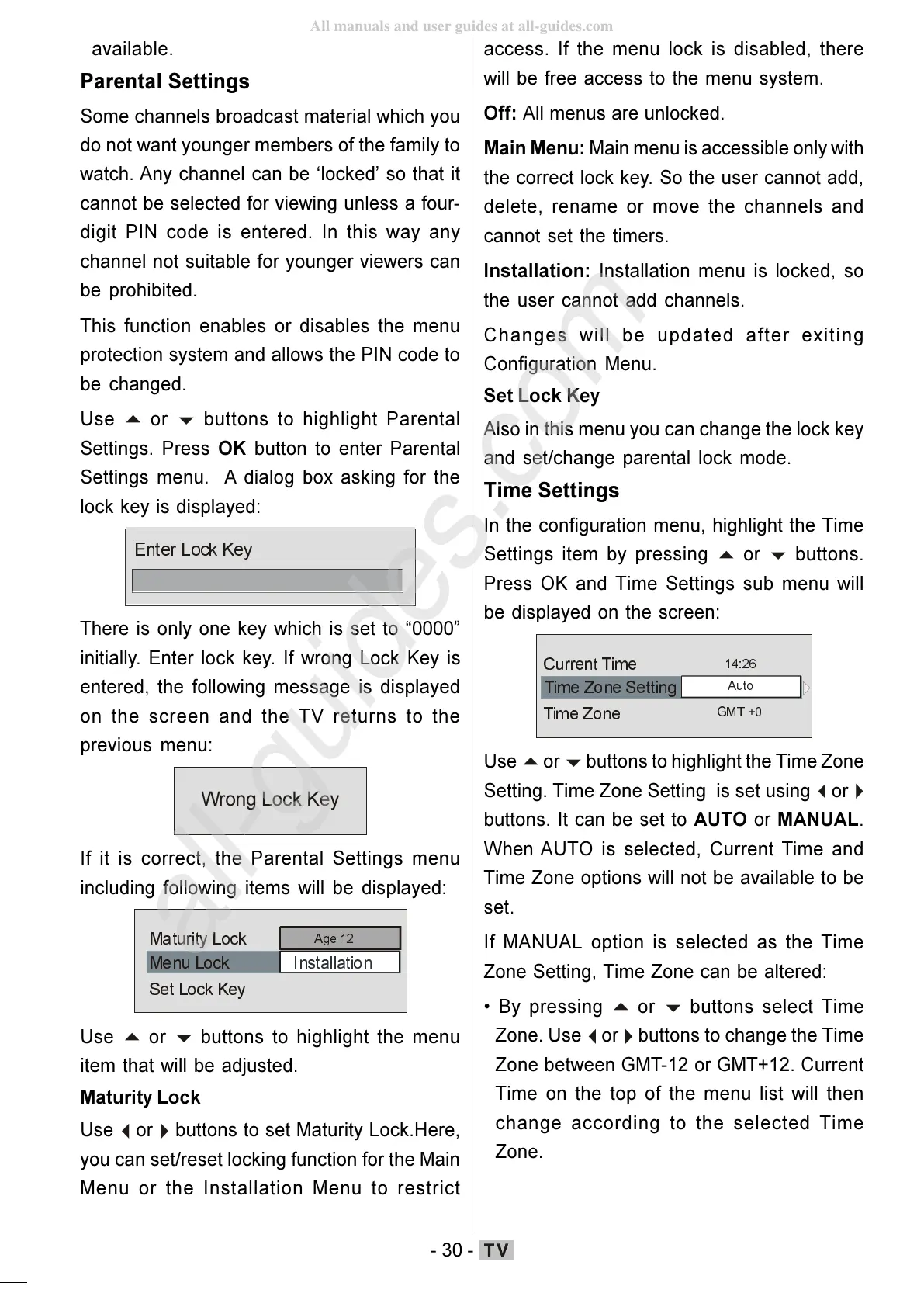
If it is correct, the Parental Settings menu
including following items will be displayed:
0HQX/RFN
,QVWDOODWLRQ
6HW/RFN.H\
0 DWXULW\/R FN
$JH
Use
buttons to highlight the menu
item that will be adjusted.
Maturity Lock
Use
buttons to set Maturity Lock.Here,
you can set/reset locking function for the Main
Menu or the Installation Menu to restrict
access. If the menu lock is disabled, there
will be free access to the menu system.
Off: All menus are unlocked.
Main Menu: Main menu is accessible only with
the correct lock key. So the user cannot add,
delete, rename or move the channels and
cannot set the timers.
Installation: Installation menu is locked, so
the user cannot add channels.
Changes will be updated after exiting
Configuration Menu.
Set Lock Key
Also in this menu you can change the lock key
and set/change parental lock mode.
Time Settings
In the configuration menu, highlight the Time
Settings item by pressing
buttons.
Press OK and Time Settings sub menu will
be displayed on the screen:
7LPH=RQH
&XUUH QW7LPH
$XWR
*07
Use
buttons to highlight the Time Zone
Setting. Time Zone Setting is set using
buttons. It can be set to AUTO or MANUAL.
When AUTO is selected, Current Time and
Time Zone options will not be available to be
set.
If MANUAL option is selected as the Time
Zone Setting, Time Zone can be altered:
By pressing
buttons select Time
Zone. Use
buttons to change the Time
Zone between GMT-12 or GMT+12. Current
Time on the top of the menu list will then
change according to the selected Time
Zone.
ENG-01-TV-22784W-1165UK-MB29-PEUIDTV-(1SCRT-AV-YPBPR-HP-SPDIF-STRLOUT-PCIN)-10060401-5013xxxx.p6511.10.2008, 17:3730
All manuals and user guides at all-guides.com
all-guides.com







 To Next Page