- 38 -
the
79
button. For going back, press M.
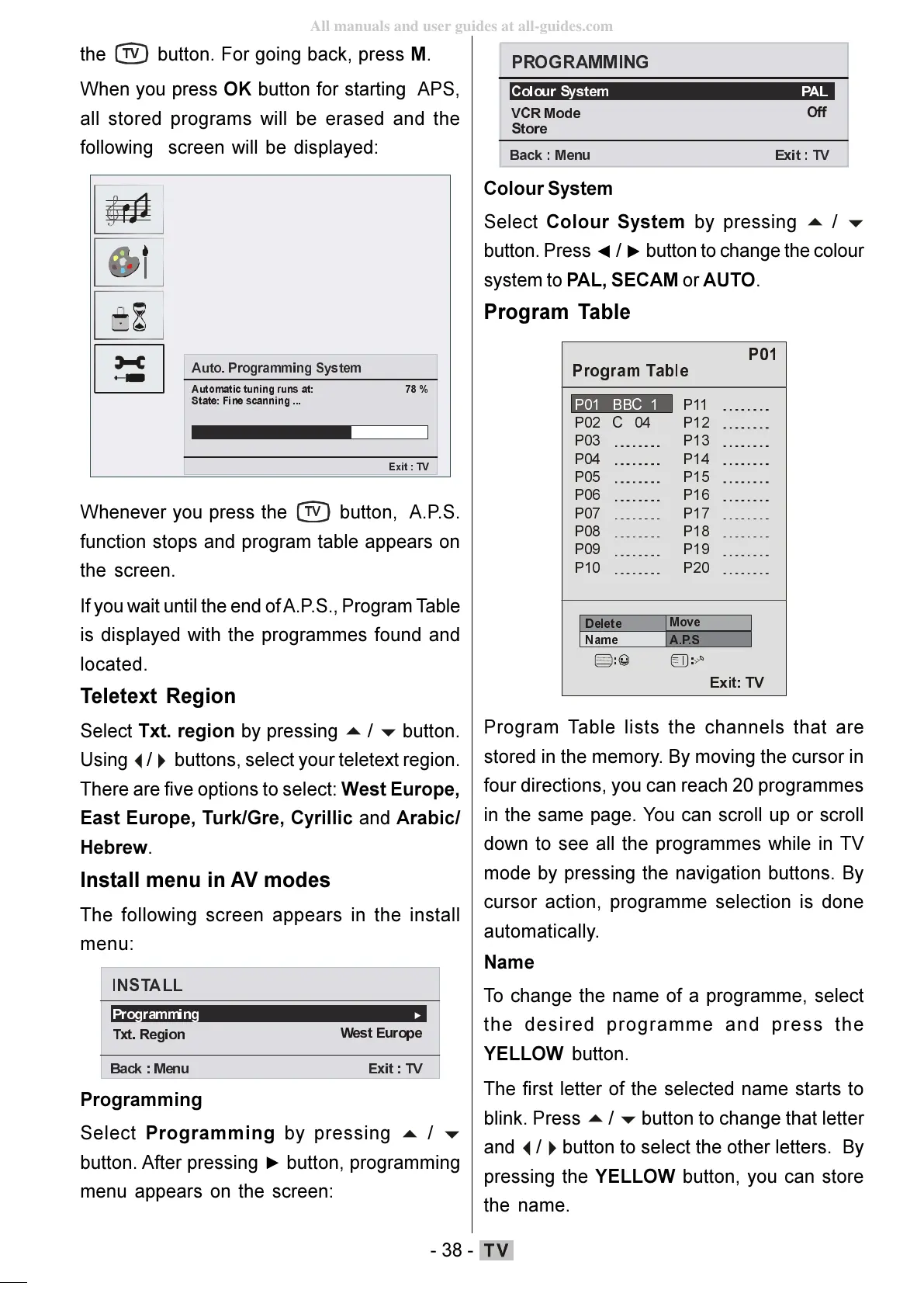
When you press OK button for starting APS,
all stored programs will be erased and the
following screen will be displayed:
$XWR3URJUDPPLQJ6\V WHP
$XWRPDWLFWXQLQJUXQVDW
6WDWH)LQHVFDQQLQJ
([LW7 9
Whenever you press the
79
button, A.P.S.
function stops and program table appears on
the screen.
If you wait until the end of A.P.S., Program Table
is displayed with the programmes found and
located.
Teletext Region
Select Txt. region by pressing
buttons, select your teletext region.
There are five options to select: West Europe,
East Europe, Turk/Gre, Cyrillic and Arabic/
Hebrew.
Install menu in AV modes
The following screen appears in the install
menu:
,167$//
3URJUDPP LQJ
7[W5HJLRQ
:HVW(XURSH
%DF N 0HQX ([LW79
Programming
Select Programming by pressing
button. After pressing button, programming
menu appears on the screen:
3$/
9&50RGH
6WRUH
2II
% DFN0HQ X ( [LW 79
Colour System
Select Colour System by pressing
button. Press / button to change the colour
system to PAL, SECAM or AUTO.
Program Table
3
3 %%&
3&
3 3
3
3
3 3
3 3
3 3
3 3
3 3
3 3
3 3
'HOHWH
1DPH
0RYH
$36
([LW79
Program Table lists the channels that are
stored in the memory. By moving the cursor in
four directions, you can reach 20 programmes
in the same page. You can scroll up or scroll
down to see all the programmes while in TV
mode by pressing the navigation buttons. By
cursor action, programme selection is done
automatically.
Name
To change the name of a programme, select
the desired programme and press the
YELLOW button.
The first letter of the selected name starts to
blink. Press
button to change that letter
and
button to select the other letters. By
pressing the YELLOW button, you can store
the name.
ENG-01-TV-22784W-1165UK-MB29-PEUIDTV-(1SCRT-AV-YPBPR-HP-SPDIF-STRLOUT-PCIN)-10060401-5013xxxx.p6511.10.2008, 17:3738
All manuals and user guides at all-guides.com






 To Next Page