English - 10 -
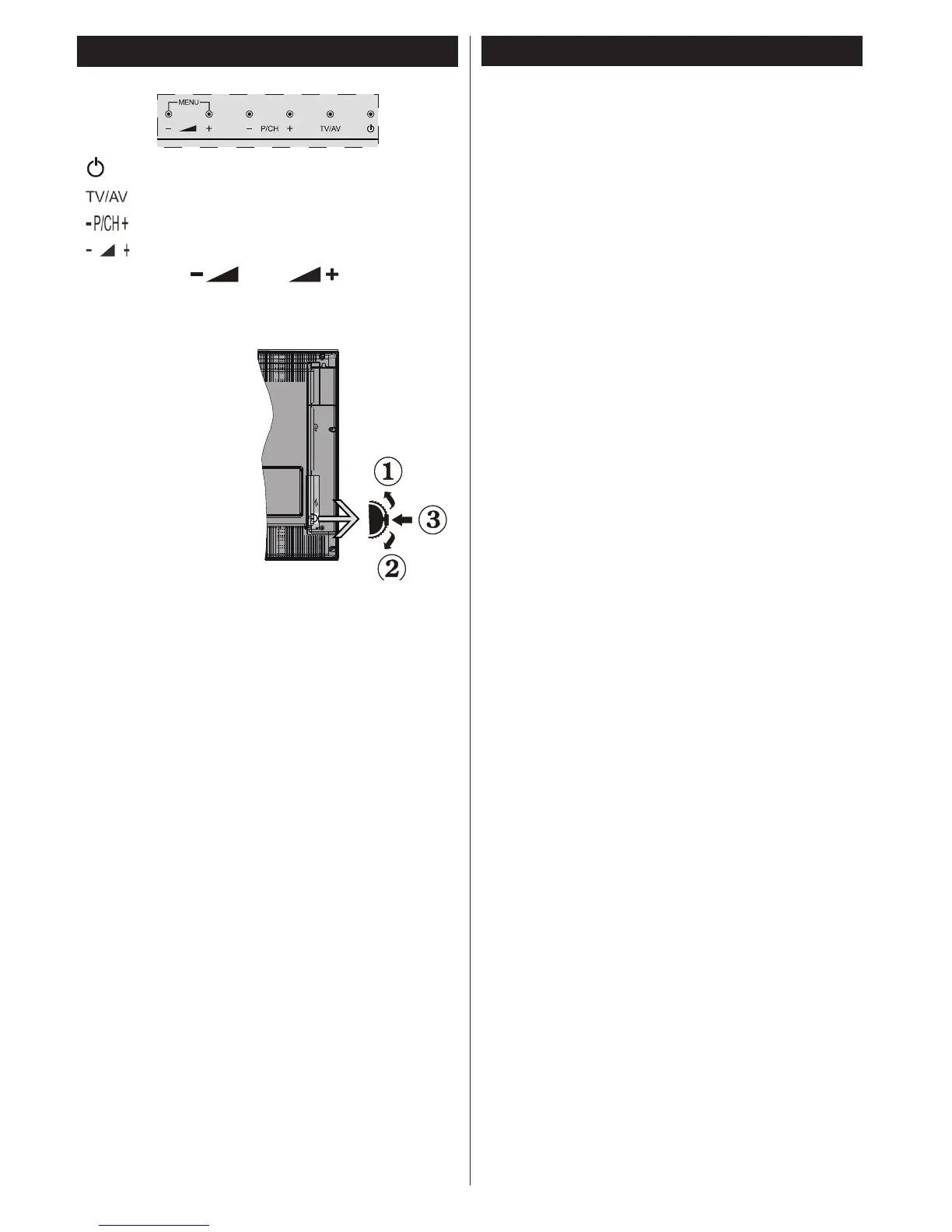
TV and Operating Buttons
Standby/On
Source
Programme +/-
Volume +/-
Note: Press “ ” and “ ” buttons at the
same time to view main menu.
-or-
1. Up direction
2. Down direction
3. Programme/
Volume / AV
/ Standby-On
selection switch
Note:You can move
the switch, upward or
downward to change
the volume. If you want
to change channels,
press the middle of the switch once (Position 3)
and then move upward or downward. If you press
the middle of the switch once more, source OSD
will be displayed. If you press the middle of the
switch and hold about a few seconds, the TV will
switch to standby mode. Main menu OSD cannot
be displayed via control buttons.
Environmental Information
This television is designed to consume less energy
to help save the environment. To reduce energy
consumption, you should take the following steps:
If you set the Power Save Mode as Eco, the TV will
switch to energy-saving mode. The Power Save Mode
settings can be found In the ‘Picture’ section of the
Main Menu. Note that some picture settings will be
unavailable to be changed.
If Picture Off is selected, “Screen will be off in
3 seconds.” message will be displayed. Select
PROCEED and press OK to continue. The screen
will be off immediately.
When the TV is not in use, please switch off or
disconnect the TV from the mains plug. This will also
reduce energy consumption.


 To Next Page