62
FUNCTION (continued)
Photo Input Function (continued)
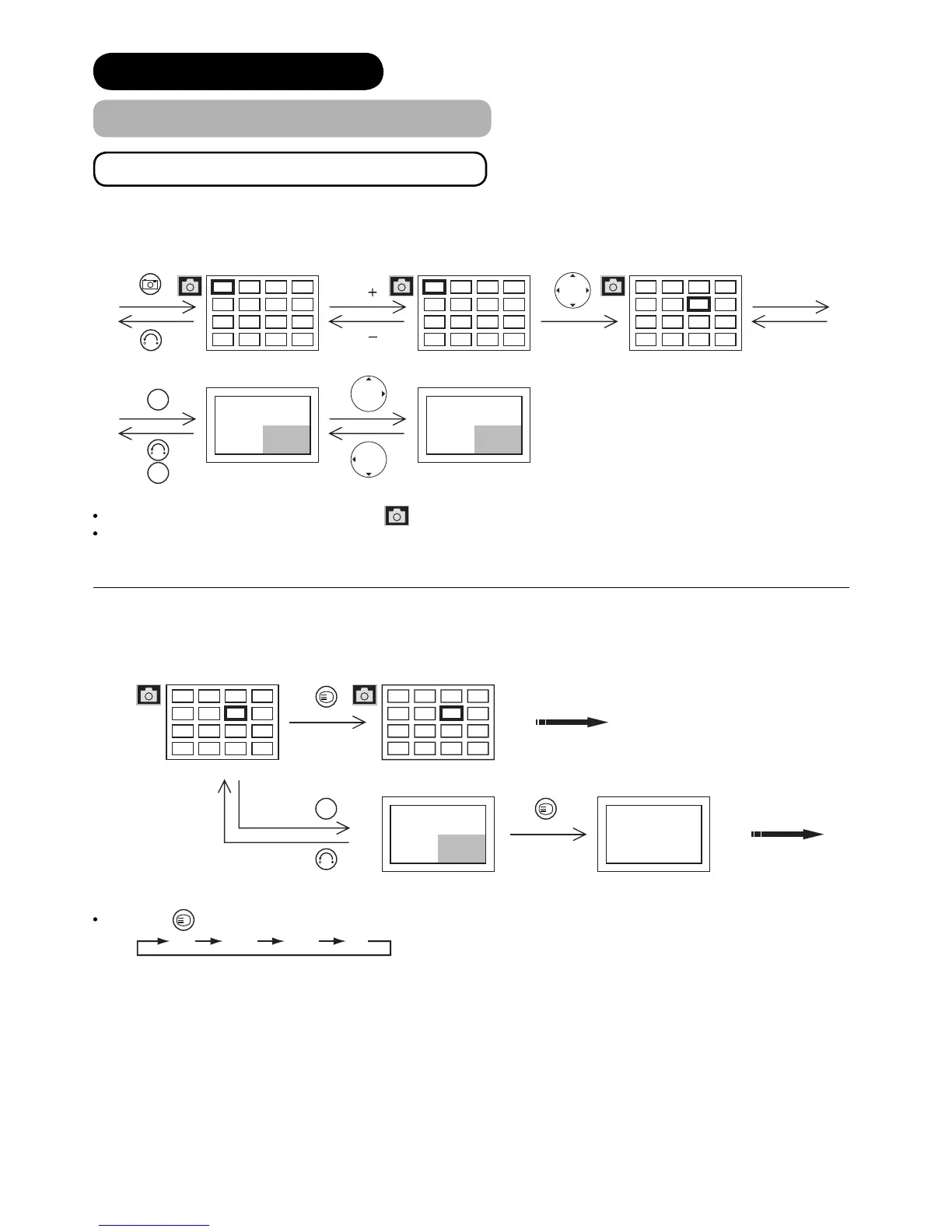
Displaying Still Picture in Photo Mode
Thumbnail-Size Image (Index) to Full-Size Image
When you enter the Photo Index mode, the icon appears as the indication.
You can also select the preferred fi le in both Thumbnail-size and Full-size image by inputting the fi le directly with
numeric buttons of remote control.
Rotation Function
Each time
?
-ROTATE-
button is pressed, the picture is rotated in the sequence of the following.
4
8
12
16
3
7
11
15
2
6
10
14
1
5
9
13
20
24
28
32
19
23
27
31
18
22
26
30
17
21
25
29
20
24
28
32
19
23
27
31
18
22
26
30
17
21
25
29
No. 23
28/05/03
1600x1200
No. 24
28/05/03
1600x1200
Photo Index (1
st
Page). Photo Index (2
nd
Page)
Move to next page.
Photo Index (2
nd
Page)
Select the file.
Full size
File#23 is displayed.
Full size
File#24 is displayed.
OK
OK
P
P
A
A
No. 23
28/05/03
1600x1200
Photo Index (2
nd
Page). Rotating a thumbnail
image to 90°.
Rotating a full size
image to 90°.
Full size
File#23 is displayed.
OK
A
A
?
-ROTATE-
?
-ROTATE-
90° 180° 270° 0°


 To Next Page