9
42HDF52
1.
2.
3.
4.
5.
6. (Continued from previous page)
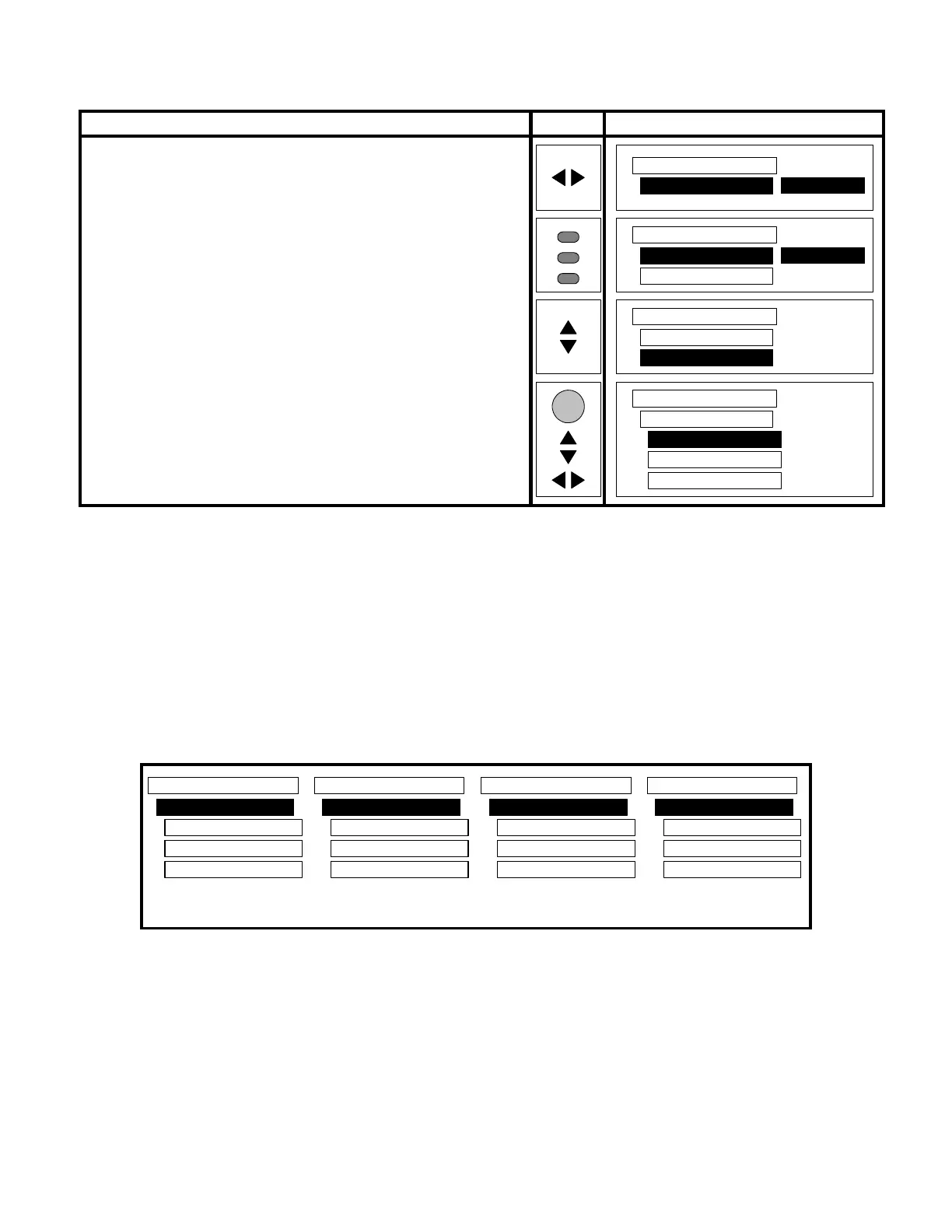
(Instruction) (Remote) (OSD)
7. Press the SLEEP button on the remote three (3) times. A new
line will appear below Color Temperature which co-
responds to whatever color temp had been selected in the pre-
vious step.
8. Scroll or until Cool Adj.
2
is high-lighted.
9. Press the SEL button on remote. The Red, Green , and Blue
parameters will appear.
10. Use or and or until the actual color temperature as
measured on the screen is within the specs shown in Table 1.
Video
Color Temperature
Cool
Video
Color Temperature
Cool
Cool Adj.
Video
Color Temperature
Cool
Cool Adj.
SLEEP
SLEEP
SLEEP
SEL
Video
Cool Adj.
Red 255
Green 194
Blue 252
Notes:
2. Depending on which temperature is being adjusted. Could be any of the following:
Cool Adj.
Natural Adj.
Warm Adj.
Black/White Adj.
Video
Warm Adj.
Red 255
Green 151
Blue 138
Video
Black/White Adj.
Red 255
Green 136
Blue 109
Video
Natural Adj.
Red 255
Green 166
Blue 202
Video
Cool Adj.
Red 255
Green 194
Blue 252
Sample values of the different color temperature parameters





 To Next Page