8
42HDF52
5. Service Adjustments
Service Mode
This model has a limited service mode; there is no access to I2C parameters of any kind. The only service adjustments that can
be performed are the color temperature defaults.
Please note that to perform these adjustments, a colorimetry meter, such as a Minolta CA-100 or CA-200 is required
to meas-
ure the actual screen during adjustments.
Color Temperature
This model has four (4) different color temperature defaults. The associated color temperature X:Y readings are shown below
on Table 1.
Preliminary:
Input 100 IRE white image. Allow 15 minutes warm up.
Procedure:
COLOR MODE X READING Y READING
COOL 0.268 +/- 0.01 0.283 +/- 0.01
NATURAL 0.285 +/- 0.01 0.293 +/- 0.01
WARM 0.314 +/- 0.01 0.327 +/- 0.01
BLACK & WHITE 0.335 +/- 0.01 0.343 +/- 0.01
Table 1
(continued)
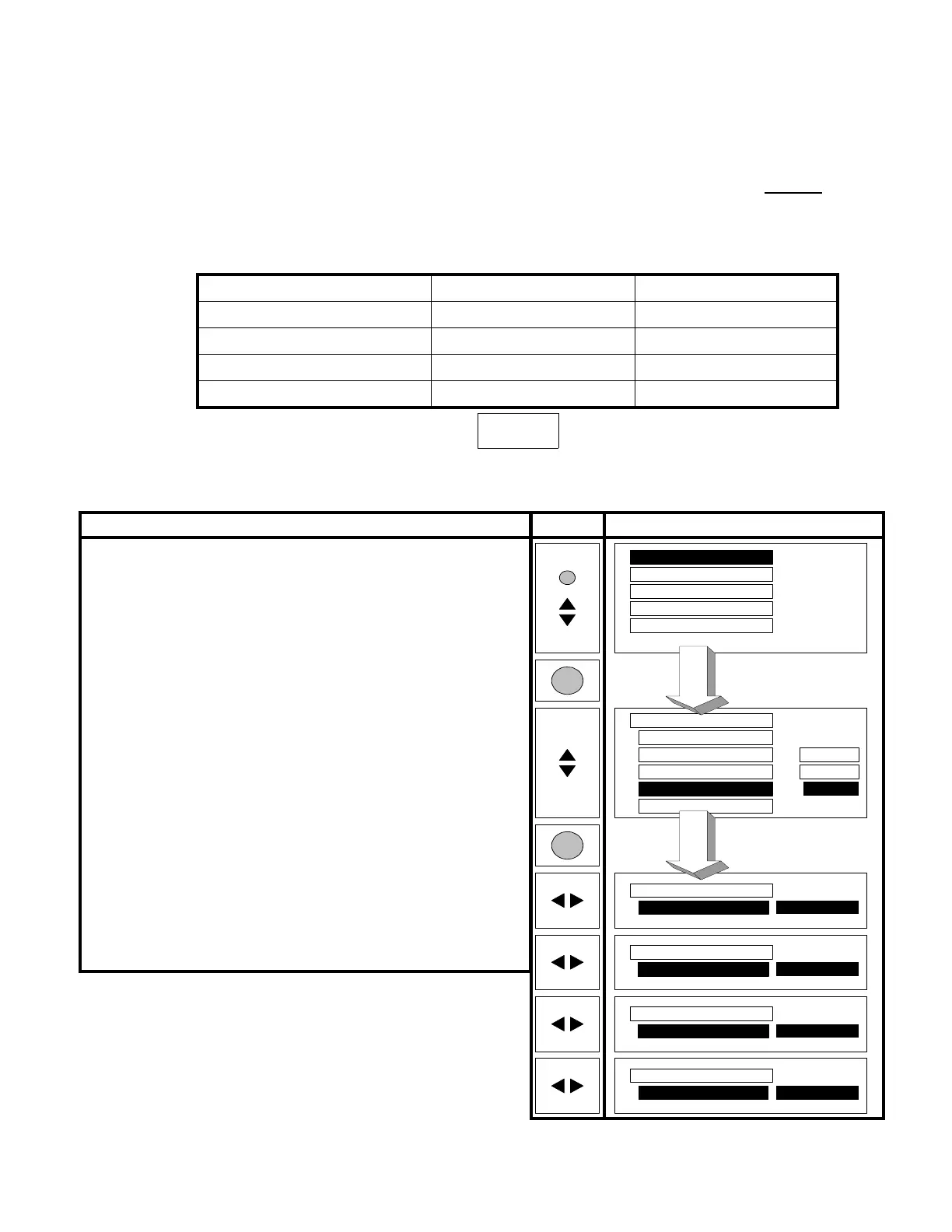
Video
Color Temperature
Cool
MENU
Video
Image
Audio
Language
System
Video
Picture Mode
Tint
Sharpness
Color Temperature
Reset
Dynamic
1
Cool
1
O
O
SEL
SEL
Video
Color Temperature
Video
Color Temperature
Video
Color Temperature
Natural
Warm
Black/White
(Instruction) (Remote) (OSD)
1. Press the MENU button on remote.
2. Scroll or until Video is high-lighted.
3. Press the SEL button on remote.
4. Scroll or until Color Temperature is high-lighted.
(see note 1)
5. Press the SEL button on remote.
6. Scroll or until the Color Temperature which needs
adjustment is indicated at the right side.
Notes:
1. There are three (3) possible displays on this step, depending on
which Picture Mode is selected. Color Temperature follows Pic-
ture Mode, i.e. Dynamic > Cool, Natural > Warm, Cinema >
Warm. OSD controls for Brightness, Contrast, and Color only
appear when in Natural picture mode.





 To Next Page