7 EN
How to attach the stand
NOTE:
• AssuretheACcordisnotconnectedtoanACoutlet.
• Beforebeginningthisprocess,makesurethatyouhaveaclean,safe,andcushionedspacetoworkattoavoidanydamagetothe
unit.
• DonottouchorpresstheLEDscreen,theglassmightbreakunderpressure.
1 CarefullyplacetheTVscreenface-downonaclean,cushionedsurface.
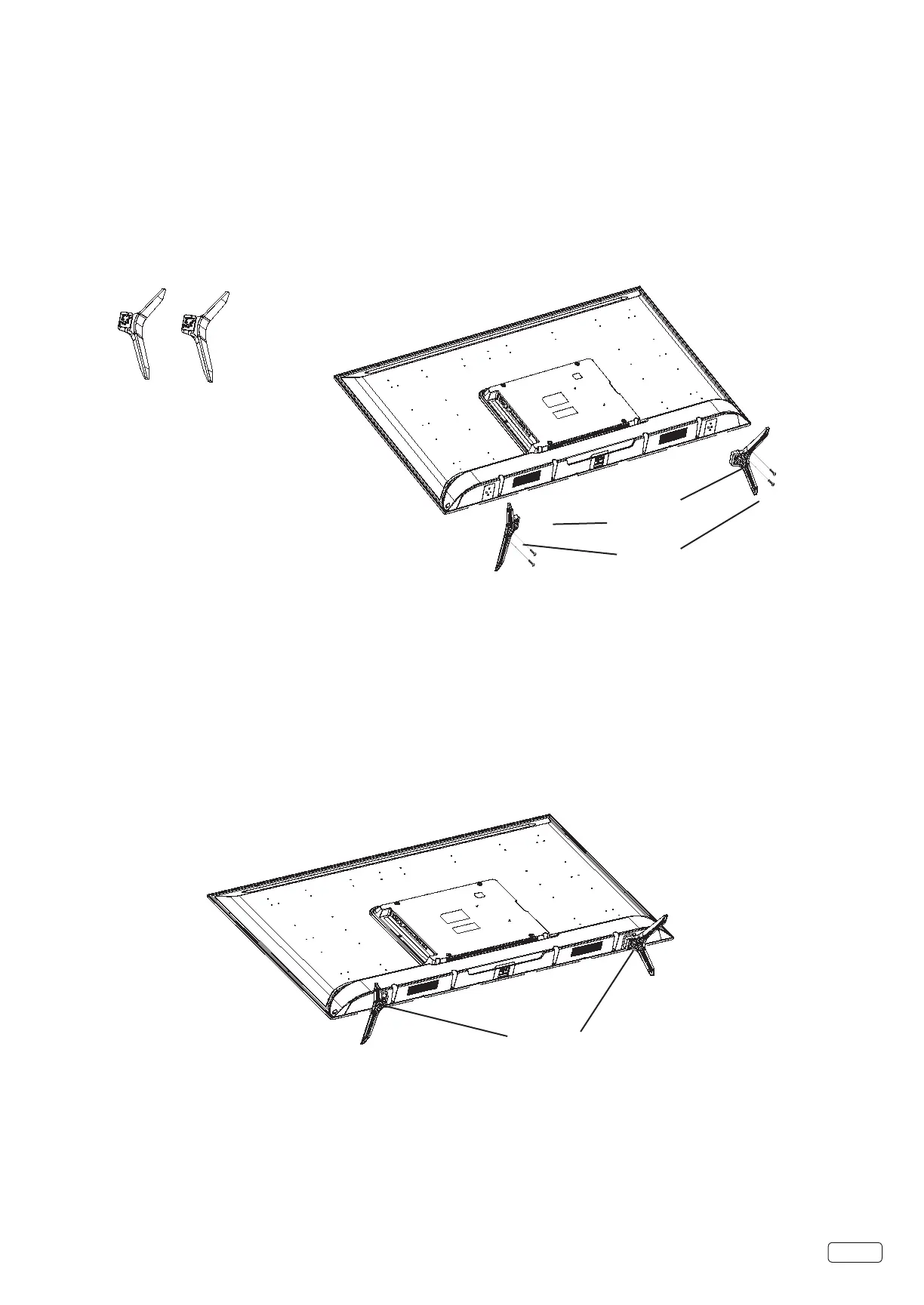
2 Insert and secure the stands (R and L) with 2 screws (supplied) each side as shown in Figure 1.
• Be sure to follow the above instructions. Insucient tightening or incorrect installation of the stand will not support your TV correctly,
and could result in damage or injury from tip-over.
Figure 1
Stands
L
R
Screws
Screws
How to remove the stand
Whenyoutransportthisproduct,removethestandandpackitatagainstthebackoftheunitinthecarton.Toremovethestand,
performtheabovestepsinreverseorder.
WhenyoumounttheTVonthewall,removebothstands(RandL).
TodisconnectthestandremovethescrewsfromthebottomofTV.
Stands


 To Next Page