EasyManua.ls Logo

Hitachi 40K31 - User Manual

Hitachi 40K31
31 pages
Print Icon
To Next Page IconTo Next Page
Loading...
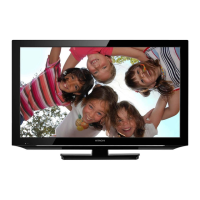
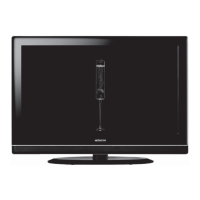
40K31
40” Class (39.50” Diag.)
Serial No.
Model:
Thank you for purchasing this Hitachi product.
Please read these instructions carefully.
For additional assistance please call Toll Free 800.HITACHI (800.448.2244)
or visit our website at www.hitachi.us/tv.
Keep this Owner’s Guide for future reference.
Record the model name and serial number of your LCD Television for future reference.
This information is located on the back of the television.
CONGRATULATIONS
OWNER’S GUIDE
OG_40K31_073118

Questions and Answers

  • L
    lgibbsAug 18, 2025
    How to fix Hitachi 40K31 that won't turn on?
    • T
      Thomas GarrettAug 18, 2025
      If your Hitachi LCD TV isn't turning on, ensure the power cord is securely plugged into an AC outlet. Try a different outlet to rule out power issues. Also, check your fuse or circuit breaker. As a last resort, unplug the unit for an hour and then plug it back in.
  • I
    ibrownAug 20, 2025
    Why is my Hitachi 40K31 remote not working?
    • O
      oevansAug 21, 2025
      If your Hitachi LCD TV remote isn't working, first replace the batteries, ensuring they are correctly inserted. Then, move closer to the TV, within 15 feet, making sure the remote is aimed at the sensor and that there are no obstructions between the remote and the TV. Finally, verify that the TV's power cord is plugged in.
  • C
    Clinton McdowellAug 23, 2025
    What to do if my Hitachi 40K31 LCD TV has no sound?
    • M
      Melissa TaylorAug 23, 2025
      If you're experiencing poor or no sound on your Hitachi LCD TV, first tune to another station to rule out issues with the current broadcast. Then, check your TV's sound adjustments, such as volume and mute settings. Also, check for any potential sources of interference and verify the audio language setting.
  • K
    Kimberly GeorgeAug 26, 2025
    Why is my Hitachi LCD TV picture quality so bad?
    • C
      Christie ThomasAug 26, 2025
      If your Hitachi LCD TV has poor or no picture, try tuning to another station to eliminate broadcast issues. Ensure that channels are correctly set into the memory. Check the antenna or cable TV connections and adjust the antenna. Also, check for any sources of interference and review the picture control adjustments.
  • J
    Justin YoungAug 27, 2025
    Why does my Hitachi 40K31 have poor color?
    • P
      Patricia MendozaAug 28, 2025
      If your Hitachi LCD TV has poor or no color, try tuning to another station to rule out broadcast problems. Also, make sure the channels are set into memory. Check the picture control adjustments, the antenna or cable TV connections (adjusting the antenna if needed), and check for sources of possible interference.
  • A
    agrimesAug 30, 2025
    How to improve Hitachi 40K31 LCD TV reception on certain channels?
    • J
      Jessica RodriguezAug 31, 2025
      If you're getting poor reception on some channels with your Hitachi LCD TV, first tune to another station to rule out station-specific issues. Make sure that channels are set into memory. If a station is weak, adjust the antenna to improve reception. Also, check for any sources of interference.
  • J
    Jacqueline ThomasSep 1, 2025
    Why does my Hitachi 40K31 have no CATV reception?
    • R
      Rodney PittmanSep 2, 2025
      If you have no CATV reception on your Hitachi LCD TV, check all cable TV connections. Set the Source menu option to the Cable mode. If the problem persists, try another channel to rule out issues with the current station or cable TV system.
  • I
    istoneSep 4, 2025
    How to remove bars on Hitachi LCD TV screen?
    • P
      Pamela ThomasSep 5, 2025
      If you see horizontal or diagonal bars on your Hitachi LCD TV screen, check the antenna connections and adjust or redirect the antenna. Also, check for sources of possible interference.
  • R
    Rachel LucasSep 6, 2025
    Why does my Hitachi LCD TV picture wobble?
    • R
      rosscarlosSep 7, 2025
      If the picture on your Hitachi LCD TV wobbles or drifts, first tune to another station to rule out station-related problems. Make sure the channels are set into memory. If you are using cable TV, the company might be scrambling the signal, so try adjusting the antenna.
  • J
    John PrattSep 9, 2025
    Why can't my Hitachi 40K31 receive channels above 13?
    • M
      Maurice Rangel DDSSep 10, 2025
      If your Hitachi LCD TV isn't receiving channels above 13, make sure the appropriate Source (Air or Cable) has been selected. If you're using an antenna, check the UHF antenna connections.

Summary

TV Control Keys Overview

Control Key and Indicators

Details physical control keys and indicators like remote sensor and power status.

Control Key Functions

Explains how multi-function buttons navigate and operate the TV without a remote.

Remote Control Operations

Remote Control Button Functions

Details the functions of each button on the remote control for TV operation and device control.

Product Features and Specifications

HDTV and Design

Highlights unique space-saving design and LED HDTV technology.

Picture and Audio Performance

Details LED backlight, USB input, sleep timer, and audio performance features.

Battery Precautions and Installation

Battery Usage Guidelines

Provides essential precautions for using and installing batteries in the remote control.

Antenna and Cable TV Connections

Connecting an Antenna

Instructions for connecting indoor/outdoor antennas for VHF/UHF reception.

Connecting Cable TV

Guides for connecting basic and scrambled cable TV services.

Initial Setup and Basic Operation

Initial Setup Wizard

Guides the user through the first-time TV setup process for optimal configuration.

TV Operation Basics

Explains how to adjust volume, select channels, and input sources.

Menu Navigation and Quick Guide

Menu Operation Steps

Provides a step-by-step guide to navigate the TV's menu system.

INFO and SLEEP Functions

Details the INFO button for displaying information and the SLEEP timer.

Video Settings and Convenience Functions

Picture Mode and Customization

Explains adjustable picture modes like Standard, Dynamic, Movie, ECO, and Custom.

Color and Advanced Video Settings

Covers color temperature, aspect ratio, noise reduction, and dynamic contrast.

Audio and Time Settings

Audio Mode and Sound Adjustment

Details sound modes, balance, MTS, audio language, and digital output.

Time and Auto Clock Settings

Covers sleep timer, time zone, daylight savings, time format, and auto clock.

System Setup and Control Functions

Menu Language and OSD Settings

Allows selection of menu language, OSD timeout, and input labels.

HDMI-CEC and Voice Guidance

Manages HDMI-CEC features and voice guidance settings.

Channel Management and Setup

Selecting Air or Cable Source

Guides users to select between Air or Cable TV sources for channel scanning.

Channel List and Skipping

Explains how to manage channels in the list and skip unwanted ones.

Performing Auto Channel Scan

Details the process of scanning for available channels automatically.

Channel Labeling and Parental Control

Creating Custom Channel Labels

Allows assigning custom names (up to 7 characters) to channels for easier identification.

Parental Control Setup and Lock

Guides on setting up parental controls and blocking connected devices.

Parental Control Rating Systems

Setting US Rating Levels

Allows setting age-based restrictions for US TV and movie content.

Canadian Rating System Setup

Enables setting Canadian age and content-based viewing restrictions.

Parental Control and Closed Captioning

Password Management and Region 5 Ratings

Covers changing the parental control password and downloading region-specific ratings.

Understanding Closed Captioning

Explains what closed captioning is and its purpose for viewers.

Setting Closed Caption Modes

Guides on activating CC modes, selecting analog/digital captions, and troubleshooting.

Closed Caption Options and Aspect Switching

Customizing Closed Caption Display

Allows adjustments to font style, size, color, and opacity for digital captions.

Picture Aspect Ratio Selection

Covers changing the display aspect ratio to Wide, Cinema, Normal, or Point to Point.

JPEG Viewer and PC Input

Viewing Photos via USB

Instructions for connecting a USB device and viewing JPEG photos.

Supported PC Input Formats

Lists the various PC resolutions and refresh rates supported by the TV.

Troubleshooting Reception Issues

Common Reception Disturbances

Explains causes and potential solutions for ignition noise, ghosts, snow, and RF interference.

General Troubleshooting Guide

Troubleshooting Common TV Problems

Provides a checklist for diagnosing and resolving issues like no operation, poor sound, or picture problems.

Product Specifications

Technical Specifications Overview

Details model, panel, display, inputs, outputs, power, dimensions, and accessories.

Customer Support Information

Contacting Hitachi Support

Provides phone numbers, website, and address for customer service and warranty support.

Limited Warranty Details

Warranty Terms and Conditions

Outlines the limited parts and labor warranty, coverage, and exclusions.

Warranty Limitations and Exclusions

Lists conditions that void the warranty, such as misuse, unauthorized repair, or damage.

Hitachi 40K31 Specifications

General IconGeneral
BrandHitachi
Model40K31
CategoryLCD TV
LanguageEnglish

Related product manuals