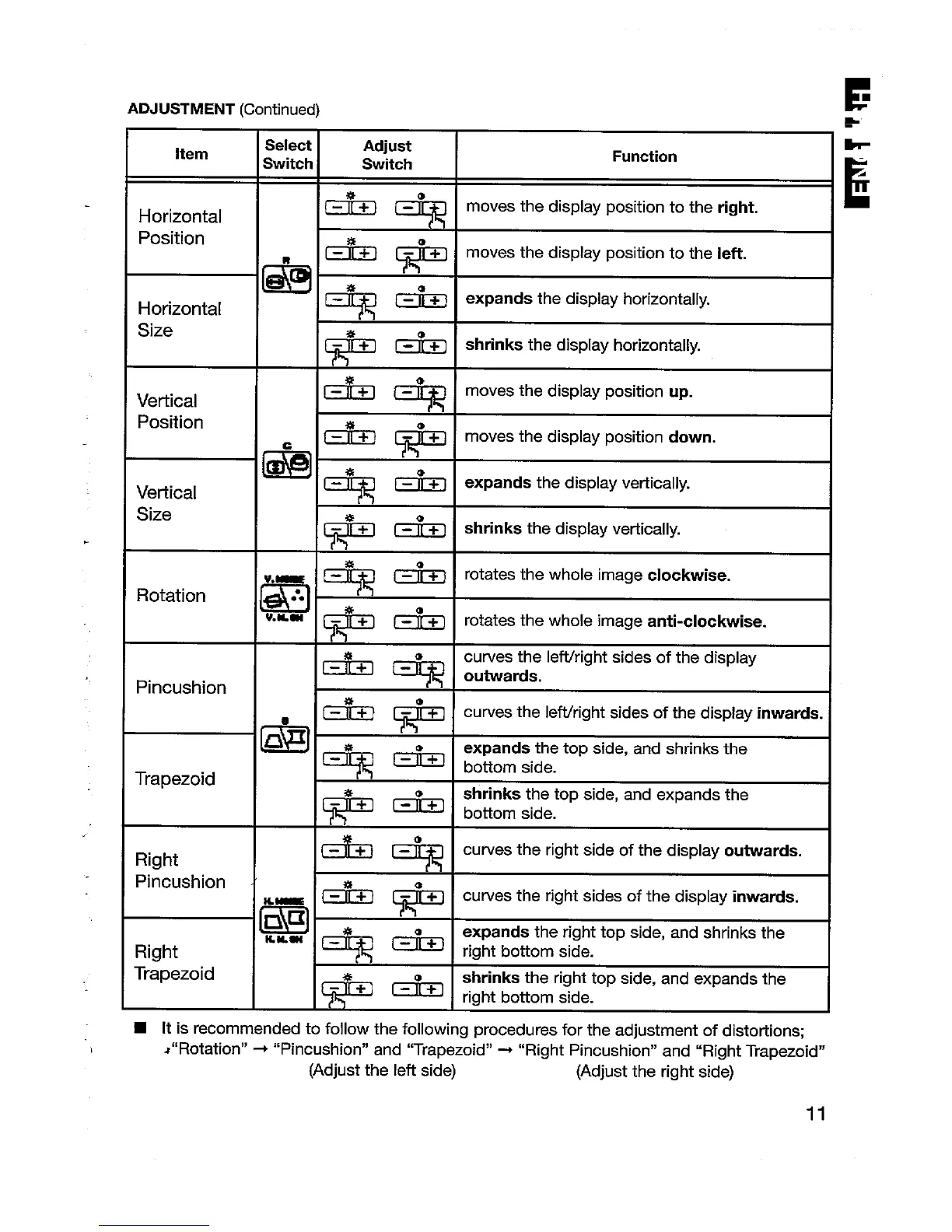
ADJUSTMENT (Continued)
.
.
item
Horizontal
Position
Horizontal
Size
Vertical
Position
Vertical
Size
Rotation
Pincushion
Trapezoid
Right
Pincushion
Right
Trapezoid
Adjust
b
Switch
Function
E
A
& -“
-.
moves the display position to the right.
Eik
+
moves the display position to the left.
[*G F-h-,
expands thecfisplay horizontally.
*&
shrinlcsthecfisp[ay horizontally.
l-+-l [+1
moves the display position
up.
al
*
moves the display position down.
%
[-=-%
expands the display vertically.
[~1 [~]
shrinks the display vertically.
[~~ [~] I rotates the whole image CIOCIMSe.
.,
,
[~1 ~ I rotates the whole image anti-clockwise.
,,
1
curves the left/right sides of the display
* (*=1
outwads.
53 [*I
curves the Ieftlright sides of the display inwards.
% ‘“
expands the top side, and shrinks the
*
bottom side.
shrinks
the top side, and expands the
**
bottom side.
~ [~1 I curves the right side of the display outwards.
I
& C@
curves the right sides of the display inwards.
I
m,
expands the right top side, and shrinks the
*G *
right botiom side.
T;+] [+]
shrinks the right top
side, and expands the
right
bottom side.
■ [t is recommended to follow the following procedures for the adjustment of disto~ions:
J“Rotation” + ‘rPincushion” and “Trapez-oid” ~ “Right Pincushion” and “Right Trapezoid”
(Adjust the left side)
(Adjust the right side)
11






 To Next Page