-- OPERATION
1~~~~1
;!~>?,,,,,,%,:,,,,-. “v.
...%.
,,.,,.....,,.:,...,.,.....f+>..,..... ,....:,:,Z+
a~
:,‘
I
1----------
*
n -
r 1
I
+
/1
I
\
~
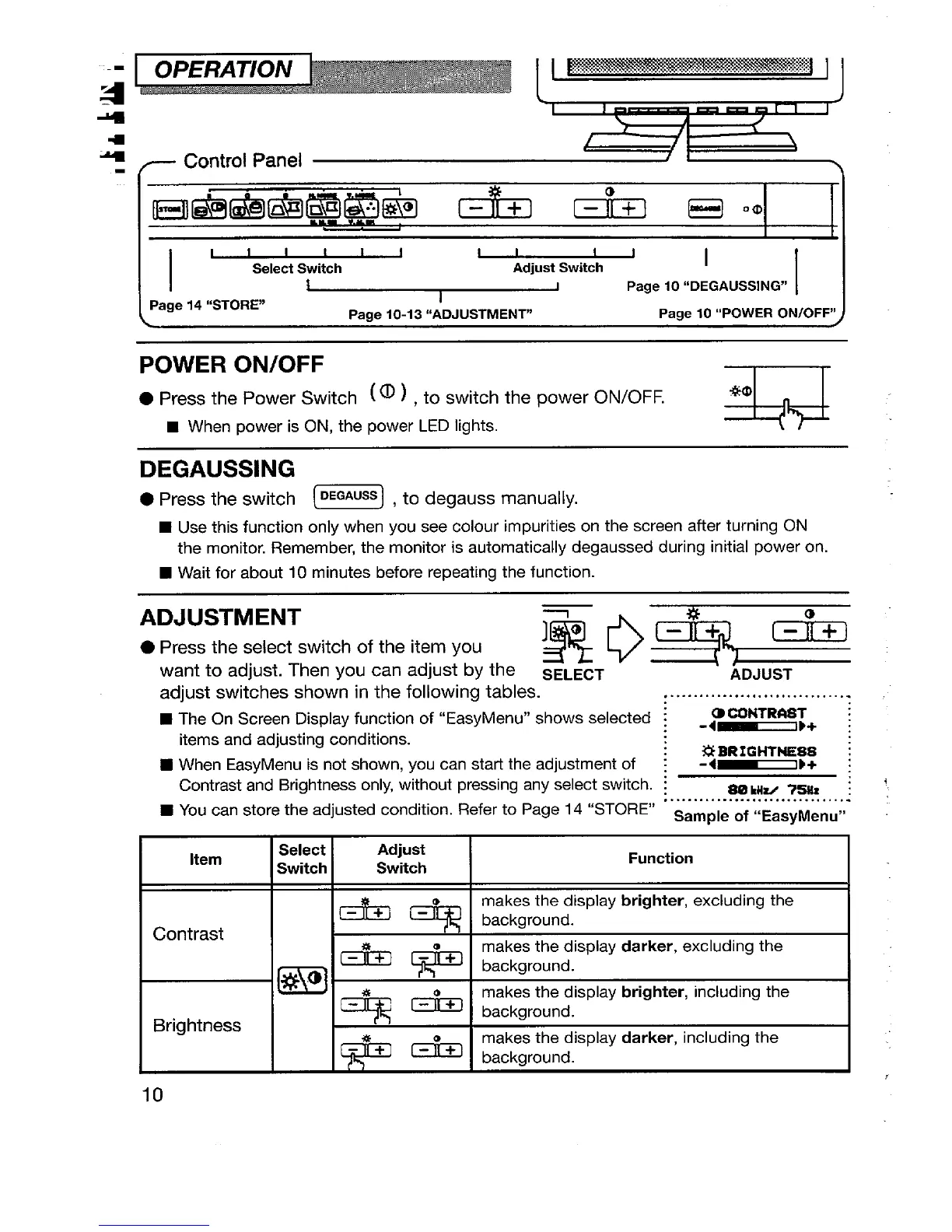
fl Control Panel
i
I
4
\
,
L
I“’v’,’’i”
Select Switch
Adjust Switch
I
Page 10 “DEGAUSSING”
Page 14 “STORE”
1
Page 10-13 “ADJUSTMENT”
Page 10 “POWER ON/OFF”
POWER ON/OFF
● Press the Power Switch ( 0 ) , to switch the power ON/OFF.
a
*O
E When
power is ON, the power LED lights.
DEGAUSSING
● Press the switch ~~] , to degauss manually.
■
Use this function only when you see colour impurities on the screen after turning ON
the monitor. Remember, the monitor is automatically degaussed during initial power on.
■ Wait for about 10 minutes before repeating the function.
ADJUSTMENT
● Press the select switch of the item you
R ~ ,*~j ,-=%-]
want to adjust. Then you can adjust by the
SELECT
ADJUST
adjust switches
shown in the following tables.
................................
■
The On Screen Display function of “EasyMenu” shows selected :
CDCONTRAST :
-4~)+ :
items and adjusting cond itions.
W When EasyMenu is not shown, you can start the adjustment of :
?3BRIGHTME88 :
-4~}+ :
Contrast and Brightness only, without pressing any select switch. ~
80 kilti Z5Mx ; ‘,
■ You can store the adjusted condition. Refer to Page 14 “STORE” sample of -Ea~yMenu,,
. . ............... .. ... . .. .. .. ...
Item
Select
Adjust
Switch
Switch
Function
&*
background.
makes the display brighter, excluding the
Contrast
makes the display darker, excluding the
* [*
background.
m
makes the display brighter, including the
Brightness
**
background.
makes the display darker, including the
*
*
background.
10







 To Next Page